
How to Replace W10128551 Freezer Evaporator Fan Motor on Whirlpool Refrigerator — Step-by-Step
Unplug refrigerator completely before starting — evaporator fan connects directly to control board with live voltage when powered
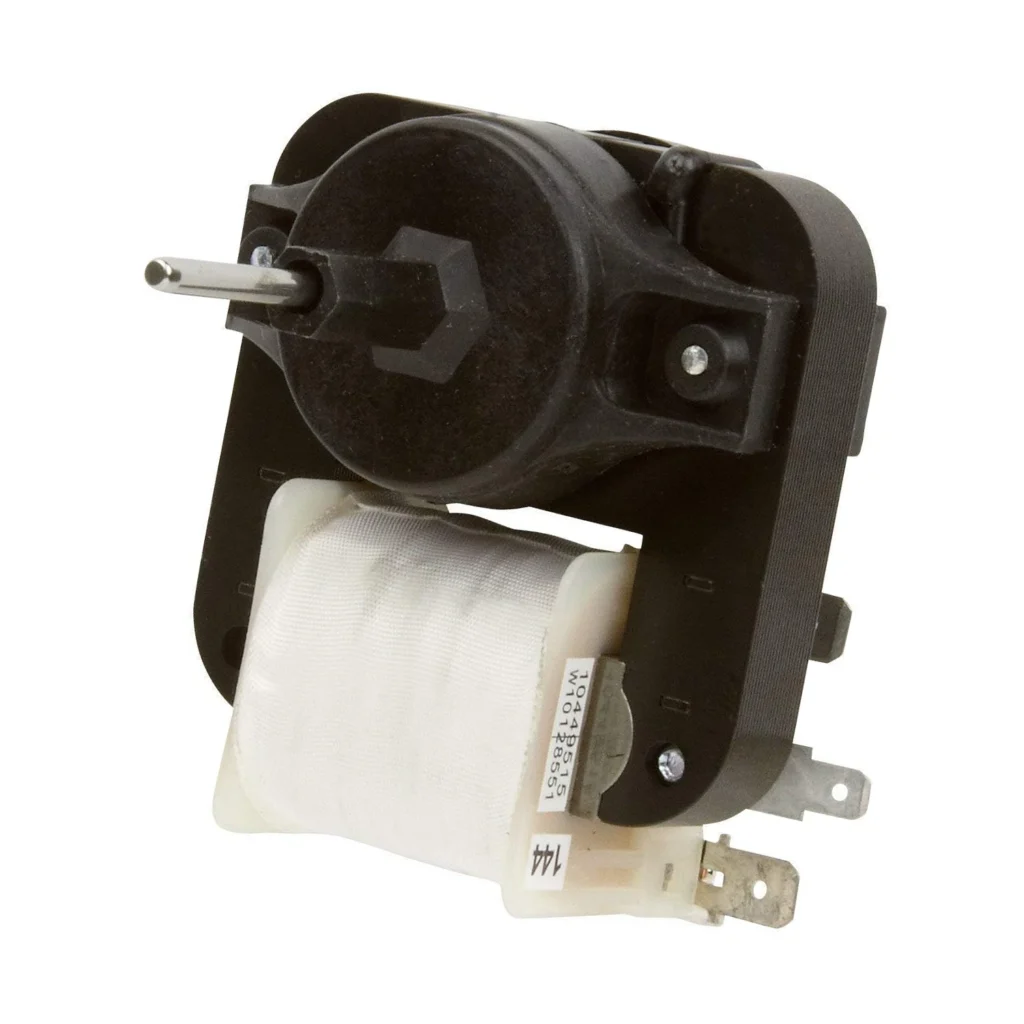
Your Whirlpool's freezer is rock-solid at 0°F, but the fridge section is sitting at 50°F and your milk just went bad. You hear the compressor running, but there's dead silence where the fan should be humming. That's your evaporator fan motor, and when it quits, cold air stops circulating from the freezer to the fresh food compartment. Models like the WRF535SWHZ, MFI2569VEM1, and WRS325FDAM04 all use the W10128551 motor — and they all fail the same way.
What You Need Before Starting
This repair takes about 45 minutes and requires basic comfort with refrigerator disassembly. You'll be working inside the freezer compartment, so empty it first and store frozen items in a cooler.
- ¼-inch nut driver
- Phillips screwdriver
- Flathead screwdriver (for wire harness clips)
- Towels (for condensation cleanup)
- Work gloves (metal edges can be sharp)
Repair Time: 30-45 minutes | Difficulty: Moderate
Safety First
Unplug the refrigerator completely before starting — not just turning off the ice maker, actually pull the plug. The evaporator fan connects directly to the control board, and you'll be working with live wiring if you skip this step. If your fridge is built-in and hard to pull out, locate the breaker and shut off power at the panel. Water lines don't need to be disconnected for this repair, but have towels ready because you'll see frost buildup behind the panel.
Step 1: Remove the Freezer Shelves and Access Panel
Clear out the freezer completely. You'll see a back panel covering the evaporator coils — this is held by several Phillips screws along the edges and possibly a couple at the top. Some models like the WRX735SDBM00 have a plastic trim piece that pops off first. Remove all screws and carefully pull the panel forward at the bottom, then lift up to clear the top tabs. You'll likely see frost buildup on the coils — that's normal if the fan has been dead for a while.
Step 2: Disconnect the Failed Fan Motor
The fan motor sits in a plastic housing at the top of the evaporator coils. You'll see a wire harness with a white connector — press the locking tab and pull straight out. Don't yank on the wires themselves. On models like the MFI2568AEW, there's also a ground wire attached with a screw — remove that too. Now remove the mounting screws holding the fan bracket (usually three ¼-inch screws). The whole assembly pulls out once these are free.
Step 3: Install the New W10128551 Motor
Your new motor comes with the fan blade already attached — don't remove it unless you're reusing your old blade (usually unnecessary). Position the motor bracket in the same orientation as the old one, aligning the screw holes. Thread in the mounting screws hand-tight first, then snug them with your nut driver. Don't overtighten — you're threading into plastic. Reconnect the wire harness until you hear it click, and reattach the ground wire if your model has one.
Step 4: Reassemble the Freezer Panel
Before closing everything up, manually spin the fan blade to make sure it rotates freely without rubbing. Position the evaporator cover panel, hooking the top tabs first, then push the bottom flush. Replace all screws working from top to bottom. If you skipped any screws, the panel will rattle later — and you'll know immediately when you plug it back in. Replace any trim pieces you removed earlier.
Step 5: Test the Repair
Plug the refrigerator back in and wait about 30 seconds. You should hear the new fan motor start up with a smooth, quiet hum. Open the freezer door — the fan should stop (there's a door switch). Close it, and the fan should restart within a few seconds. If the fan runs, you're done. Let the fridge run for 2-3 hours, then check the fresh food section temperature — it should be dropping toward 37°F.
Testing After Installation
Monitor both compartments over the next 24 hours. The freezer should stay at 0°F, and the fridge section should settle between 35-38°F. If the fridge is still too warm after 24 hours but the fan is running, you've got a different problem — likely a failed damper control or thermistor. But if the fan motor was your issue, cold air should now be circulating properly and your fridge section will be back to keeping food fresh.
Frequently Asked Questions
Why is my freezer cold but the fridge section warm?
The evaporator fan motor circulates cold air from the freezer coils to the fresh food compartment. When it fails, the freezer stays cold (because that's where the coils are), but the fridge warms up because cold air isn't being pushed there. This is the most common symptom of a dead W10128551 motor.
Will this fix a noisy refrigerator?
If the noise is coming from inside the freezer and sounds like grinding or squealing, yes — a worn evaporator fan motor bearing causes exactly that sound. If the noise is coming from behind or underneath the fridge, that's your condenser fan or compressor, not this part.
Do I need to defrost the freezer before replacing the fan?
Not necessarily, but you'll see frost buildup on the evaporator coils when you remove the panel. It won't prevent you from accessing the fan motor, but it'll melt while you work and create some mess. Having towels ready is usually enough — a full defrost isn't required for the repair itself.
Manually spin the new fan blade before reassembling the panel to ensure it rotates freely without rubbing against the housing
Need the part for this repair?
W10128551 · In Stock · Ships next business day