
How to Replace DC62-00024F Water Inlet Valve on Samsung Washers — Step-by-Step
Always unplug the washer and turn off water supply valves before beginning this repair to prevent electrical shock and water damage
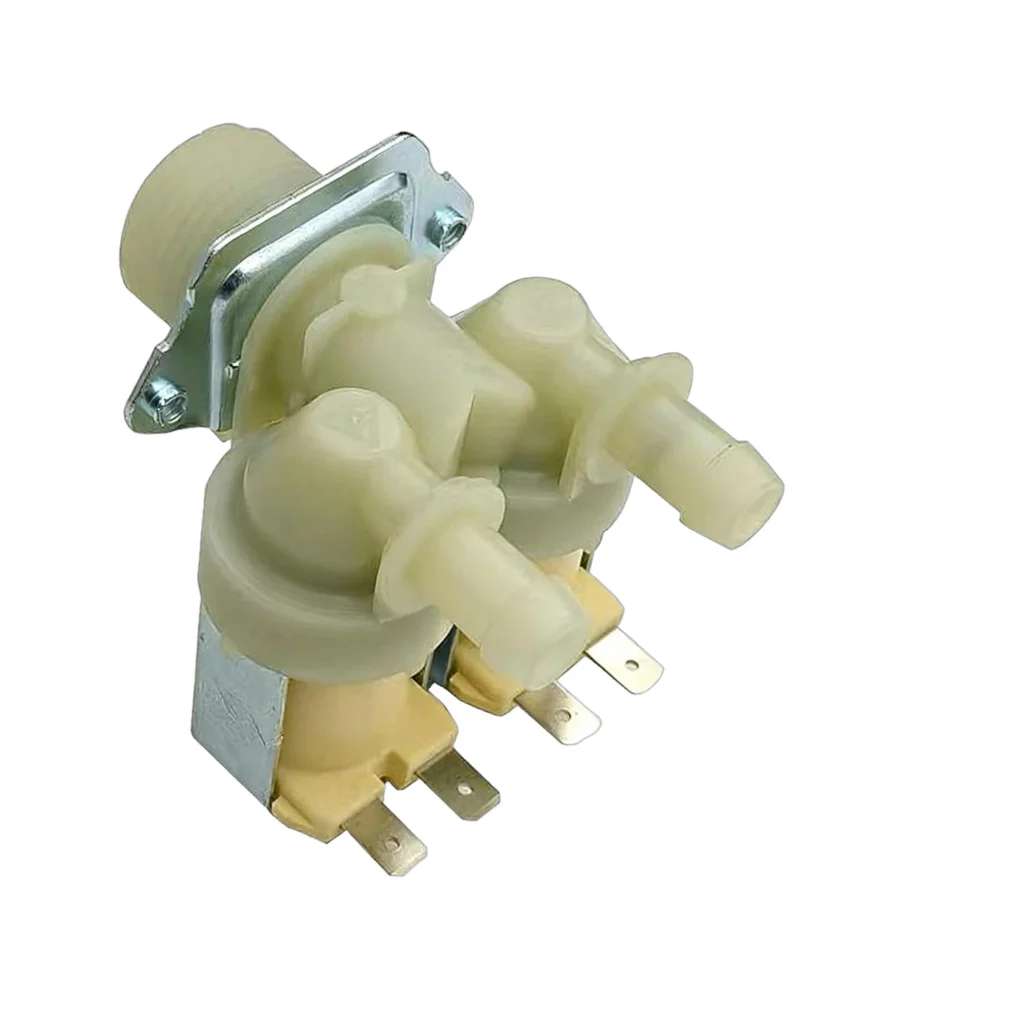
Your Samsung washer starts a cycle, you hear the usual startup sounds, but no water flows into the drum. You check the supply lines — they're fine. The problem isn't your plumbing; it's the water inlet valve that's failed to open. The DC62-00024F water inlet valve controls water flow into your washer, and when it fails, your machine can't fill properly or at all.
What You Need Before Starting
This repair is straightforward if you're comfortable working with basic hand tools and disconnecting water lines. Here's what you'll need:
- Phillips head screwdriver
- 1/4" nut driver or socket wrench
- Needle-nose pliers
- Bucket and towels for water spillage
- Replacement DC62-00024F water inlet valve
Estimated time: 30-45 minutes
Difficulty: Moderate — requires accessing the rear panel and handling water connections
Safety First
Before you touch anything, unplug the washer from the electrical outlet. Turn off both hot and cold water supply valves behind the machine. Even after shutting off the water, expect some residual water in the inlet valve and hoses — keep that bucket handy. If your washer has been recently used, wait 10 minutes to let internal components cool down.
Step 1: Access the Water Inlet Valve
Pull the washer away from the wall to access the back panel. Disconnect the hot and cold water supply hoses from the inlet valve — water will drip out, so position your bucket underneath. On Samsung models like the WF1752WPC and WF8750LSW, remove the screws securing the top rear panel (typically 4-6 screws). The water inlet valve is mounted at the top rear of the machine where the supply hoses connect.
Step 2: Disconnect the Wire Harness and Hoses
You'll see two solenoid connectors on the valve — these control hot and cold water flow. Press the locking tabs and pull each connector straight off. Don't yank on the wires themselves. Next, use your pliers to squeeze and slide the hose clamps away from the internal hoses connected to the valve outlet ports. Twist and pull these hoses off carefully — more water will spill here.
Step 3: Remove the Old Inlet Valve
The DC62-00024F valve is held in place by two or three mounting screws. Remove these screws with your nut driver and carefully pull the valve away from the mounting bracket. Inspect the mesh screens inside the inlet ports — if they're clogged with sediment, that might've contributed to the failure, but at this point you're replacing the whole assembly anyway.
Step 4: Install the New DC62-00024F Valve
Position your new valve in the mounting bracket exactly as the old one sat. Thread in the mounting screws and tighten them snugly — don't overtighten, as you can crack the plastic housing. Reconnect the internal hoses to the valve outlets and slide the hose clamps back into position about half an inch from the connection point. Push the wire harness connectors back onto the solenoids until you hear them click.
Step 5: Reconnect Water Supply and Test
Thread the hot and cold supply hoses back onto the valve inlet ports. Hand-tighten them firmly, then give them another quarter turn with pliers if needed — don't strip the threads. Turn the water supply valves back on slowly and check for leaks around all connections. Plug the washer back in and run a small test cycle. You should hear the valve click open and water should flow into the drum within 5-10 seconds of starting the cycle.
Testing After Installation
Run a quick rinse cycle and watch for proper water flow. Check that both hot and cold water function correctly by selecting different wash temperature settings. Inspect all your connection points one more time while water is flowing — any drips now mean you need to tighten that connection. If water flows normally and the washer completes its fill cycle, you've successfully replaced the valve.
Frequently Asked Questions
Will this DC62-00024F valve work on my Samsung washer model?
This valve is compatible with numerous Samsung front-load and top-load washers, including models WF1752WPC, WF1804WPC, WF7700N6W, WF7708N6W, WF7704S8V, and WF8750LSW among others. Always verify your model number on the inside of the door or on the back panel matches the compatibility list.
How do I know if my inlet valve has failed versus just clogged screens?
If you're getting no water flow at all despite good water pressure from your supply lines, and the screens aren't visibly clogged, the solenoid coils inside have likely failed. You can test with a multimeter — the solenoids should read around 500-1500 ohms. Outside that range, or if you get no reading at all, replace the valve.
Can I just replace one solenoid instead of the whole valve?
The DC62-00024F is a dual-solenoid assembly sold as one unit. The solenoids aren't designed to be replaced individually, and attempting to do so usually costs more in time and frustration than just replacing the whole valve. Plus, if one solenoid failed, the other isn't far behind.
Clean the mesh inlet screens on your new valve before installation to ensure maximum water flow and prevent premature failure
Need the part for this repair?
DC62-00024F · In Stock · Ships next business day