
How to Replace DC34-00028A Door Lock Switch on Samsung Washer — Step-by-Step
Always unplug the washer before replacing the door lock assembly. The lock carries live voltage during operation.
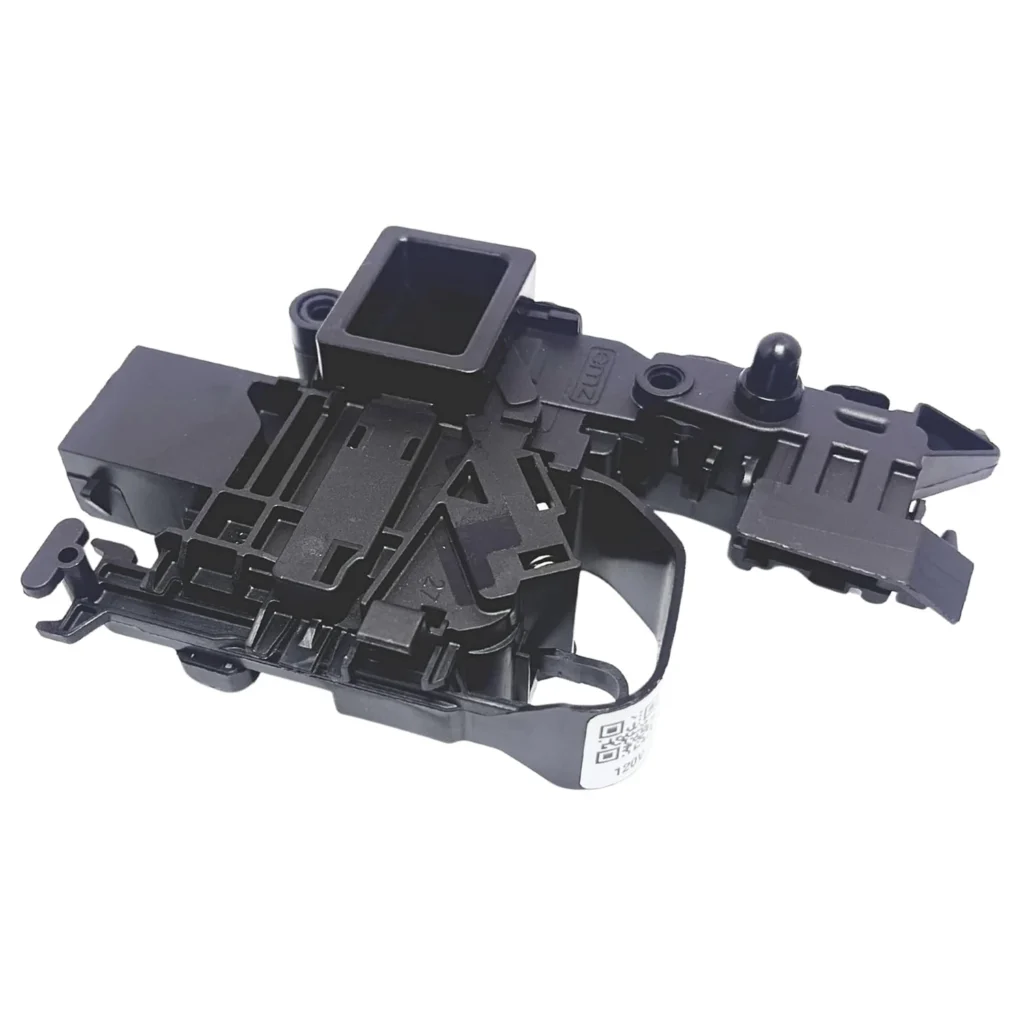
Your Samsung washer won't start, and you hear three beeps followed by a blinking door lock light. The control panel shows an error code, but the door won't latch properly. This is the classic signature of a failed door lock switch — one of the most common failures on models like the WF45R6300AV and WF50R8500AV. The DC34-00028A door lock assembly controls whether your washer can begin a cycle, and when it fails, your machine becomes a expensive clothes holder.
What You Need Before Starting
Tools required:
- Phillips screwdriver
- Flathead screwdriver or pry tool
- Work gloves
- Towel (to protect the floor)
Estimated time: 25-35 minutes
Difficulty level: Moderate — Requires front panel removal but straightforward once accessed
Safety First
Unplug your washer from the wall outlet before you touch anything. Water and electricity don't mix, and the door lock assembly carries live voltage during normal operation. Wear work gloves to protect your hands from sharp metal edges inside the cabinet. If there's water in the drum, run a drain cycle first or manually drain using the emergency drain hose at the front.
Step 1: Access the Front Panel
Pull the detergent drawer completely out, then press the release tab to remove it. You'll see two screws at the top of the front panel behind where the drawer sat. Remove these screws. Next, open the washer door and locate the screws around the door opening — typically four screws securing the front panel. Remove all of these screws and set them aside.
Step 2: Remove the Front Panel
With all screws removed, grasp the top of the front panel and lift it up slightly, then pull it forward. The panel hooks at the bottom, so you need to lift before pulling. Set the panel aside carefully — it's bulky but not too heavy. You'll now see the door lock assembly mounted on the right side of the door opening.
Step 3: Disconnect the Old Door Lock Switch
Locate the wire harness connected to the back of the door lock assembly. Press the locking tab and pull the connector straight off — don't yank on the wires themselves. Take a photo with your phone before disconnecting if you want a reference for reassembly. Remove the screws holding the lock assembly to the front of the washer cabinet (usually two or three screws). Pull the old assembly out.
Step 4: Install the New DC34-00028A Lock
Position your new DC34-00028A door lock assembly in the same orientation as the old one. The latch mechanism should face inward toward where the door striker will engage. Secure it with the mounting screws, tightening them snugly but not overtightened — you don't want to crack the plastic housing. Reconnect the wire harness until you hear the locking tab click into place.
Step 5: Reassemble and Test
Reverse the disassembly process: hook the bottom tabs of the front panel into place, push the top back, and reinstall all screws. Don't forget the screws behind the detergent drawer location. Slide the drawer back in. Plug the washer back in and run a quick test cycle. Close the door and press start — you should hear the lock engage with a solid click within a few seconds. The door lock light should illuminate steadily, not blink.
Testing After Installation
Run a rinse and spin cycle as your first test. Listen for the door lock engaging when you press start — it makes a distinct clicking sound. Try opening the door during the cycle (you shouldn't be able to). Check that error codes don't appear. If everything works smoothly, you're done. The new lock assembly is compatible with models from the WF45R6100AW through the WF50A8600AV series and should last several years with normal use.
Frequently Asked Questions
Will this work if my washer shows a dE error code?
Yes. The dE, dE1, and dE2 error codes on Samsung washers specifically indicate door lock failures. The DC34-00028A assembly is the exact part Samsung techs use to fix these errors. After replacement, you'll need to close the door and run a test cycle to clear the error from memory.
Do I need to recalibrate the washer after replacing the door lock?
No calibration is needed for a door lock replacement. The switch is plug-and-play. However, if your washer has been showing other issues, you might want to run a calibration cycle anyway (check your manual for the button combination — usually involves holding two buttons for 3 seconds).
The door closes but won't lock — is this definitely the lock assembly?
Most likely, yes. But check the door striker (the plastic piece on the door that engages the lock) first. If it's broken or loose, even a new lock won't work. The striker should be firmly attached and not cracked. If the striker is fine and the lock still won't engage, the DC34-00028A assembly is your fix.
Take a photo of the wire harness connection before disconnecting — it makes reassembly foolproof.
Need the part for this repair?
DC34-00028A · In Stock · Ships next business day