
How to Replace DC31-20014C Drain Clutch Motor on Samsung Washer — Step-by-Step
Unplug washer completely and bail out standing water before tipping machine to prevent electrical shock and water damage to floor
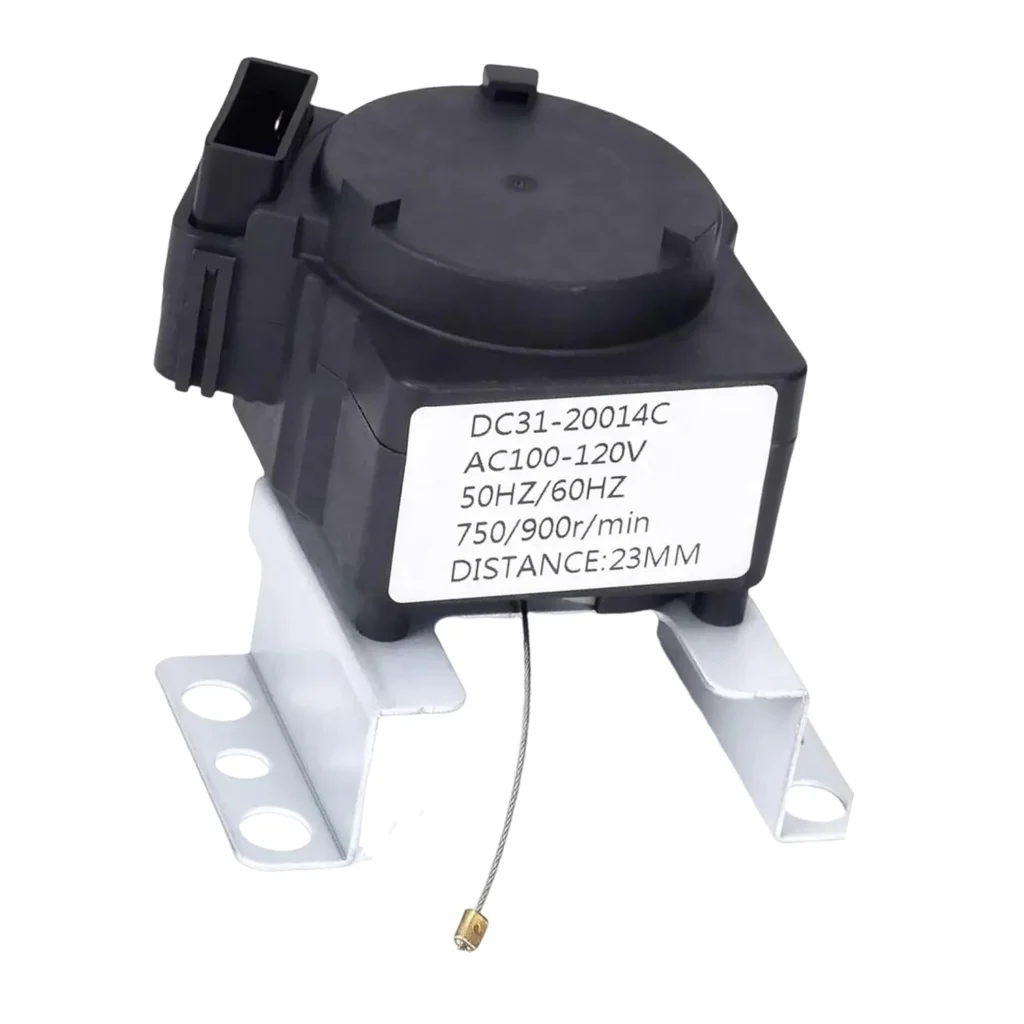
Your Samsung washer runs through the entire cycle, fills and agitates just fine, but when it's time to drain — nothing. The drum sits full of water, and you're left staring at soaking wet clothes. Nine times out of ten on models like the WA54R7600AV or WA50R5400AW, that's your drain clutch motor giving up. This little motor controls the mechanical clutch that shifts your washer from wash mode to drain mode, and when it fails, you're stuck.
What You Need Before Starting
This repair takes about 45-60 minutes for most DIYers. It's a moderate difficulty job — you'll need to tip the washer and work underneath it, but the actual motor swap is straightforward once you're there.
Tools required:
- 1/4" and 5/16" nut drivers or socket set
- Phillips screwdriver
- Flathead screwdriver (for wire harness clips)
- Work gloves
- Towels (for any residual water)
- Helper (optional but recommended for tipping the washer)
Safety First
Unplug the washer completely before you start. Not just pulling it away from the wall — actually unplug it. You'll be working near electrical connections and moving parts. Also, if there's standing water in the drum, bail out as much as you can with a cup or siphon it out before tipping the machine. Samsung top-loaders hold 3-5 gallons when they won't drain, and you don't want that flooding your floor.
Step 1: Access the Bottom of the Washer
The drain clutch motor lives underneath your washer, mounted to the base assembly. Pull the washer away from the wall so you've got working room on all sides. Carefully tip the washer backward — have someone help you here, or lean it against the wall at about a 45-degree angle. You'll see the entire underside, with the motor mounted near the center drain assembly. It's the black cylindrical component with wires running to it.
Step 2: Disconnect the Wire Harness
Locate the wire connector plugged into the drain clutch motor. It's usually a white or black multi-pin connector. Press the locking tab with your flathead screwdriver and pull the connector straight off. Don't yank on the wires themselves — pull from the plastic connector body. Take a quick photo with your phone before disconnecting if you want a reference for reassembly.
Step 3: Remove the Mounting Bolts
The DC31-20014C motor is held in place by three or four bolts around its mounting flange. Use your 1/4" nut driver to remove these bolts. They thread directly into the plastic base housing, so keep them in a safe spot — they're easy to lose under a tipped washer. Once the bolts are out, the motor assembly will pull free from the drain housing. You might need to wiggle it slightly to break it loose from the rubber seal.
Step 4: Install the New Drain Clutch Motor
Line up your new DC31-20014C motor with the mounting holes in the base assembly. The motor only fits one way — there's a keyed alignment on the shaft that matches the drain clutch mechanism. Push the motor into place until it seats firmly against the housing. Thread in all mounting bolts finger-tight first, then snug them down with your nut driver in a star pattern so the motor seats evenly. Don't overtighten — you're threading into plastic, and about 15-20 inch-pounds is plenty.
Step 5: Reconnect and Test
Plug the wire harness back onto the motor until you hear the locking tab click. Give the connector a gentle tug to make sure it's secure. Carefully lower the washer back to the floor and plug it in. Run a drain and spin cycle without any clothes in the drum. You should hear the motor activate with a distinct mechanical click as it engages the clutch, followed by water draining out. If you've got models like the WA45T3400AW or WA50R5200AV, the cycle should complete in 8-10 minutes.
Testing After Installation
Run a full wash cycle with a small load to verify everything works. Listen for the drain clutch motor engaging — it should make a single click or clunk sound when the washer shifts from agitate to drain mode. The water should drain completely within 2-3 minutes. If the washer still won't drain or you hear grinding noises, double-check that the motor is fully seated and all mounting bolts are tight. On rare occasions, the drain pump itself might also be clogged, so verify water actually flows out the drain hose.
Frequently Asked Questions
Will this motor work on my WA54R7200AW or WA50R5400AV model?
Yes, the DC31-20014C is the correct drain clutch motor for Samsung top-load washers in the WA45T, WA50R, and WA54R series. It replaces the original Samsung part numbers AP4211210, PS4204941, and 2068406. If your model number starts with WA45, WA50, or WA54, you're in the right place.
My washer drains but makes a loud grinding noise — is this the right part?
Possibly. A failing drain clutch motor can make grinding or clicking sounds as the internal gears wear out. However, if the washer drains successfully but sounds terrible, you might also have a worn drain pump bearing. The clutch motor controls engagement, while the pump does the actual water moving. If you're hearing noise during the entire drain cycle, not just at the beginning, check the pump too.
How do I know if it's the motor or the clutch assembly itself?
The DC31-20014C is a motor-clutch combo unit, so if either component fails, you replace the whole thing. If your washer won't shift into drain mode at all — meaning it agitates fine but never even attempts to drain — that's almost always this motor. If it tries to drain but nothing happens, you might have a clogged pump or kinked drain hose. The motor either works or it doesn't; there's no partial failure mode.
Take a photo of the wire harness connection before disconnecting — it'll save you troubleshooting time during reassembly
Need the part for this repair?
DC31-20014C · In Stock · Ships next business day