
How to Replace DC31-00180A Drain Pump Motor on Samsung Washers — Step-by-Step
Always unplug washer before repair. Residual water will drain from pump housing — have towels and pan ready.
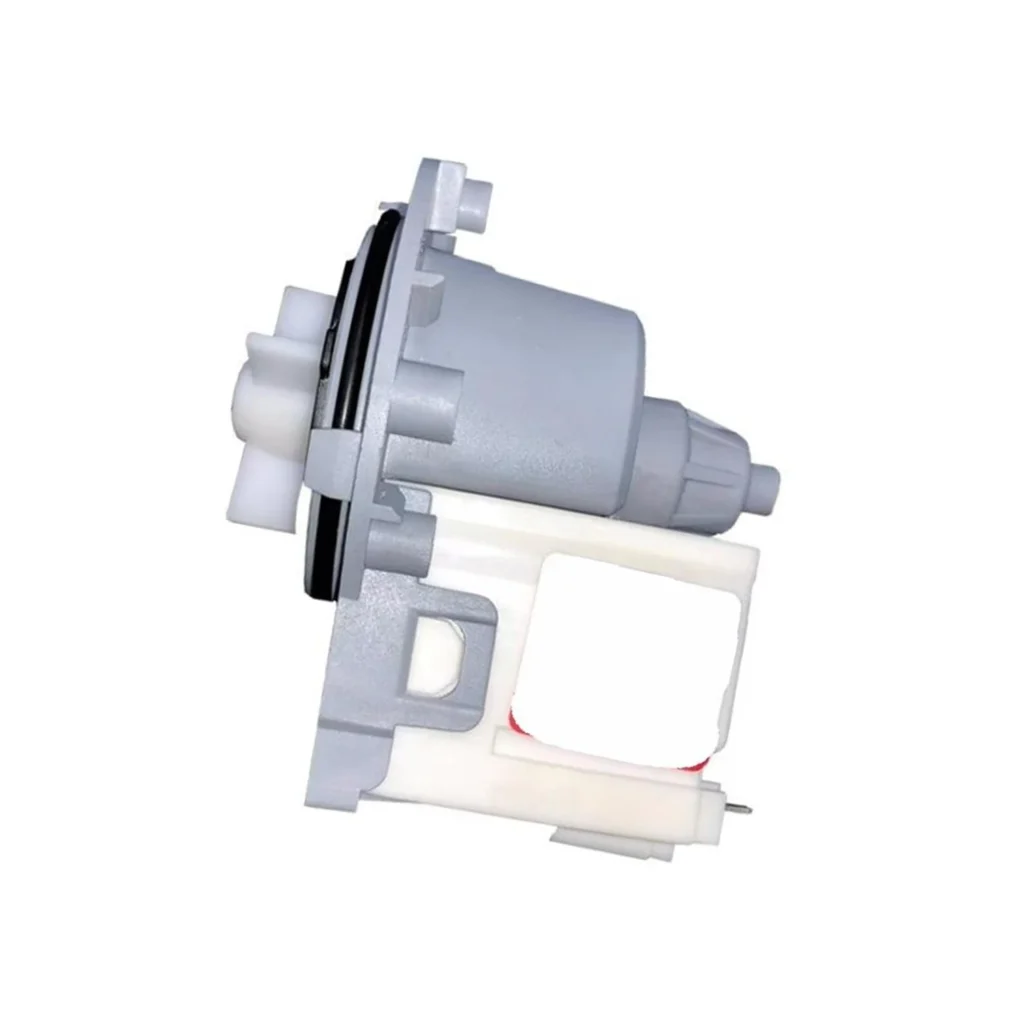
Your Samsung washer won't drain, the cycle just sits there with water pooled at the bottom. You hear a humming sound but nothing's moving. That's usually your drain pump calling it quits. The DC31-00180A is the OEM replacement pump motor that keeps your washer draining properly on models like the WW80J5355MW, WF1802WPC, and dozens of other Samsung front-loaders.
What You Need Before Starting
- Phillips screwdriver
- Flathead screwdriver or putty knife
- Towels (you'll have water spillage)
- Shallow pan or bucket
- Needle-nose pliers
- Work gloves
Repair Time: 30-45 minutes
Difficulty: MODERATE
Safety First
Unplug the washer completely before you touch anything. Even though you're working on a drain pump, there's live voltage running to that motor. Move the washer away from the wall so you can access the back panel comfortably. Have those towels ready — there's always residual water in the pump housing, and it's coming out when you disconnect the hoses.
Step 1: Access the Drain Pump Assembly
Most Samsung front-loaders require removing the front lower panel. Use a flathead screwdriver or putty knife to pop off the small access door at the bottom front of the washer. Behind it, you'll find two screws securing the kickplate panel. Remove those screws and pull the panel forward to release the clips. On models like the WW70J42131W and WF8804RPW, the pump is now visible on the right side.
Step 2: Drain Residual Water
Before disconnecting anything, you need to drain the pump housing. Locate the small drain hose usually clipped near the filter. Pull it out, remove the cap, and let water drain into your shallow pan. Once that's done, unscrew the debris filter counterclockwise. More water will come out — this is normal. Keep those towels handy.
Step 3: Disconnect Pump Connections
You'll see two large hoses connected to the pump — the inlet from the tub and the outlet to the drain. Use needle-nose pliers to squeeze and slide the wire clamps back along each hose. Pull the hoses off the pump fittings. Expect more water spillage here. Next, disconnect the wire harness from the pump motor by pressing the release tab and pulling straight out.
Step 4: Remove the Old Pump Motor
The DC31-00180A pump assembly is held by three screws arranged in a triangle pattern on the mounting bracket. Remove all three screws using your Phillips screwdriver. On some Samsung models like the WD80K6410OW and WF0702WKW, there's a plastic retaining clip at the top — slide it upward to release. Rotate the pump slightly counterclockwise and pull it out of the housing.
Step 5: Install the New DC31-00180A Pump
Position your new pump motor into the mounting bracket, aligning the rubber grommets with the holes. Rotate it clockwise until it seats properly. Reinstall the three mounting screws and tighten them evenly — don't overtighten or you'll crack the plastic housing. Reconnect the wire harness until you hear the click. Slide both hoses back onto the pump fittings and reposition the wire clamps about half an inch from the ends.
Testing After Installation
Reinstall the debris filter by screwing it in clockwise. Replace the access panel and kickplate. Plug the washer back in and run a drain/spin cycle without clothes. Watch underneath for any water leaks at the hose connections. You should hear the new pump engage immediately and water should drain within 30 seconds. If the washer completes the cycle without error codes, you're done.
Frequently Asked Questions
Will DC31-00180A work if my original part number is DC31-00056A?
Yes, absolutely. The DC31-00180A directly replaces DC31-30008D, DC31-00056A, and DC31-30001A. Samsung updated the design but maintained backward compatibility across their front-load washer lines from 2010 onward.
My washer still won't drain after replacing the pump — what now?
Check the drain hose running from the washer to your standpipe for clogs or kinks. Also inspect the coin trap filter you removed earlier — sometimes a sock or small item blocks flow even with a new pump. Run a diagnostic cycle to check for error codes pointing to other issues.
Do I need to replace the rubber gasket on the debris filter?
Not unless it's damaged. The filter housing uses an O-ring gasket that should still seal properly after reinstallation. If you notice water leaking from the filter area after your repair, then replace that gasket separately — it's not included with the DC31-00180A pump motor.
Take a photo of wire harness orientation before disconnecting to ensure correct reinstallation
Need the part for this repair?
DC31-00180A · In Stock · Ships next business day