
How to Replace 6501KW2002A Washer Rotor Position Sensor on LG Washers — Step-by-Step
Unplug washer before repair. Keep metal objects away from rotor magnets. Consult doctor if you have a pacemaker before working near strong magnets.
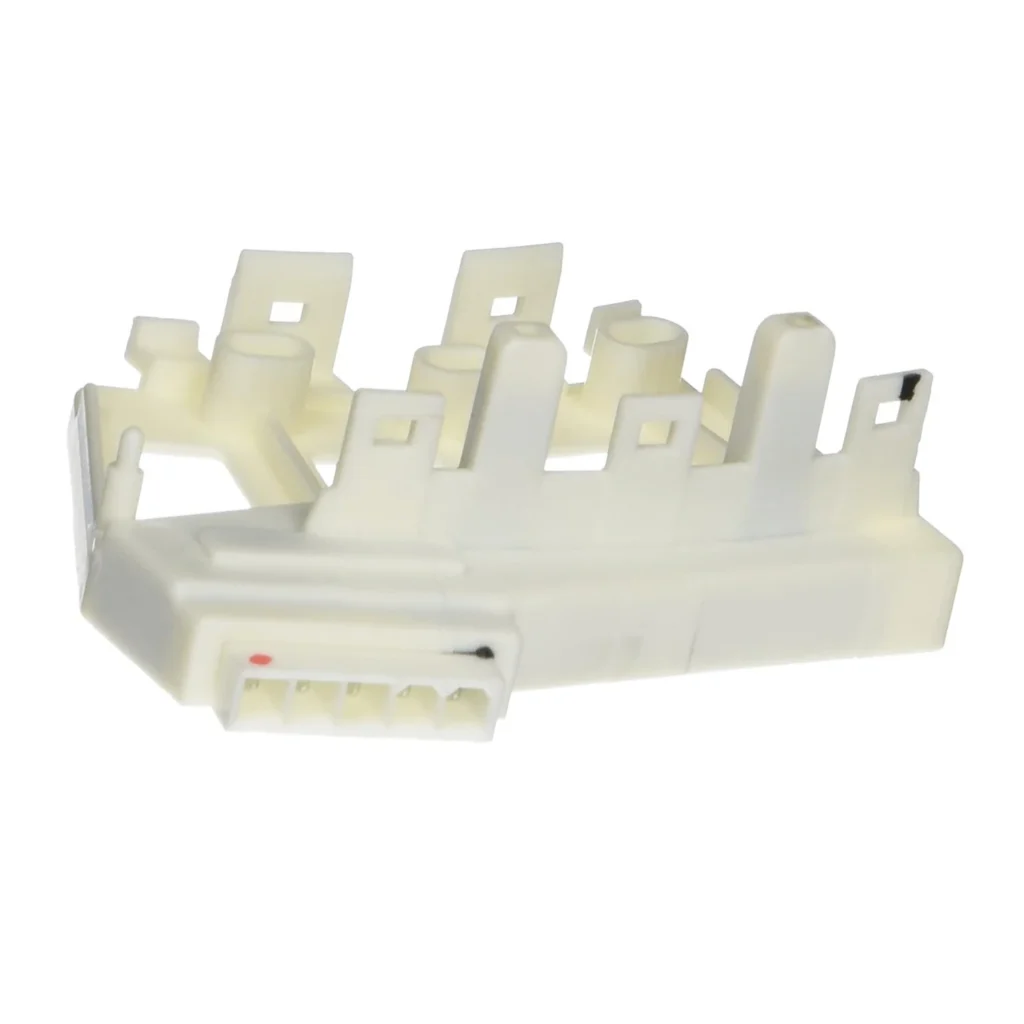
Your LG washer stops mid-cycle, flashes an LE error code, and the drum won't budge. You've already checked for jammed clothes and reset the machine twice. The culprit? It's probably the rotor position sensor — also called the Hall sensor — tucked behind that back panel. One user told us: "I looked up the error code online and found tons of complaints & fixes... bought the Rotor Position Sensor Switch for $17.00 — what did I have to lose?" Twenty-five minutes later, their washer was running perfectly.
This sensor tells the control board where the drum is positioned during the spin cycle. When it fails, your WM2016CW, WM3170CW, or any LG front-loader with a direct drive motor will throw that LE code and refuse to spin. Here's how to replace it yourself without paying $200 for a service call.
What You Need Before Starting
Tools:
- Phillips and flat-head screwdrivers
- Socket set with 17 mm and 10 mm sockets (not 15 mm — that's the wrong size)
- Socket wrench with 6-inch extension
- Blue medium-strength Loctite
Repair Time: 1-2 hours
Difficulty: Easy
Safety First
Unplug the washer completely before you start. Pull it away from the wall so you can access the back panel comfortably. The rotor assembly has strong magnets, so keep metal tools and watches at a safe distance when you're working near it. If you have a pacemaker, have someone else do this repair — those magnets are no joke.
Step 1: Remove the Back Panel
There are four screws holding the back panel in place. Use your Phillips screwdriver to remove them, then lift the panel straight back and set it aside. You'll immediately see the motor assembly with the big silver rotor drum attached to it. The Hall sensor is a small black component on the side of the motor, usually with a two-wire connector.
Step 2: Remove the Main Rotor Bolt
This is where most people mess up. You need a 17 mm socket, not 15 mm like some YouTube videos claim. Attach your socket wrench with an extension and position it on the large bolt in the center of the rotor. Here's the trick: have someone reach inside the drum from the front and hold it firmly so it doesn't rotate. Turn the bolt counterclockwise to loosen it. Once it's loose, remove the bolt completely and carefully pull the rotor straight off the motor shaft. It's magnetic, so it'll resist a bit — wiggle it gently if needed.
Step 3: Remove the Stator Bolts
With the rotor off, you'll see six bolts holding the stator coil assembly to the motor. Use your 10 mm socket to remove all six. Also remove the ground screw and the wire harness clamp screw nearby. Carefully lift the stator assembly forward slightly — you don't need to fully remove it, just create enough clearance to access the Hall sensor on the motor housing.
Step 4: Replace the Hall Sensor
The sensor is held in place by a plastic clip. Use a flat-head screwdriver to gently pry the clip open — don't force it or you'll crack the mounting tab. Slide the old sensor out, disconnect the two-wire harness, and connect your new 6501KW2002B sensor. Push it into the mounting slot until you hear it click. The orientation matters: the wiring should face the same direction as the original.
Step 5: Reassemble Everything
Reverse the disassembly process. Reattach the stator with all six bolts, reinstall the ground screw and harness clamp. Before you put the rotor back on, apply a small dab of blue Loctite to the threads of the main bolt. Slide the rotor onto the motor shaft (it'll pull itself on magnetically), then thread the bolt back in. Again, have someone hold the drum from inside while you tighten the bolt firmly with your 17 mm socket. Replace the back panel and plug the washer back in.
Testing After Installation
Run an empty spin cycle on high speed. The washer should ramp up smoothly without the LE error. If the drum doesn't immediately start spinning, try this trick from a user who had the same issue: "I turned on the washer, selected high speed spin and with the back open I carefully moved the drum several inches until the hall switch sensor made an electrical 'click' and the drum then began to function properly." Sometimes the sensor needs to find its home position during the first startup.
Check that the washer completes a full cycle without noise or error codes. If you still get an LE code, double-check that the sensor connector is fully seated and the rotor bolt is tight.
Frequently Asked Questions
Will this fix the LE error code on my LG washer?
Yes, if the Hall sensor is the problem. The LE code specifically points to a motor issue, and the rotor position sensor is the most common cause. If you've ruled out a locked rotor (stuck item between drum and tub) and the wiring looks good, replacing this sensor fixes it 90% of the time. Models like the WM2016CW, WM3170CW, WM3370HWA, and WM3575CW all use the same sensor.
Do I really need Loctite on the rotor bolt?
Absolutely. That bolt experiences constant vibration during spin cycles. Without threadlocker, it can work itself loose over time, which causes the rotor to wobble and eventually damages the motor. Use blue medium-strength Loctite — not red, which is permanent. Blue allows you to remove the bolt later if needed, but keeps it secure during normal operation.
Can I test the old sensor to confirm it's bad?
You can, but it requires a multimeter and some patience. With the sensor disconnected, check for continuity between the two terminals while moving a magnet near it — resistance should change. Most people just swap the sensor since it's inexpensive and the symptoms (LE code, no spin) point directly to it. If the new sensor doesn't fix the issue, you're likely looking at a motor stator or control board problem, which is a different repair entirely.
Have someone hold the drum from inside when loosening or tightening the main rotor bolt — it prevents the drum from spinning and makes the job much easier.
Need the part for this repair?
6501KW2002A · In Stock · Ships next business day