
How to Replace 241854301 Evaporator Fan Motor on Frigidaire Refrigerator — Step-by-Step
Always unplug refrigerator before repair. The evaporator fan motor runs on 120V household current. Work in a dry environment to avoid electrical shock.
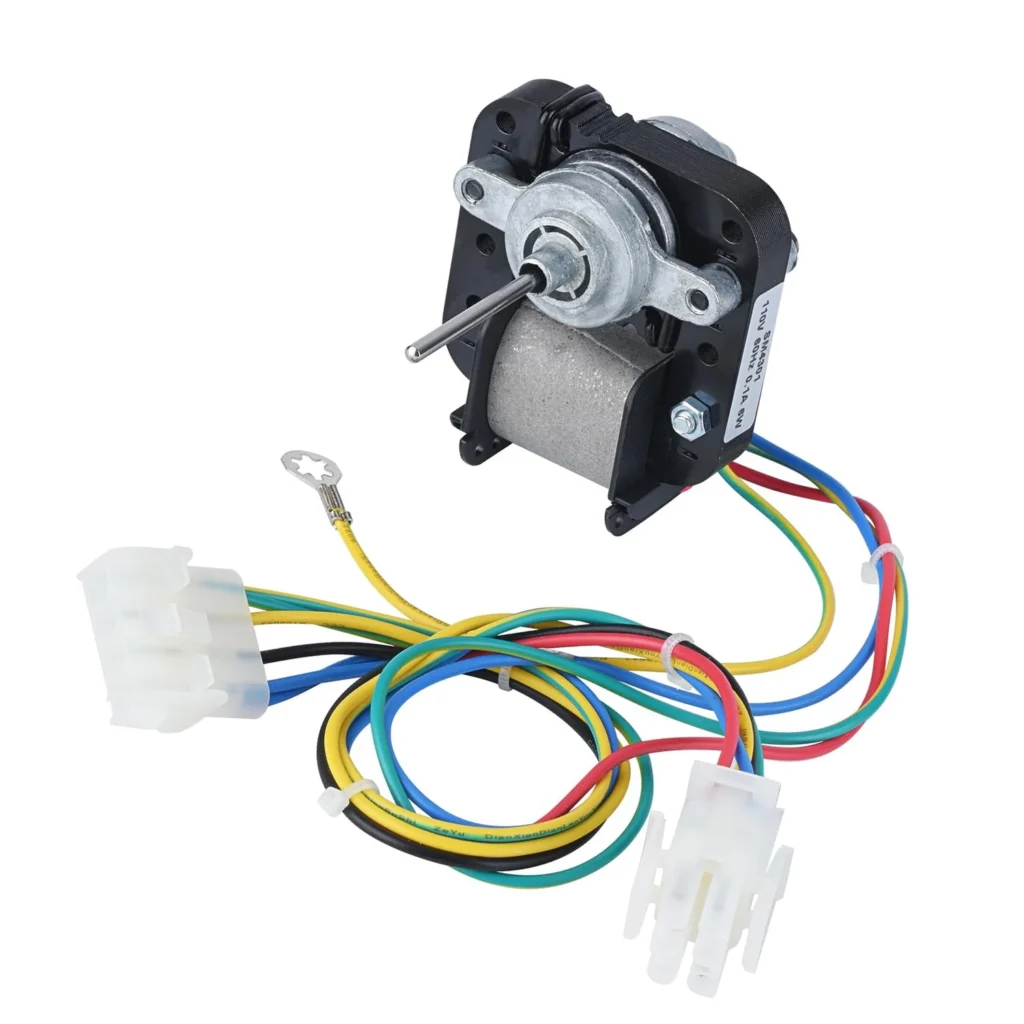
Your Frigidaire's freezer is ice-cold, but the fridge section feels like it's barely trying. Milk's going bad faster than usual, and you're cranking the temperature dial down with zero results. This is the classic sign of a failed evaporator fan motor — the part responsible for pushing cold air from the freezer into your refrigerator compartment.
When the 241854301 evaporator fan motor burns out, your freezer keeps working because the compressor still runs. But without that fan circulating air, your fridge section warms up. The good news? This is one of the easiest refrigerator repairs you can tackle yourself in under 30 minutes.
What You Need Before Starting
This repair doesn't require a full toolbox. Here's what you'll actually use:
- Nut drivers (1/4" most common)
- Phillips and flathead screwdrivers
- Socket set (for mounting bracket bolts)
- Wrench set (if your model has hex-head fasteners)
Estimated repair time: 15-30 minutes
Difficulty level: Very Easy — No technical experience required
Safety First
Always unplug your refrigerator before starting any repair work. The evaporator fan motor runs on 120V household current, and you'll be working in the freezer compartment where moisture and electricity don't mix well. Remove frozen items from the freezer or transfer them to a cooler. You'll need clear access to the back panel inside the freezer.
Step 1: Access the Evaporator Fan Assembly
Empty your freezer shelves and locate the back panel — it's the white plastic cover inside the freezer compartment. Remove all screws holding this panel in place (typically 4-6 screws along the edges). Gently pull the panel forward and lift it out. You'll see the evaporator coils and the fan motor mounted behind them. On models like the FFHT1826LM4 and FFHT1817LW0, the fan sits directly in the center of the evaporator housing.
Step 2: Disconnect the Old Motor
The fan motor connects with a simple wire harness plug. Pull the connector apart — don't yank on the wires themselves. If it's stuck from years of frost buildup, wiggle it gently while pulling. Next, remove the mounting screws or clips holding the fan motor bracket to the evaporator housing. Most Frigidaire models use two or three screws that secure the motor mounting bracket.
Step 3: Remove the Fan Blade
Before you can pull out the old motor, you need to remove the fan blade. Look for a set screw or push-on clip at the center of the blade where it attaches to the motor shaft. Loosen the set screw with your flathead screwdriver, then slide the blade off the shaft. Some blades just pull straight off. Keep this blade — you'll reuse it unless it's cracked or damaged.
Step 4: Install the New 241854301 Motor
Slide your original fan blade onto the new motor shaft. Make sure it's positioned exactly like it was on the old motor — typically about 1/4 inch from the motor housing. Tighten the set screw firmly. Mount the new motor assembly back into the bracket using the same screws you removed. Connect the wire harness until you hear it click into place. Give the blade a quick spin with your finger — it should rotate freely without wobbling or rubbing.
Step 5: Reassemble and Test
Replace the evaporator cover panel and secure all screws. Plug your refrigerator back in and listen. Within seconds, you should hear the new fan motor running — it's a steady, quiet hum. Place your hand near the air vents in the fridge section. You should feel cold air flowing within 5-10 minutes. Let the unit run for an hour, then check the temperature. Your fridge compartment should start cooling down noticeably.
Testing After Installation
Don't just assume everything's working. Check these specific things after your repair:
- Fan runs continuously when the door is closed (open the door and press the light switch to verify)
- No unusual rattling or grinding noises from the freezer
- Cold air flowing from vents into the refrigerator section
- Refrigerator temperature dropping to 37-38°F within 2-3 hours
- No frost buildup around the new motor after 24 hours
One customer shared: "Ordered the motor from appliance pro and had an issue with delivery, but when it finally arrived I put it on and it's working like a brand new refrigerator." That's exactly what you should experience — immediate improvement in cooling performance.
Frequently Asked Questions
Why is my freezer cold but refrigerator warm?
This happens when the evaporator fan motor fails. The compressor still produces cold air in the freezer, but without the fan running, that cold air never gets pushed into the refrigerator compartment. It's the most common symptom of fan motor failure and affects models like the FFHT1826LSA, FFHT1814LW1, and dozens of other Frigidaire top-freezer refrigerators.
Can I use the 241854301 motor in my Kenmore refrigerator?
Yes, if your Kenmore was manufactured by Frigidaire or Electrolux. This motor replaces multiple part numbers including AP4343697, PS2331827, 1465278, and 5303918549. Check your model number against the compatibility list — many Kenmore 253-series and some Kelvinator models use this exact motor.
How do I know if the fan motor is actually bad?
Open your freezer and listen. If you don't hear a fan running, manually spin the fan blade with your finger. If it's hard to turn or doesn't spin freely, the motor bearings are shot. If it spins freely but doesn't run when plugged in, the motor's electrically dead. Either way, you need the 241854301 replacement. The motor should run whenever the compressor is running — they work together.
Do I need to defrost my freezer before replacing the fan motor?
Not necessarily, but it makes the job easier. If you've got heavy frost buildup on the evaporator cover panel, those screws will be tough to remove. A quick defrost (or a blow dryer aimed at the screws) speeds things up. The actual motor replacement takes 15 minutes once you can access it — the defrosting is what adds time if needed.
Spin the new fan blade by hand after installation to verify free rotation before reassembling. Any wobble or resistance means it's not properly mounted.
Need the part for this repair?
241854301 · In Stock · Ships next business day