
Samsung Washer dE Error Code — What It Means & How to Fix
Door lock malfunction — washer cannot confirm door is properly closed and locked
The dE error code appears when the Samsung washer's door lock assembly fails to engage, disengage, or communicate its status to the main control board. The washer will not start the wash cycle as a safety precaution. This is most commonly caused by a failed door lock switch assembly (part DC34-00028A), though door misalignment and wiring issues can also trigger this error. The lock assembly contains both mechanical latching components and electrical switches that wear out over time.
Always unplug the washer before attempting door lock replacement. If water is trapped inside the drum, drain it completely using the emergency drain hose before opening the front panel to prevent flooding.
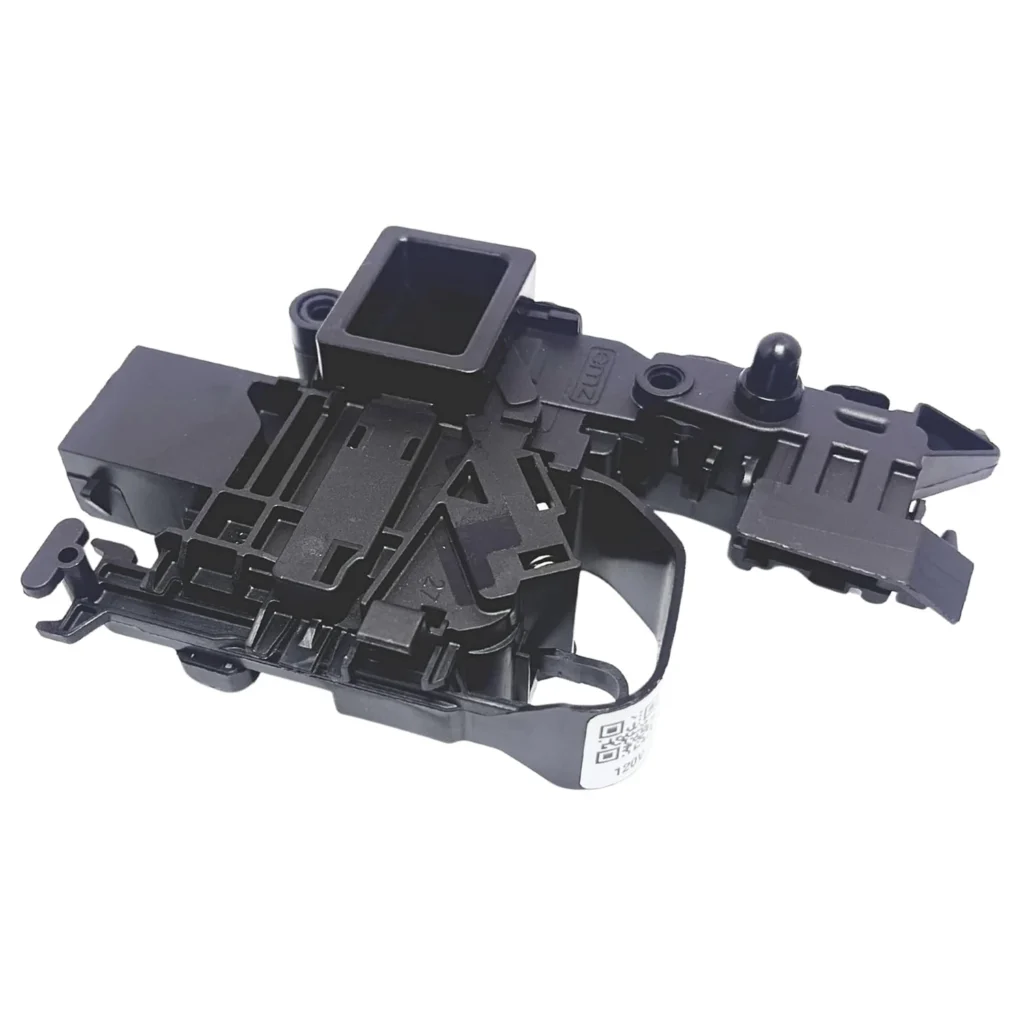
You load the washer, press start, and instead of that satisfying click of the door locking, you get nothing. The drum won't spin. The display flashes "dE" or "dE1" or "dE2" — and your laundry sits there, hostage to a door that won't cooperate. This is one of the most common Samsung washer failures, and it's almost always the door lock assembly that's failed.
The good news? This is a straightforward fix if you're comfortable with basic repairs. The bad news? You can't just bypass it — modern washers won't run without a functioning door lock for safety reasons.
What dE Error Code Actually Means
The "dE" error family (dE, dE1, dE2) stands for "door error." Your washer has a three-part door lock system: the physical latch mechanism, an electrical switch that confirms the door is closed, and a solenoid lock that secures it during the wash cycle. When the control board can't confirm all three are working, it throws this error and refuses to start.
Here's the breakdown:
- dE — Generic door error, door won't lock or unlock
- dE1 — Door lock switch malfunction detected
- dE2 — Door lock/unlock cycle failed multiple times
All three codes point to the same component: the door lock assembly (Samsung part DC34-00028A). This assembly handles both the mechanical latch and the electrical confirmation signal. When it fails, the control board gets incomplete data and stops the cycle before it starts.
Most Likely Causes (Ranked by Probability)
1. Failed Door Lock Switch Assembly (80% of cases)
The DC34-00028A door lock assembly contains plastic gears and a thermal-sensitive locking mechanism that wears out after 3-5 years of regular use. The electrical contacts inside corrode, or the locking solenoid burns out. This is especially common on front-loaders like the WF45R6300AV, WF45T6000AW, and WF50R8500AV models where the door gets opened and closed multiple times daily.
2. Warped or Misaligned Door (15% of cases)
If your washer has been moved recently or sits on an uneven floor, the door striker plate can miss the lock assembly entirely. The door appears closed, but the latch never engages the switch. You'll sometimes hear clicking as it tries repeatedly to lock.
3. Wiring Harness Connection Issues (4% of cases)
The wire connector behind the door lock can corrode or work loose from vibration. This is more common if you've had any water leaks around the door seal — moisture creeps into the connector and causes intermittent failures.
4. Control Board Malfunction (1% of cases)
Rarely, the main control board loses its ability to read the door lock signal correctly. This typically comes with other error codes as well, not just dE.
Step-by-Step Fix
Before you start: Unplug the washer completely. Wear work gloves — there are sharp edges inside the front panel. If there's water trapped inside, you'll need to drain it first using the emergency drain hose (usually behind the lower access panel).
Test #1: Check Door Alignment
- Close the door and watch the striker plate on the door edge — does it line up perfectly with the lock assembly opening on the washer frame?
- If it's off by more than 1/8 inch, check if your washer is level. Use a carpenter's level across the top. Adjust the leveling legs at the front corners.
- Try the cycle again. If the error persists, move to the next test.
Test #2: Inspect the Lock Assembly
- Open the washer door. Look inside the door opening on the right side (on most models) for the door lock housing.
- Check for visible damage: cracks in the plastic housing, burn marks, or broken pieces.
- Gently wiggle the assembly — it shouldn't move more than a millimeter. If it's loose, the mounting screws have failed.
Replacement Procedure
- Remove the screws holding the front lower access panel (usually 2-3 screws along the bottom edge).
- Reach up behind the door opening to access the door lock assembly. You'll feel a wire harness connector — press the locking tab and disconnect it.
- Remove the two screws securing the lock assembly to the frame (typically Torx or Phillips head).
- Pull the old assembly out through the front opening. Note which way the wire harness routes.
- Install the new DC34-00028A assembly in reverse order. Make sure the striker plate aligns with the lock opening before tightening screws.
- Reconnect the wire harness until you hear it click.
- Reinstall the lower panel, plug in the washer, and run a test cycle.
When the Fix Doesn't Work
If you've replaced the door lock and still get a dE error:
Check the wiring harness path. Follow the wires from the door lock back toward the control board. Look for pinched wires, especially where they pass through the metal frame opening. A wire with damaged insulation can short intermittently.
Test with the door open. Start a cycle with the door slightly ajar. If you get a different error code (like an OE or LE code), the control board is working — you have a different primary problem and the dE code was secondary.
Consider the control board. If you've confirmed the new lock is installed correctly, aligned properly, and the wiring is intact, the main control board may have failed. This is a more expensive repair ($200-400 for the part alone), and at that point you need to decide if the washer is worth fixing based on its age.
Frequently Asked Questions
Can I force the door open when I get a dE error?
Yes, but carefully. Unplug the washer first. Most Samsung washers have a manual release tab near the door lock (usually accessed by removing the lower panel). Pull the tab while gently pulling the door. Never force it with tools — you'll crack the door frame.
How long does the DC34-00028A door lock typically last?
Expect 4-6 years with normal use (one load per day). Heavy users running multiple loads daily often see failures around the 3-year mark. The thermal element inside the lock degrades from repeated heating and cooling cycles.
Will a dE error clear on its own if I just wait?
Occasionally, yes — if the error was caused by a temporary power surge or moisture in the connector. Unplug the washer for 10 minutes, plug it back in, and try again. If it clears but comes back within a few cycles, the lock assembly is failing and needs replacement soon.
Before ordering a new door lock, check washer leveling with a carpenter's level. An unlevel washer causes the door striker to miss the lock assembly, triggering false dE errors. Adjust the front leveling legs until the bubble is centered.
Need the control board or touchpad?
Genuine OEM & aftermarket options in stock