
Samsung Front-Load Washer dE Error Code — What It Means & How to Fix
Door lock error — washer can't confirm door is properly closed and locked
The dE error code appears when Samsung's control board doesn't receive the proper electrical signal from the door lock switch assembly. The washer won't start a cycle or stops mid-cycle because it can't verify the door is securely locked. This prevents the drum from spinning with the door unlatched, which would cause flooding and safety hazards.
Always unplug the washer before removing the door lock assembly. If the washer is locked mid-cycle, drain it completely using the emergency drain hose before attempting to force the door open.
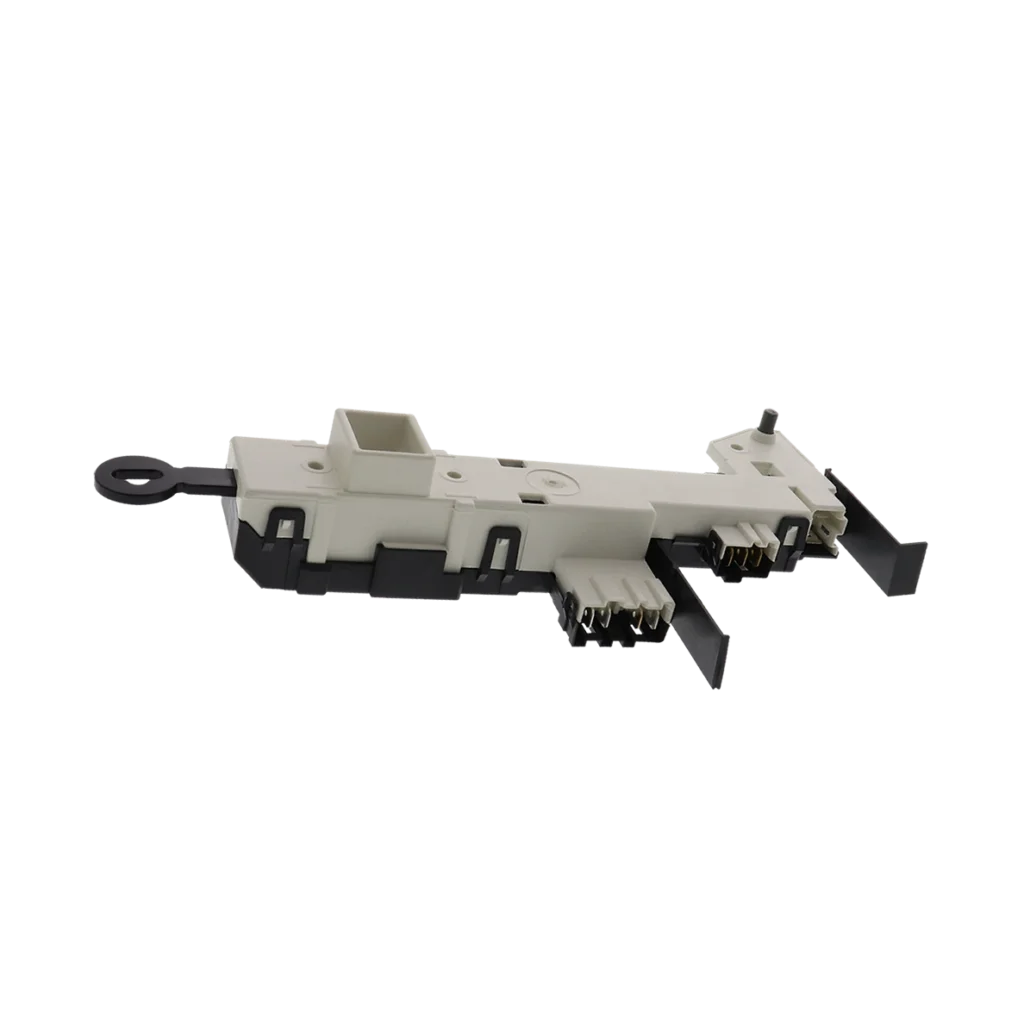
You're running late, you've got a full load of laundry waiting, and your Samsung front-load washer just stopped mid-cycle with "dE" flashing on the display. The door won't unlock, or it won't lock at all. Either way, you're stuck with wet clothes and zero patience for cryptic error codes.
The dE error (sometimes shown as "dE2" or "dC") is one of the most common Samsung washer failures, and it's almost always tied to the door lock assembly. Before you call a repair tech charging $150 just to show up, let's walk through exactly what's happening and how to fix it yourself.
What dE Error Code Actually Means
The "dE" stands for "door error." Your washer's control board isn't getting the signal it needs from the door lock switch assembly. Samsung front-loaders won't start a cycle — or will stop mid-cycle — if the door isn't properly locked. It's a safety feature preventing the drum from spinning with the door open and flooding your laundry room.
Here's what's happening behind the scenes: when you close the door, a striker on the door should engage with the lock assembly mounted in the washer frame. The lock assembly has a solenoid that physically locks the striker in place, plus a switch that tells the control board "door is secure." If that electrical signal doesn't reach the board within a few seconds, you get dE.
Sometimes the door won't close at all. Other times it closes but won't lock. And occasionally, it locks but the switch inside the assembly fails, so the board never gets confirmation.
Most Likely Causes (Ranked by Probability)
1. Failed door lock switch assembly (75% of cases): The DC64-00519B assembly contains both the locking solenoid and the electrical switch. Over time — usually after 5-7 years of use — the internal contacts wear out or the solenoid coil burns out. When this happens, the door might close but won't engage the lock, or it locks but doesn't send the signal to the control board.
2. Misaligned door striker (15% of cases): The plastic striker piece mounted on the door itself can crack, bend, or shift position. If it's not aligning perfectly with the lock assembly opening, the lock can't engage. You'll hear the door click shut, but the lock mechanism never catches.
3. Wiring harness damage (7% of cases): The wires connecting the door lock to the control board run through the door hinge area. Constant opening and closing can fray these wires right where they flex. You might see the error code appear intermittently — works fine one load, fails the next.
4. Control board failure (3% of cases): Rarely, the issue is with the main control board itself. If the door lock assembly tests good electrically and the striker is aligned, the board might not be processing the lock signal correctly. This is the expensive fix you want to rule out last.
Step-by-Step Fix for dE Error
Step 1: Force the door open (if it's locked)
If your washer stopped mid-cycle with the door locked, you'll need to drain it first. Unplug the washer, then locate the small emergency drain hose at the bottom front (usually behind a kickplate panel). Pull it out, remove the cap, and drain into a shallow pan. Once drained, find the emergency door release tab — it's a small plastic or wire loop near the door lock assembly. Pull it to manually release the lock.
Step 2: Inspect the door striker
Open the door and look at the plastic piece that sticks out from the door frame (the striker). It should be centered and intact. If it's cracked, loose, or sitting at an angle, that's your problem. The striker typically pulls off after removing two screws. Samsung OEM strikers run about $12. If the striker looks fine, move to step 3.
Step 3: Test the door lock assembly
Unplug the washer. Open the door and locate the lock assembly on the front right side of the door opening. Remove the front boot clamp (the large wire or band clamp holding the rubber door seal). Peel back the boot just enough to access the lock assembly. It's held by 2-3 screws. Remove those screws and pull the assembly forward enough to disconnect the wire harness.
Using a multimeter set to continuity mode, test between the terminals on the lock assembly while manually operating the lock mechanism. You should see continuity change as the lock engages. No change? The switch is dead. That's the DC64-00519B assembly failing — the most common scenario for models like the WF419AAW/XAA, WF42H5200AP/A2, and WF457ARGSWR/AA.
Step 4: Install the new door lock
If you're replacing the assembly, the DC64-00519B is a direct swap. Connect the wire harness first (push until you hear it click), then position the assembly in the mounting holes and secure with the screws you removed. Fold the boot seal back into position and reinstall the clamp. Make sure the boot lip is seated evenly all the way around before tightening.
Step 5: Test the repair
Plug the washer back in. Close the door — you should hear a distinct click as the lock engages, then maybe a second click as it locks. The washer should power on normally without the dE error. Run a quick rinse cycle to verify everything works.
When the Fix Doesn't Work
If you've replaced the door lock assembly and the dE error persists, check the wiring harness for damage. Trace the wires from the lock assembly back to where they enter the washer cabinet through the hinge area. Look for frayed insulation, exposed copper, or burnt wire connections.
Still getting dE? The control board might not be processing the lock signal. This is where you're looking at a $200-300 repair if you replace the board yourself, or $400-500 with a service call. At that point, you'll want to consider the washer's age and whether it's worth putting that much into the repair.
Some techs will also check the wiring harness connection at the control board itself — occasionally those push-on connectors work loose from vibration.
Frequently Asked Questions
Can I bypass the door lock to finish my laundry?
No, and you really shouldn't try. The door lock isn't just about keeping the door closed — it's a safety interlock that prevents the drum from spinning at 1,000+ RPM with the door unlatched. Bypassing it risks serious injury and will void any remaining warranty. The DC64-00519B replacement takes about 30 minutes and costs $43.99 — just fix it properly.
Why does the dE error come and go?
Intermittent dE errors usually mean the door lock assembly is failing but not completely dead yet. The internal switch contacts might be corroded, making inconsistent connection. Or the striker alignment is just barely off, so it works sometimes depending on exactly how you close the door. This will get worse over time — if you're seeing dE even occasionally, plan on replacing the lock assembly soon.
Will this fix work for dE2 and dC error codes?
Yes. Samsung uses slightly different error codes across different model years, but dE, dE2, and dC all indicate the same door lock problem. The dE2 variant is more common on newer models (2015+), while dC shows up on some older machines. The DC64-00519B lock assembly fixes all three codes on compatible models like the WF45H6300AG/A2, WF42H5400AF/A2, and WF45K6200AW/A2.
Before ordering parts, check if the door striker (the plastic piece on the door) is cracked or misaligned — that's a $12 fix versus $44 for the lock assembly. Also verify the door closes smoothly without catching on the boot seal.
Need the control board or touchpad?
Genuine OEM & aftermarket options in stock