
Samsung Washer nF Error Code — What It Means & How to Fix
No fill or water supply error
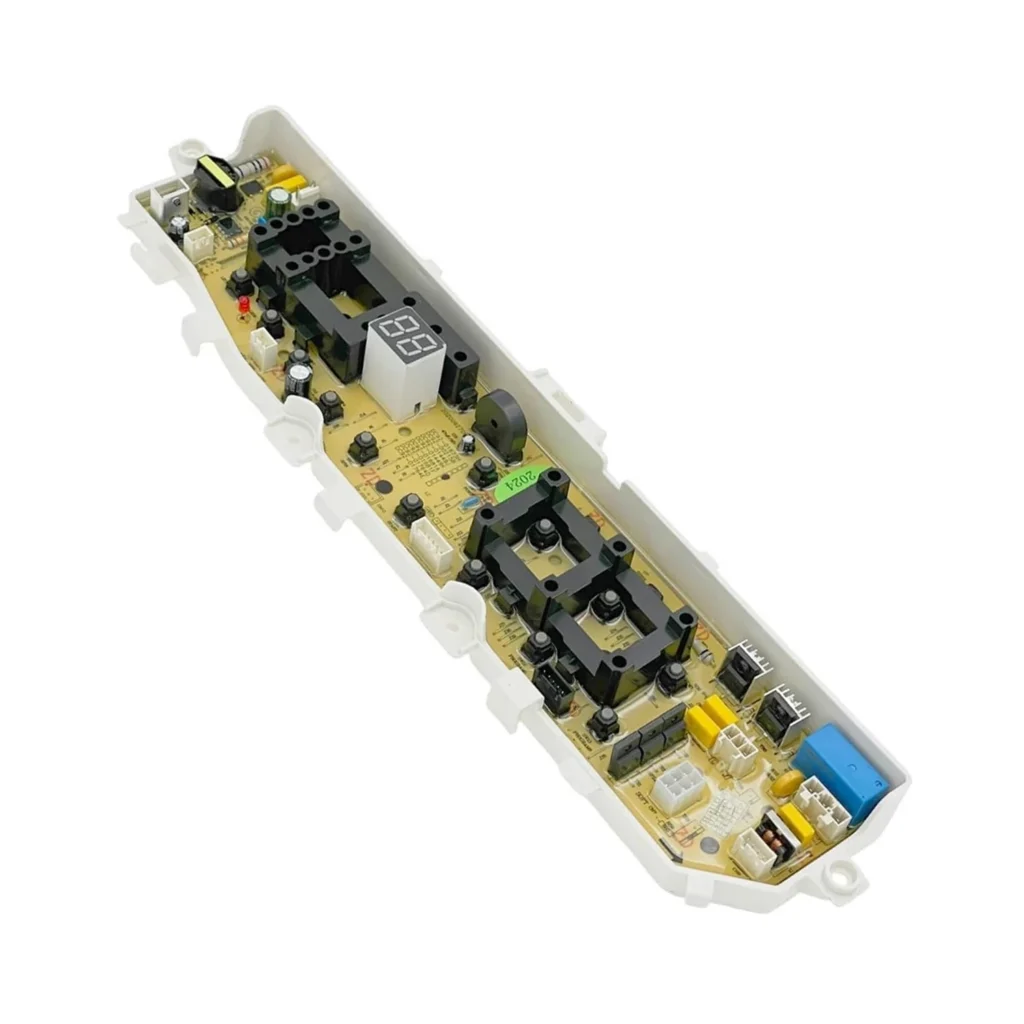
The Samsung washer's control board isn't detecting water entering the drum within the expected timeframe. This triggers when the main control board (DC92-01681A) fails to energize the water inlet valve, typically due to a failed relay, corroded connections, or damaged circuitry on the board itself. Unlike simple hose problems, this represents an electrical failure in the fill control system.
Always unplug the washer before accessing the control board. Capacitors on the board can hold charge even when unplugged — wait 5 minutes after disconnecting power. Never spray water near the control panel during cleaning.
You load the washer, press start, and within seconds it stops cold. The display shows "nF" or "4E" — Samsung's way of telling you water isn't flowing into the drum. Your clothes are sitting there dry, and you've got no idea if it's the hoses, the valves, or something worse.
On Samsung top-load washers like the WA75H4400SS and WA60H4000SG, this error almost always points to a water supply issue. But when the hoses are fine and water pressure is good, the problem's usually the main control board (DC92-01681A) — specifically the relay that controls the water inlet valve.
What nF Error Code Actually Means
The nF error (also displayed as 4E or 4C on some models) stands for "no fill" or "water supply error." The control board expects to see water entering the drum within a specific timeframe — typically 10-15 minutes. When it doesn't detect the proper water level, it throws this code and stops the cycle.
Here's what's happening electronically: the main control board sends power to the water inlet valve solenoids. If the board's relay is stuck, corroded, or burnt out, it won't energize the valve even though everything else checks out. The water pressure sensor tells the board "still no water," and you get the nF error.
This is different from a clogged inlet screen (you'd hear water trickling) or kinked hoses (you'd see obvious bends). When the control board's the culprit, everything looks right but nothing happens.
Most Likely Causes
Failed relay on main control board: The DC92-01681A board has relays that click on to power the inlet valve. These relays wear out from repeated cycling — especially in homes with hard water that causes frequent valve strain. You might hear a faint click when the washer tries to fill, but no water flows. Probability: High if hoses and valves test good.
Corroded board connections: Moisture creeps into the control board housing over time, particularly in humid laundry rooms. The corrosion disrupts the signal path to the water valve circuit. You'll sometimes see greenish residue on the board connector pins. Probability: Medium on washers 4+ years old.
Water inlet valve coil failure: The valve itself has electromagnetic coils that open water flow. These can burn out, but you'd usually smell burnt plastic. If both hot and cold fail simultaneously, suspect the board, not the valve. Probability: Medium — test valve resistance first.
Defective water level pressure sensor: The sensor tells the board how much water's in the tub. A faulty sensor might report "full" when the tub's empty, so the board never tries to fill. Less common but possible. Probability: Low unless accompanied by overfill issues.
Step-by-Step Fix
1. Verify basic water supply — Turn off the washer. Check that both hot and cold shut-off valves behind the machine are fully open (turn counterclockwise). Disconnect inlet hoses and inspect the small mesh screens inside the valve ports. Mineral buildup here causes 30% of nF errors. Clean or replace screens if clogged.
2. Test the water inlet valve — With hoses disconnected, use a multimeter to check resistance across each valve solenoid terminal. You should read 500-1500 ohms for each coil. Infinite resistance (OL) means the coil's open. But if both coils test good and you still get nF, the board's not sending power.
3. Access the main control board — Unplug the washer. The DC92-01681A board sits inside the control panel on top. Remove the screws securing the back of the control panel (usually three), then tilt it forward. You'll see the board mounted with plastic clips and a wiring harness.
4. Inspect for visible damage — Look for burnt relays (blackened rectangular components), bulging capacitors, or corrosion around connector pins. Shine a flashlight at an angle — moisture damage shows up as white or green residue. If you see this, board replacement is your only option.
5. Replace the control board — Photograph all wire connections before unplugging. The main harness has a locking tab — press it down while pulling straight out. Remove the mounting screws (typically two or three). Install the new DC92-01681A board, reconnect all harnesses (they're keyed so wrong connections are difficult), and secure the control panel. This replacement also covers part numbers DC92-01449J and DC92-01390A for older production runs.
6. Run a diagnostic cycle — Plug in the washer and start a normal cycle. The washer should begin filling within 10 seconds. Listen for the inlet valve click — it's a distinct double-click as hot and cold valves energize. If you hear clicking but get nF again, recheck your harness connections. One loose pin will cause this.
When the Fix Doesn't Work
If you've replaced the board and still get nF, check the wire harness between the control board and the water valve. On WA80H4000SW models particularly, the harness runs along the cabinet edge where it can chafe against sharp metal. A single broken wire will prevent valve operation even with a new board.
Also verify your home's water pressure at the hose bib — it should be at least 20 PSI. Low municipal pressure or a partially-closed main valve will trigger nF because the washer can't fill fast enough. Test by disconnecting the inlet hose and seeing if water flows strongly into a bucket.
In rare cases, a faulty door lock assembly sends incorrect signals to the main board, preventing the fill cycle from starting. But you'd usually get a dE (door error) code alongside nF.
Frequently Asked Questions
Can I reset the nF error without replacing parts?
Unplug the washer for 60 seconds to clear the error temporarily. If it's a board relay that's stuck (not burnt), this sometimes works for one cycle. But the error will return — it's a symptom, not a software glitch. If unplugging fixes it permanently, you had a temporary power surge issue, not a failed component.
Why does nF appear only on hot wash cycles?
Your board is fine — the hot water inlet valve solenoid is the problem. The control board sends separate signals to hot and cold valves. When only hot fails, test resistance on just the hot coil. If it reads open, replace the inlet valve, not the board. The DC92-01681A controls both, but won't cause single-temperature failures.
How long does the DC92-01681A control board typically last?
Expect 5-8 years in normal use. Power surges, humidity, and voltage fluctuations shorten life. Homes with frequent brownouts or no surge protector on the washer circuit see failures around year 4. If your washer's under 3 years old and nF appears, check the warranty — Samsung covered these boards under extended warranty for certain production dates.
Before ordering a new board, swap the hot and cold inlet hose connections at the valve. Run a cold cycle. If nF disappears, your valve's fine and the board's relay for the hot circuit is faulty — confirming you need the DC92-01681A replacement.
Need the control board or touchpad?
Genuine OEM & aftermarket options in stock