
How to Replace DC34-00025D Washer Door Lock Switch on Samsung WF45K, WF50K, WW90K Series — Step-by-Step
Unplug washer completely and wait 5 minutes before starting repair. Water near door seal creates shock hazard. Tip washer back slightly and use towels to catch residual water drainage.
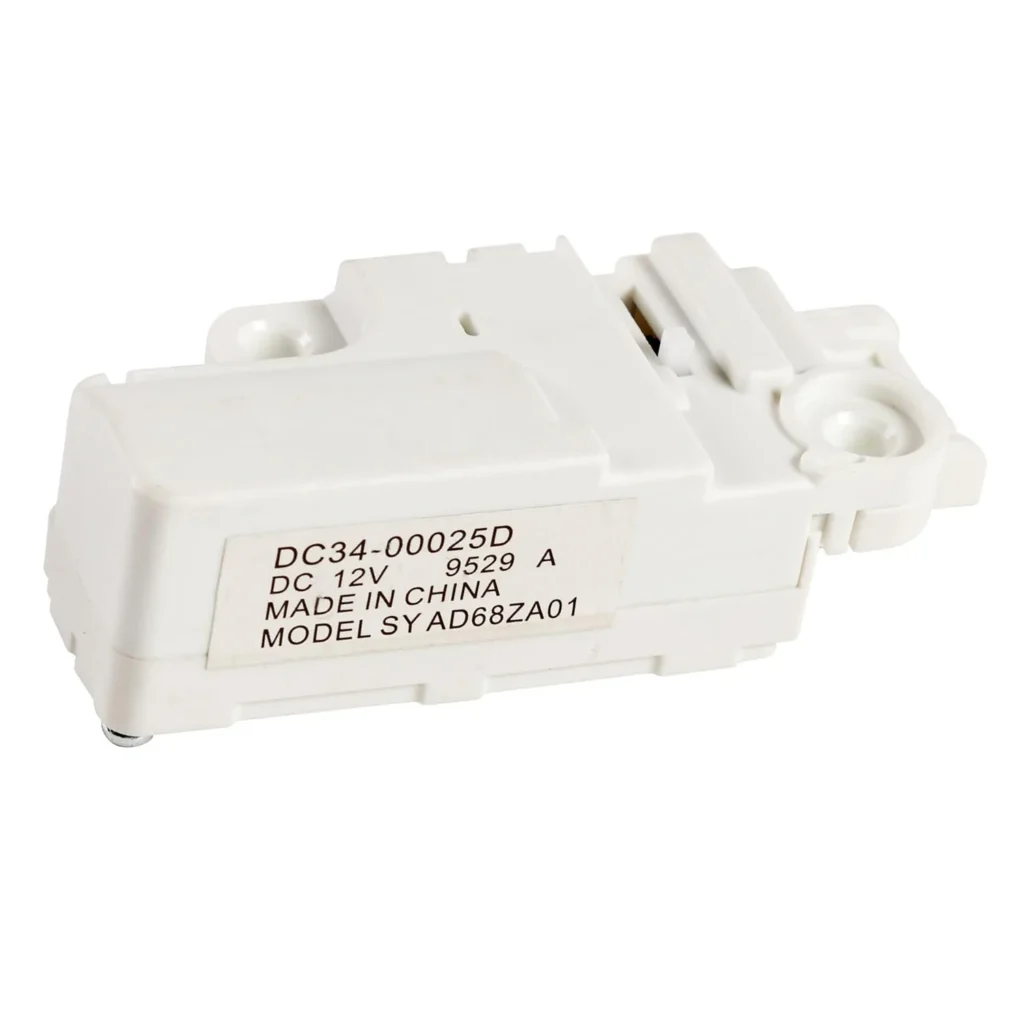
Your Samsung washer won't start the cycle, and the door lock light blinks at you like it's mocking your laundry pile. You press start, hear a faint clicking sound, but nothing happens. If you've got a WF45K6200AW, WF50K7500AV, or WW90K74150OX that won't lock its door, the DC34-00025D door lock switch has likely failed — it's one of the most common failures on these front-load models because the locking mechanism gets constant mechanical stress every single wash cycle.
What You Need Before Starting
Repair time: 20-30 minutes
Difficulty: Moderate
You'll need these tools:
- T20 Torx screwdriver
- Phillips head screwdriver
- Flathead screwdriver (for prying clips)
- Work gloves
- Towel (to catch any residual water)
- Flashlight or headlamp
Safety First
Warning: Unplug the washer completely before starting this repair. Even though you're working on a low-voltage switch, water and electricity near the door seal area create real shock hazards. Also, leave the washer unplugged for at least 5 minutes to let internal capacitors discharge. If your model has been running recently, tip it slightly backward and place towels underneath — you'll likely get a small amount of water draining from the door boot area when you remove the lock assembly.
Step 1: Remove the Door Boot Clamp
Open the washer door fully. You'll see a thick wire spring clamp holding the rubber door boot to the front panel — it looks like a heavy-duty spring formed into a circle. Locate the small tab or end of this spring, usually at the bottom or side. Using your flathead screwdriver, pry the spring out of its groove and carefully work it off the boot. Once it's loose, peel the front edge of the rubber boot back toward the drum interior to expose the door lock assembly mounting area.
Step 2: Disconnect the Wiring Harness
Look at the bottom right side of the door opening where the lock mechanism sits. You'll see a white or gray wire connector plugged into the back of the lock assembly. Press the locking tab on the connector and pull it straight back — don't yank on the wires themselves. If it's stuck from detergent buildup (common on these models), gently wiggle it side to side while pulling. Take a photo with your phone before disconnecting so you remember the exact orientation.
Step 3: Remove the Old Door Lock Switch
The DC34-00025D is held in place by two screws on Samsung WF and WW series washers. Use your T20 Torx screwdriver to remove both mounting screws — they're typically positioned at the top and bottom of the lock housing. Once the screws are out, carefully pull the entire lock assembly toward you and out through the front door opening. You might need to angle it slightly to clear the door boot rubber. Inspect the old unit — you'll often see melted plastic around the latch mechanism or broken plastic tabs, which confirms why it failed.
Step 4: Install the New DC34-00025D Lock Switch
Position your new DC34-00025D lock switch into the mounting hole, making sure the latch mechanism faces the door strike plate (the metal piece on the door itself). The switch should sit flush against the front panel. Thread both mounting screws back in and tighten them firmly, but don't overtighten — you're threading into plastic housing and can strip it easily. Reconnect the wire harness to the back of the new lock unit until you hear it click into place. Give it a gentle tug to confirm it's seated properly.
Step 5: Reinstall the Door Boot and Test
Pull the rubber door boot back over the front panel edge. Starting at the top, work the wire spring clamp back into its groove in the boot. You'll need to stretch it slightly as you work your way around — use your flathead screwdriver to hook it into the groove, but be careful not to puncture the rubber. Once the clamp is fully seated, plug the washer back in. Close the door and run a drain/spin cycle (or quick wash) to test the lock. You should hear a definitive click as the lock engages, and the door should be firmly locked during the cycle. If the lock light stays solid and the cycle starts normally, you're done.
Testing After Installation
After completing the repair, run through this checklist: Close the door and listen for the locking click — it should happen within 2-3 seconds of pressing start. Try pulling the door handle during the lock cycle; it shouldn't budge. Check that the door lock indicator light on your control panel stays solid, not blinking. Run a complete wash cycle on your WF45K6200AZ, WF50K7500AW, or whichever model you have to make sure it locks, unlocks after the cycle, and doesn't throw any door error codes like dE, dE1, or dC.
Frequently Asked Questions
Will this DC34-00025D work on my specific Samsung washer model?
This door lock switch is compatible with Samsung WF45K, WF50K, and WW90K series washers, including models like WF45K6200AW/A2, WF45K6500AV/A2, WF50K7500AV/A2, WW90K74150OX, WW85K5410WW, and WD13J7825KP among others. It replaces OEM part numbers AP6025317, PS11758871, and EAP11758871. If your model number starts with WF45K, WF50K, WW90K, WW85K, or WD13J/WD18J, you're good to go. Check the full compatibility list on the product page if you have a different Samsung front-load washer.
My washer still shows a door error code after replacing the lock — what's wrong?
If you're still getting dE or dE1 error codes after installing the new DC34-00025D, check three things: First, make sure the wire harness connector clicked fully into place — a partially connected plug won't allow the control board to detect the lock. Second, inspect the strike plate on the door itself for damage or misalignment; if it's bent or broken, the lock can't engage properly even though the switch is new. Third, unplug the washer for 2 minutes to reset the control board, then try again. Occasionally the board needs a power cycle to recognize the new lock assembly.
How long should a Samsung washer door lock switch last?
The door lock switch on Samsung front-loaders typically lasts 5-8 years with normal use, but high-frequency washers (families doing 10+ loads per week) often see failures around the 3-4 year mark. The DC34-00025D uses a mechanical latch that physically moves every cycle, and the plastic components eventually wear out or crack. If you hear clicking but the door won't lock, or the lock engages but won't release after the cycle, the switch has mechanically failed. Heat from the washer's internal components and detergent residue buildup accelerate wear on this part.
Take a photo of the wire connector before disconnecting it — the orientation matters for proper lock function. Also, don't overtighten the mounting screws; you're threading into plastic and can strip the holes easily.
Need the part for this repair?
DC34-00025D · In Stock · Ships next business day