
How to Replace DA47-00243K Bimetal Defrost Thermostat on Samsung Refrigerator — Step-by-Step
Unplug refrigerator completely before starting — defrost system operates at 120V
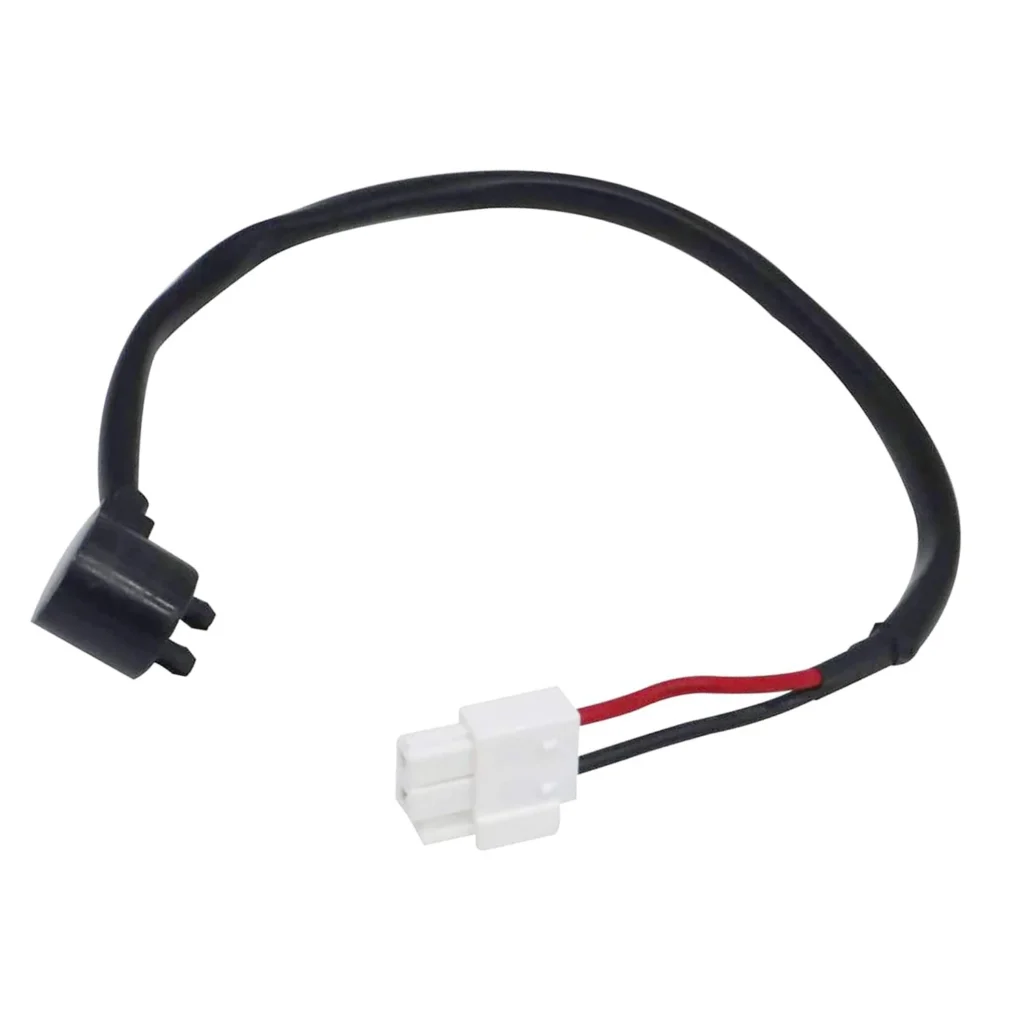
When you open your Samsung refrigerator and find a glacier forming in the freezer section, the bimetal defrost thermostat is usually the culprit. I've seen this on dozens of RF-series models — RF197ABPN, RF217ACRS, RF263BEAESR — where ice creeps across the evaporator coils because the defrost cycle won't complete. The DA47-00243K thermostat stops responding to temperature changes, either staying closed when it should open or vice versa. It's a straightforward fix that'll save you a $200+ service call.
What You Need Before Starting
- DA47-00243K bimetal defrost thermostat (replaces DA47-00243B, DA47-00243C, DA47-00243J)
- 1/4" nut driver or socket wrench
- Flathead screwdriver
- Needle-nose pliers (for wire terminals)
- Towels (for water from melting ice)
- Work gloves (metal edges are sharp)
Repair Time: 45-60 minutes including defrost wait time
Difficulty: Moderate — requires accessing freezer evaporator cover
Safety First
Unplug your refrigerator completely before starting. The defrost system runs on 120V, and you'll be working near both electrical connections and sharp metal fins. If there's significant ice buildup, let the freezer defrost for 2-3 hours with the door open — trying to pry off ice-covered panels will crack the plastic mounting tabs every time.
Step 1: Remove Freezer Contents and Shelving
Empty the freezer completely and remove all shelving, bins, and the ice bucket assembly. On RF-series models, the evaporator cover is behind the back panel. You'll see several Phillips screws along the perimeter — typically six to eight depending on your exact model. Remove these screws and set them aside where they won't roll into the abyss under your fridge.
Step 2: Access the Evaporator and Locate the Thermostat
Carefully pull the evaporator cover forward and down. You might need to flex it slightly to clear the mounting tabs. Behind it, you'll see the evaporator coils — the aluminum fins where refrigerant circulates. The bimetal defrost thermostat is a small cylindrical component clipped to the evaporator coil, usually on the left side. It has two wire connectors and a metal clip holding it against the coil surface.
Step 3: Disconnect and Remove the Failed Thermostat
Take a photo of the wire connections with your phone before disconnecting anything. Pull the wire terminals straight off — they're friction-fit connectors, no screws. If they're stubborn, use needle-nose pliers to grip near the terminal and wiggle while pulling. The thermostat itself is held by a spring clip. Squeeze the clip tabs and slide the old thermostat out of its bracket.
Step 4: Install the New DA47-00243K Thermostat
Position the new thermostat so the sensor bulb makes solid contact with the evaporator coil surface — this is critical for proper temperature sensing. Slide it into the mounting bracket until the spring clip engages with a click. The thermostat should sit flat against the coil with no gaps. Connect the two wire terminals, matching your reference photo. The wires aren't polarity-sensitive, but keeping them in the original positions prevents confusion later.
Step 5: Reassemble and Test
Replace the evaporator cover, ensuring all mounting tabs align properly before driving the screws. Don't overtighten — these are plastic threads that strip easily. Reinstall the shelving and bins. Plug the refrigerator back in and let it run for 24 hours. The defrost cycle typically runs every 8-12 hours, so you won't see immediate results. Check after a day — the freezer should maintain 0-5°F without ice accumulation on the evaporator.
Testing After Installation
After 24 hours, open the freezer and verify consistent temperature. Remove the evaporator cover again and inspect the coils — they should be clear of frost buildup except for light surface frost that's normal. If you're still seeing ice accumulation in the same pattern as before, check that the thermostat sensor bulb is making full contact with the coil. A gap of even 1/8" will prevent accurate temperature sensing and delay the defrost cycle.
Frequently Asked Questions
How do I know if my defrost thermostat is bad or if it's the heater?
The easiest test: if ice builds up symmetrically across the entire evaporator, the thermostat isn't closing to allow defrost. If only part of the coil frosts over, you've got a defrost heater problem. The thermostat fails more often — it's a $50 part versus $80+ for the heater, so it's worth trying first when you're troubleshooting freezer getting too warm on the defrost cycle.
Can I use DA47-00243B instead of DA47-00243K?
The DA47-00243K replaces earlier versions including DA47-00243B, DA47-00243C, and DA47-00243J. Samsung updated the design slightly, but they're functionally identical and mount the same way. The K-suffix version is the current production part with improved terminal connections that resist corrosion better.
Why does ice keep building up in my freezer even after replacing the thermostat?
Three common causes: the thermostat sensor isn't touching the evaporator coil (most common — I've seen this dozens of times), the defrost heater itself has failed, or the defrost timer/control board isn't sending power to the system. If you confirmed good contact during installation, test the defrost heater with a multimeter — it should read 20-40 ohms. Zero ohms means it's shorted; infinite resistance means it's open and needs replacement.
Take a photo of wire connections before disconnecting. Ensure thermostat sensor bulb makes solid contact with evaporator coil — even small gaps prevent accurate temperature sensing
Need the part for this repair?
DA47-00243K · In Stock · Ships next business day