
Samsung Washer dE Error Code — What It Means & How to Fix
Door lock error - door not locking or lock not detected
The dE error code on Samsung front-load washers indicates the door lock assembly failed to engage or the control board didn't receive the confirmation signal from the door lock switch. The washer will not start any cycle until this error is resolved because the door lock is a critical safety feature preventing the door from opening during high-speed spin cycles.
Always unplug the washer before working on the door lock assembly. Do not attempt to bypass the door lock safety feature. If clothes are stuck inside with the door locked, use the emergency manual release tab near the drain filter — never force the door open.
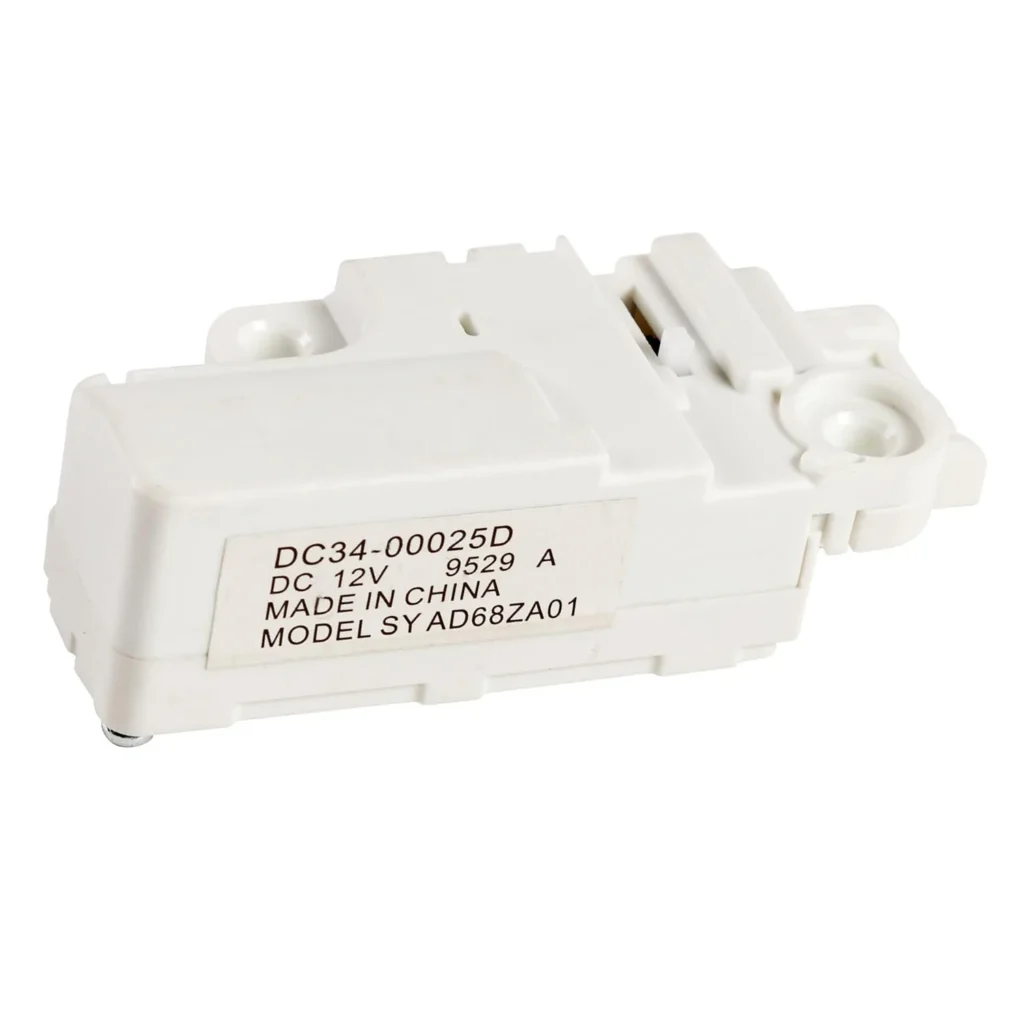
You load the washer, press start, and instead of the reassuring click of the door locking, you get a blinking "dE" or "dE1" on the display. The drum doesn't move. The machine just sits there, refusing to start. On Samsung front-load washers like the WF45K6200AW and WF50K7500AW, this error code means the door lock assembly isn't engaging — and it's one of the most common failure points on these models.
What dE Error Code Actually Means
The "dE" error (sometimes shown as "dE1" or "dE2" depending on your model) stands for "door error." Samsung washers have a built-in interlock system — the door must lock completely before the wash cycle can begin. This isn't just a mechanical latch. There's an electronic switch inside the door lock assembly that sends a signal to the control board confirming the door is secure.
When the control board doesn't receive that confirmation signal within about 7 seconds of starting the cycle, it throws the dE error and stops everything. The washer won't fill, won't spin, won't do anything until it knows the door is safely locked.
The door lock assembly (part DC34-00025D on most WF45K, WF50K, and WW90K series models) contains both the mechanical locking mechanism and the electrical switch. When this part fails — which it does frequently after 3-4 years of use — you get the dE error even if the door appears to close normally.
Most Likely Causes of dE Error
Failed door lock assembly (70% of cases): The bi-metal locking mechanism inside wears out or the switch contacts corrode. You'll hear the door close, but the electronic confirmation never reaches the control board. This is especially common on WF45K6200 and WF50K7500 models manufactured between 2016-2019.
Door alignment issue (15% of cases): If the door doesn't line up perfectly with the lock striker, the latch won't engage far enough to trigger the switch. This can happen if the washer isn't level, if door hinges are worn, or if something is preventing the door from closing completely — like a sock caught in the seal.
Wiring harness damage (10% of cases): The wires connecting the door lock to the control board can get pinched, corroded from water exposure, or disconnected. Check where the harness passes through the door hinge area — that's the most common failure point.
Control board failure (5% of cases): Rarely, the main control board itself stops recognizing the door lock signal even when everything else works. This typically only happens after voltage spikes or if water has gotten into the control panel.
Step-by-Step Fix for dE Error
Step 1: Rule out simple causes
Unplug the washer. Open and close the door firmly 5-6 times. Check the rubber door boot for any clothing, coins, or debris preventing a complete seal. Make sure nothing is stuck between the door glass and the frame. If you have a level, check that the washer is level front-to-back and side-to-side — being off-level can prevent proper door alignment.
Step 2: Test the door lock manually
With the washer unplugged, locate the door lock assembly on the right side of the door opening (facing the washer). You'll see a white or gray plastic housing with wires attached. Press the door firmly closed and listen. You should hear a distinct click as the lock engages. If you hear nothing, or a weak clicking sound, the lock mechanism has failed.
Step 3: Remove the front panel
Remove the detergent dispenser drawer completely. Behind it, you'll find two screws at the top of the front panel. Remove these screws. At the bottom front of the washer, remove two more screws (they may be hidden by small plastic covers). Lift the front panel up slightly, then pull it toward you to release the clips. The entire front panel will come off, giving you access to the door lock assembly.
Step 4: Remove the failed door lock
The door lock assembly is held by three screws on the right side of the door opening. Disconnect the wire harness (it has a locking tab — press it while pulling). Remove the three mounting screws. The old lock will come out toward you. Before installing the new DC34-00025D door lock, inspect the striker plate on the door itself — if it's bent or damaged, it needs to be straightened or replaced.
Step 5: Install the new door lock
Position the new DC34-00025D lock assembly in the mounting holes. Install the three screws, but don't fully tighten them yet. Close the door and make sure the striker aligns perfectly with the lock opening. While holding the door closed, tighten the screws firmly. Connect the wire harness — you'll hear it click into place. Reattach the front panel, replace the drawer, and plug the washer back in.
Step 6: Test the repair
Run an empty rinse and spin cycle. The door should lock within 2-3 seconds of pressing start, and the dE error should not appear. If it still shows up, unplug the washer, wait 60 seconds, then plug it back in to reset the control board. Some Samsung models need this hard reset after door lock replacement.
When the Fix Doesn't Work
If you've replaced the door lock and the dE error persists, check the wire harness carefully for damage. Use a multimeter to test for continuity in the wires between the door lock connector and the control board — you're looking for 0-2 ohms of resistance with no breaks in the circuit.
If the wiring tests good, the control board itself has likely failed. Samsung main control boards for these models run $150-250, and replacement requires disconnecting multiple wire harnesses. At that point, you're looking at a repair cost approaching half the value of a new washer. Get a second opinion from a qualified technician before replacing the control board.
One other possibility: if your model has been recalled for door lock issues (some 2016 WF45K models were), you may be eligible for a free repair from Samsung even if you're out of warranty. Check Samsung's recall database with your model and serial number.
Frequently Asked Questions
Can I bypass the door lock to finish a load?
No, and you shouldn't try. The door lock is a safety feature that prevents the door from opening during the spin cycle when the drum is rotating at 1000+ RPM. Bypassing it creates a serious injury risk. If you have wet clothes stuck inside, you can manually drain the washer through the drain filter access at the bottom front, then manually unlock the door using the emergency release tab (small orange or red tab near the drain filter).
Why does the dE error come and go sometimes?
This is classic intermittent failure of the door lock switch. The electrical contacts inside are corroded or worn, so they make connection sometimes but not others. Temperature changes can affect it too — the lock might work when the washer is cold but fail once it heats up during a hot wash. This will only get worse over time until the lock fails completely. Replace it now before you're stuck mid-cycle.
How long does a Samsung washer door lock typically last?
The original OEM door locks on WF45K and WF50K series washers typically last 3-5 years with average use (6-8 loads per week). Heavy use, hard water that causes mineral buildup in the mechanism, and power surges can shorten that lifespan. The replacement DC34-00025D lock assembly should give you another 3-4 years of service if installed correctly.
Before replacing the door lock, verify the washer is level and the door closes completely without obstruction. An off-level washer can cause door alignment issues that mimic a failed lock. Also check the striker plate on the door for damage — if it's bent, straighten it before installing the new lock or the problem will recur.
Need the control board or touchpad?
Genuine OEM & aftermarket options in stock