
Whirlpool Oven Won't Heat Past 325°F — 5 Causes & How to Fix
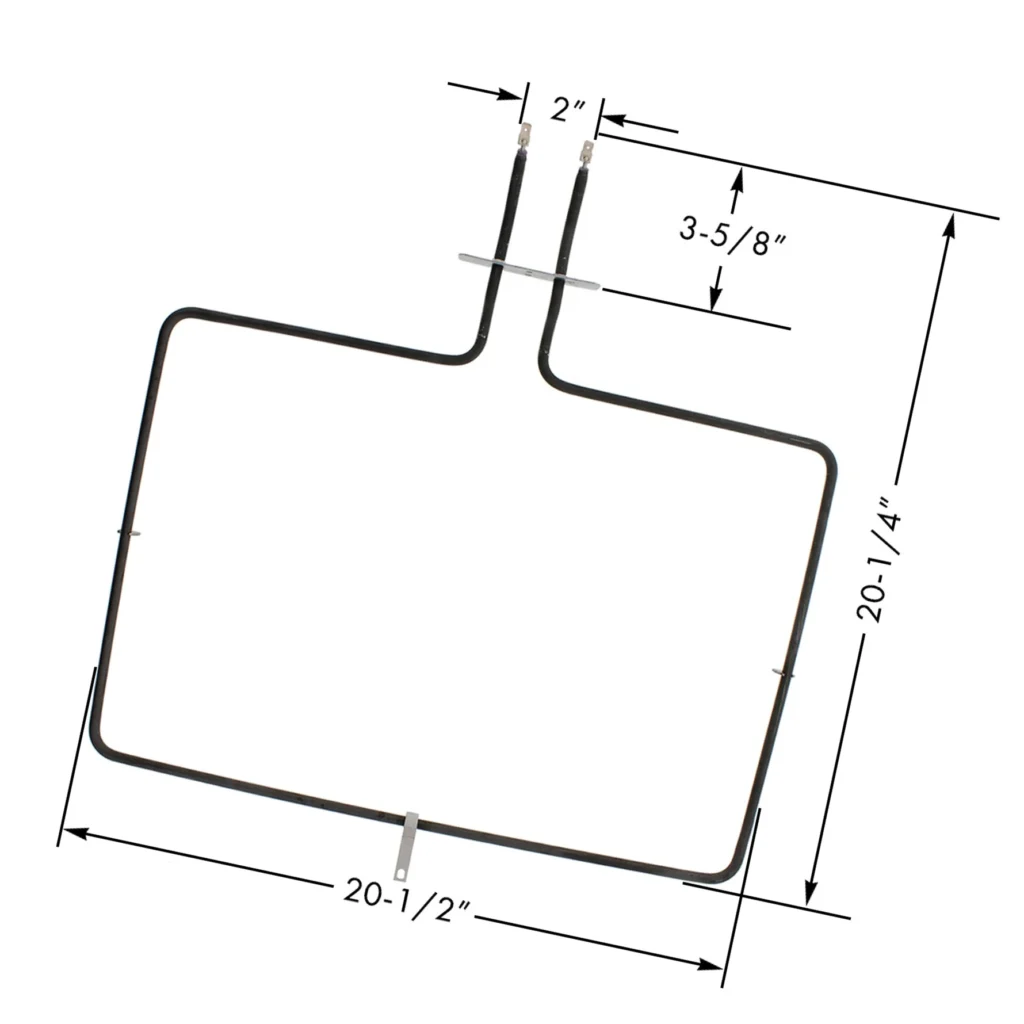
You're trying to roast chicken at 425°F, but your Whirlpool oven WFE540H0AB0 won't budge past 325 degrees. The preheat cycle runs forever, your food comes out undercooked, and you're pretty sure your oven just gave up on life. One homeowner described searching for answers and finding the culprit: "When I got the element out, the back left corner was 'burned through' so the fault could be easily seen."
That visual tells you everything. When a bake element fails — especially on Whirlpool, Maytag, KitchenAid, and Jenn-Air ranges — the oven simply can't generate enough heat. But there are actually five possible causes for this symptom, and we'll walk through each one so you can diagnose yours correctly.
Quick Symptom Check
Before you pull anything apart, confirm what you're dealing with:
- Oven preheats endlessly but never reaches set temperature
- Temperature plateaus around 250-350°F regardless of setting
- Uneven baking results — bottoms don't brown, casseroles stay cold in the center
- Visible damage on the bake element itself (blistering, cracks, burn-through spots)
- Burning smell when you first turn the oven on, then nothing happens
If three or more apply, you're likely dealing with a failed bake element or temperature sensor. Let's narrow it down.
Cause #1: Failed Bake Element (Most Likely — 70% of Cases)
Probability: Very High. The bake element (W10779716 for most Whirlpool models from 2012-present) is a consumable part. It wears out from thermal cycling — heating to 500°F, cooling down, heating again, thousands of times over its life.
Here's how to test it:
- Unplug the oven first. Seriously. Don't skip this.
- Remove oven racks and the metal cover plate (two screws at the front).
- Look at the element coil itself. See any blistering, dark spots, or actual burn-through? That's a visual confirmation.
- If it looks fine, grab a multimeter. Set it to resistance (Ω).
- Unplug the two spade connectors from the back of the oven (you'll need to remove the rear panel cover — two screws, then squeeze the sides and lift).
- Touch the multimeter probes to the element terminals. You should read 15-30 ohms at room temperature. One user measured exactly 1080 ohms on a working element, though spec varies by model.
- If you get infinite resistance (OL on the meter), the element is open — it's dead.
Why it fails: Normal wear and tear. The element expands and contracts with every heat cycle. Eventually the metal coil develops microcracks, oxidizes internally, and loses continuity. On KitchenAid models, some users report failures as early as four years — disappointing for a premium brand, but not unusual.
The fix: Replace the bake element. The W10779716 fits models like WEE745H0FS0, WFE540H0AB1, WEC530H0DB0, and about 200 others across Whirlpool, Maytag, KitchenAid, and Jenn-Air lines. It's a 15-minute swap if you follow the installation steps carefully.
Cause #2: Faulty Temperature Sensor
Probability: Moderate. The temperature sensor is a small probe mounted at the upper left rear of the oven cavity (looking in from the front). It monitors oven temp and tells the control board when to cycle the element on and off.
One DIYer described testing it like this: "The sensor plug is too small for my multimeter probes. I cut a piece of spare wire, stripped about 1/2 inch of each end, put that in the sensor plug, and the test proved sensor OK."
Here's the proper test:
- Unplug the oven.
- Remove the back panel inside the oven (usually one or two screws at top left).
- Disconnect the sensor from its plug.
- Measure resistance across the sensor terminals. At room temp (70°F), you should read around 1,080-1,100 ohms.
- If it reads way off (below 900 or above 1,200), or shows infinite resistance, replace it.
Why it fails: Sensors drift out of calibration over time, or the internal thermistor fails completely. When that happens, the control board gets bad data and either cuts power too early or never signals the element to turn on.
The fix: Replace the sensor. It's a $20-$40 part and takes 10 minutes to swap.
Cause #3: Weak or Failing Control Board
Probability: Low to Moderate. The electronic oven control (EOC) board manages all oven functions — it reads the sensor, decides when to power the element, and handles timers and settings.
If the board's relay for the bake element is weak or burned, it might deliver partial voltage. Result? The element glows faintly but never gets hot enough.
Diagnosis: This one's tricky without a service manual. If you've confirmed the element and sensor are good, but the oven still underheats, suspect the board. Look for burn marks or swollen capacitors on the board itself (you'll need to pull the control panel to inspect it).
The fix: Replace the control board. Expect $150-$300 for the part, plus labor if you hire someone. Honestly, at that price point, some folks just buy a new range.
Cause #4: Inadequate Ventilation or Blocked Vent
Probability: Low. If your oven vent (usually at the rear of the cooktop) is blocked by a pot, pan, or grease buildup, the oven can't exhaust properly. Heat gets trapped unevenly, and the temperature sensor gives false readings.
Diagnosis: Check the vent openings. Feel for hot air escaping when the oven's on. Clear any obstructions.
The fix: Clean the vent. If the vent duct itself is crimped or damaged, you'll need to straighten or replace it.
Cause #5: Loose or Corroded Electrical Connections
Probability: Low. The bake element connects to the oven via two spade terminals at the back. If those connections are loose, corroded, or oxidized, they create resistance. Resistance generates heat at the connection point instead of in the element, reducing heating efficiency.
Diagnosis: Unplug the oven, remove the rear panel, and inspect the element terminals and wire connectors. Look for discoloration, pitting, or burn marks.
The fix: Clean the terminals with fine sandpaper or a wire brush. If the spade connectors are damaged, replace them (they're available at any hardware store). Reconnect firmly.
Step-by-Step: Replacing the Bake Element (W10779716)
You've tested, you've diagnosed, and the element's toast. Here's the replacement process, pulled directly from real user experiences:
- Unplug the oven. If it's hardwired, flip the breaker. Do not skip this.
- Remove oven racks.
- Remove the two screws holding the element cover plate at the front bottom of the oven cavity.
- Remove the three screws securing the element itself (two at the front, one at the back or center depending on model).
- Gently pull the element forward to expose the terminals poking through the rear wall. Don't yank — the wires are short.
- Go to the back of the range. Remove the lower rear access panel (usually 4-6 screws).
- Remove the terminal block cover (two screws, then squeeze the sides and lift).
- Disconnect the two wire terminals from the element.
- Return to the front. Pull the old element completely free.
- Insert the new W10779716 element through the cavity from the front, threading the terminals through the back wall.
- Go back to the rear. Connect the two wires to the new element terminals. Doesn't matter which wire goes to which terminal — there's no polarity.
- Replace the terminal block cover.
- Return to the front. Position the element so it sits flat. Some wobbling is normal until you tighten the screws.
- Install the three mounting screws. Don't overtighten — you'll crack the porcelain insulator.
- Replace the cover plate (two screws).
- Plug in the oven.
- Set it to 400°F and let it preheat. Use an oven thermometer to verify it reaches temp. Should take 12-15 minutes.
One 63-year-old DIYer summed it up: "All this took about thirty minutes (very easy to do), and then my wife baked a cake. I was so happy. I'm 63 years old and was scared I'd mess it up."
Common Mistakes to Avoid
- Forgetting to unplug: You're working with 240V here. Don't test a live element with a multimeter — that's straight from the meter's own manual.
- Wrong door angle on reinstall: If you remove the oven door for easier access, note the angle when you take it off (about 60 degrees on most models). One user spent significant time figuring this out the hard way.
- Not setting the door stops: The hinge stops need to stay in the correct position or the door won't reattach.
- Overtightening screws: The element's porcelain insulator is brittle. Snug is enough.
When to Call a Pro
This repair is genuinely DIY-friendly if you're comfortable with a screwdriver and a multimeter. But call a tech if:
- You've replaced the element and sensor, but the oven still won't heat correctly (likely a control board issue)
- You smell gas (this is an electric oven repair guide — gas requires a licensed pro)
- The oven is hardwired and you're not confident working with your home's breaker panel
- You see burn marks or melted wire insulation anywhere
Expect to pay $150-$250 for a service call plus parts. The element itself (W10779716) runs about $44, so you're saving $100+ doing it yourself.
Frequently Asked Questions
How long should a Whirlpool bake element last?
Typically 5-10 years depending on usage. If you bake or roast daily, expect the shorter end of that range. Some KitchenAid users report failures around year four, which seems premature but isn't uncommon with modern elements that run hotter to meet energy efficiency standards.
Can I use my oven if the bake element is partially working?
Technically yes, but you'll get poor results and risk further damage. A weakened element draws inconsistent current, which can stress the control board's relay. Plus, your food won't cook properly — you'll waste time and ingredients. Replace it now and save yourself the frustration.
Will the W10779716 element fit my exact model?
It fits over 200 models across Whirlpool, Maytag, KitchenAid, and Jenn-Air brands manufactured from roughly 2012 onward, including WFE540H0AB0, WFE540H0AB1, WEE745H0FS0, WEC530H0DB0, WEE750H0HB0, and many others. Check the compatible models list on the product page, or look at your current element for the part number stamped on the metal bracket — if it says W10289097, W10774342, or AP5970727, the W10779716 is the correct replacement.
Diagnosed the problem?
W10779716 · In Stock · Fast shipping