
Whirlpool Dryer Won't Advance Cycles — 5 Timer Issues & Fixes
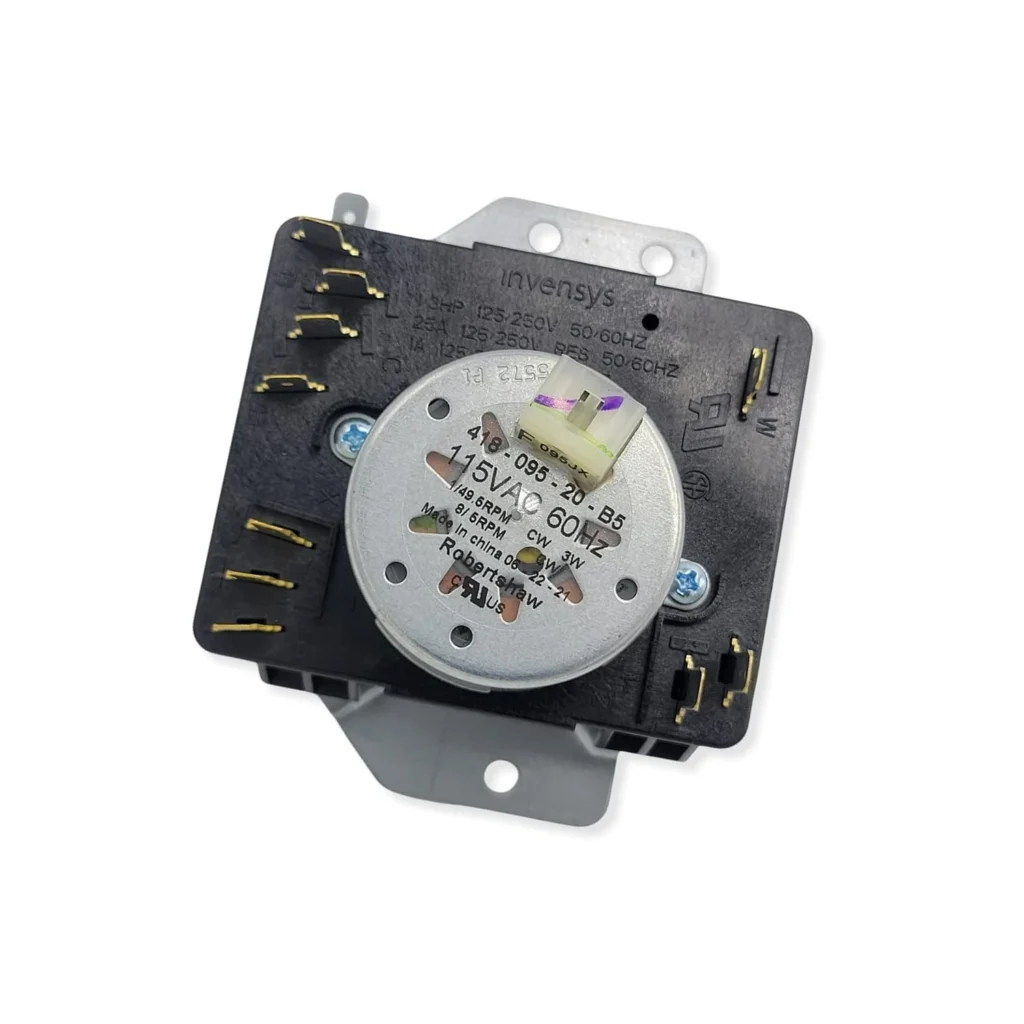
Your Whirlpool dryer hums along for 10 minutes, then just... stops. The timer knob won't turn anymore, the cycle's frozen mid-way, and your wet jeans are still soaked. You've tried rotating the dial manually — sometimes it clicks forward, sometimes it won't budge at all.
This is the classic symptom of a failing dryer timer, and if you've got a Whirlpool, Maytag, or Kenmore dryer from the WED or MEDC series (like the WED5000DW2, MEDC465HW0, or WGD4850BW1), you're probably dealing with timer assembly W10185992. Let's walk through what's actually going wrong and how to fix it.
Quick Symptom Check
Your dryer timer might be failing if you're experiencing:
- Cycle won't advance: Dryer runs but never moves to the next phase (like switching from heat to cool-down)
- Timer knob stuck: You can't rotate the dial, or it feels stiff and grinds
- Dryer won't start: The timer doesn't send power to the motor relay
- Random mid-cycle stops: Timer cuts power unexpectedly, then may restart after you wiggle the knob
- Continuous running: Timer motor burned out — dryer runs endlessly because the timer never signals "done"
If you've got two or more of these, you're likely looking at a timer replacement, not just a loose wire.
Cause #1: Timer Motor Failure (Most Likely — 60% of Cases)
What's happening: Inside the timer is a small synchronous motor that physically rotates the cam assembly to advance the cycle. After 8–12 years of use, the motor windings fail or the gears strip out.
How to diagnose:
- Unplug the dryer and remove the control panel (usually 2–4 screws along the top edge)
- Locate the timer — it's the large component behind the timer knob with multiple wire terminals
- Set your multimeter to continuity mode
- Find the two motor terminals (often labeled M on the wiring diagram)
- Test for continuity between them — you should read 2,000–3,000 ohms
- If you get infinite resistance (OL), the motor's dead
The fix: Replace the entire timer assembly (part W10185992). The motor isn't sold separately, and rebuilding it isn't practical. Budget $170–$180 for the part plus 30–45 minutes of your time.
Cause #2: Worn Timer Contacts (30% of Cases)
What's happening: The timer uses internal electrical contacts that open and close as the cam rotates. High current flowing through these contacts (especially the heater circuit) causes pitting and carbon buildup. Eventually they can't make reliable connection.
How to diagnose:
- With the timer removed, inspect the wire terminals — look for burn marks or melted plastic
- Use your multimeter to test continuity between specific terminals as you manually advance the timer cam
- Compare readings to your model's wiring diagram (tape a photo of it before disconnecting wires)
- If contacts show continuity intermittently or only when you press hard on the terminals, they're worn
The fix: Again, replacement. You can't rebuild contacts on modern timers — they're sealed units. Some techs try cleaning contacts with electrical contact cleaner, but it's a temporary fix at best.
Cause #3: Broken Timer Knob or Dial Post
What's happening: The plastic D-shaped shaft that connects the knob to the timer cam cracks or strips out. You'll turn the knob but nothing happens internally — the timer never actually rotates.
How to diagnose:
- Pull the timer knob straight off (it's friction-fit on most models)
- Look at the metal or plastic post sticking out from the timer body
- Check for cracks, rounded edges, or a post that spins freely without resistance
- If the post turns but you don't hear clicking inside the timer, the internal coupling is broken
The fix: If only the external knob is cracked, you can replace just the knob (under $10). But if the shaft itself is damaged, you need the full timer assembly.
Cause #4: Stuck Timer Cam (Rare but Fixable)
What's happening: Dust, lint, or a foreign object has jammed the cam mechanism. The motor tries to advance but physically can't rotate the cam.
How to diagnose:
- With power off and timer exposed, try manually advancing the timer by gently pushing the cam with a flathead screwdriver
- If it won't budge or you hear grinding, something's jammed
- Look for lint accumulation around the cam assembly or a small plastic piece that broke off
The fix: Carefully disassemble the timer housing (if your model allows it — some are riveted shut). Remove debris, lubricate the cam with white lithium grease, and reassemble. Success rate: about 50/50. If the cam teeth are damaged, you still need a new timer.
Cause #5: Power Supply Issues to Timer
What's happening: The timer isn't getting voltage from the main control board or a blown thermal fuse is interrupting the circuit. The timer itself is fine — it just has no power.
How to diagnose:
- Check the dryer's thermal fuse (usually on the blower housing) — test for continuity
- With the dryer plugged in, carefully probe the timer's incoming power terminals with a multimeter set to AC voltage
- You should read 120V on at least one terminal pair
- If no voltage, trace back to the terminal block and check for loose connections
The fix: Replace the thermal fuse (about $15) or repair the loose wire connection. Timers rarely fail from voltage issues unless there was a power surge.
Installation Tips for W10185992 Timer
When installing your new timer:
- Photo everything first: Take detailed pictures of wire connections from multiple angles before disconnecting anything
- Label wires: Use masking tape and a marker to tag each wire with its terminal number
- Don't force connections: Wire terminals should slide on firmly but not require excessive force
- Check the mounting bracket: Some timers include a new bracket — make sure you're using the right one
- Test before reassembly: Plug in the dryer, set the timer to a short cycle, and verify it advances before putting the control panel back
When to Call a Pro
You should probably get a technician if:
- You're not comfortable working with the dryer plugged in for voltage testing
- Your model has a digital control board instead of a mechanical timer (2015+ models)
- You've replaced the timer but still have the same symptoms (could be a bad motor relay or control board)
- There are burn marks on multiple components (indicates a larger electrical problem)
Expect to pay $250–$350 for a pro to diagnose and replace the timer, which includes the service call, part markup, and labor.
Frequently Asked Questions
Will a bad timer make my dryer not heat?
Not usually. The timer controls when the heating element turns on and off during the cycle, but a failed timer typically won't start the cycle at all. If your dryer runs but doesn't heat, check the thermal fuse, high-limit thermostat, and heating element first — those are way more likely culprits than the timer.
Can I use a used timer from another dryer?
Technically yes, but it's risky. You need the exact same part number (W10185992 or WPW10185992), and you have no idea how many cycles that used timer has on it. Given that a new timer is $170 and lasts 10+ years, saving $50 on a used one isn't worth the gamble. You'll also void any warranty claims if other components fail because of a faulty used timer.
Why does my Whirlpool dryer timer cost so much?
Timer assemblies are complex electromechanical devices with 15–20 separate circuits, a synchronous motor, and precision cam mechanisms. They're also model-specific — W10185992 works across dozens of Whirlpool, Maytag, and Kenmore models (like WED4915EW0, MEDC415EW1, and WGD5300VW1), but each timer has unique timing intervals and contact configurations. Low production volumes for each variant drive up the per-unit cost.
Diagnosed the problem?
W10185992 · In Stock · Fast shipping