
How to Replace WR60X10358 DC Condenser Fan Motor on GE Refrigerator — Step-by-Step
Unplug the refrigerator completely before starting work. The condenser compartment contains electrical connections and hot surfaces during operation.
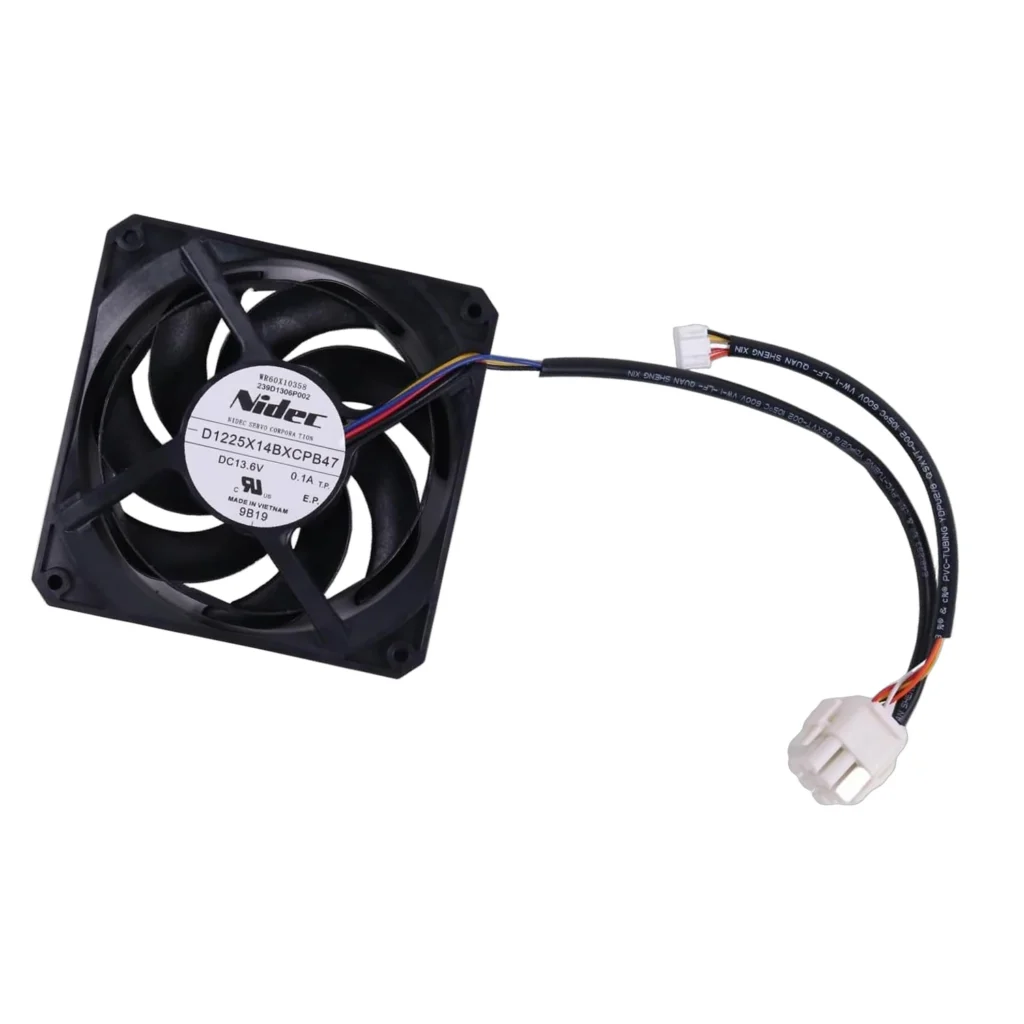
Your GE refrigerator's running constantly but not cooling properly. You touch the back panel near the compressor and notice it's blazing hot — hotter than it should be. That's your condenser fan motor giving up, and the WR60X10358 is the direct replacement that'll get things working again.
This DC condenser fan motor (also known as AP5781519, WR60X10339, or PS8690738) sits at the bottom rear of your fridge. When it fails, your compressor overheats and your energy bill climbs. The good news? This is one of the more straightforward refrigerator repairs you can tackle yourself.
What You Need Before Starting
Here's what you'll want on hand:
- 1/4" nut driver or socket wrench
- Flathead screwdriver
- Needle-nose pliers
- Work gloves (the rear panel edges can be sharp)
- Flashlight or headlamp
- Towel or cardboard to protect your floor
Estimated time: 30-45 minutes
Difficulty: MODERATE
You'll need to move the refrigerator away from the wall, so grab a helper if your fridge is particularly heavy or if you have back issues.
Safety First
Unplug the refrigerator completely before starting. The condenser fan motor operates on DC voltage, but you'll be working near the compressor and electrical connections. Don't just flip a breaker — physically unplug the unit. Also, give yourself at least 3 feet of clearance behind the fridge to work comfortably. The fan compartment can accumulate dust and pet hair, so wear a mask if you're sensitive to that stuff.
Step 1: Access the Condenser Compartment
Pull your refrigerator out from the wall and locate the lower rear access panel. On most GE French door models like the CFE28TSHBSS or CYE23TSDASS, this is a rectangular metal panel held by four to six screws. Use your 1/4" nut driver to remove these screws — they're usually sheet metal screws, so don't overtighten when you put them back. Set the panel aside and you'll see the condenser coils, compressor, and fan motor assembly.
Step 2: Disconnect the Old Fan Motor
The WR60X10358 connects via a wire harness plug. Locate the connector — it's typically a white or black plastic plug about two inches from the motor housing. Press the release tab and pull straight out. Don't yank on the wires themselves. If the connector's stubborn from years of heat cycling, use your flathead screwdriver to gently pry the release tab while pulling. Take a quick photo with your phone of the wire routing before you disconnect anything.
Step 3: Remove the Mounting Bracket
The fan motor mounts to a metal bracket with two or three screws. These are usually Phillips head, but occasionally you'll find hex heads. Remove these screws and carefully pull the old motor out. The fan blade should come with it — it's press-fitted onto the motor shaft. If your fan blade is cracked or damaged, now's the time to replace it separately, though the WR60X10358 typically includes a new blade assembly.
Step 4: Install the New WR60X10358 Motor
Position the new motor in the bracket exactly how the old one sat. The wire harness should route naturally without forcing it. Thread in the mounting screws finger-tight first, then snug them down with your driver. Don't overtighten — you're screwing into a metal bracket, and you just need it secure, not gorilla-tight. Reconnect the wire harness plug until you hear it click.
Step 5: Test and Button Up
Before replacing the access panel, plug the refrigerator back in and let it run for five minutes. You should hear the new condenser fan motor start up within a minute or two — it's a subtle whooshing sound, not loud. Reach back carefully (avoid the compressor, it gets hot fast) and feel for airflow from the fan. If it's spinning and you've got good airflow, you're golden. Unplug again, reinstall the rear panel, and slide the fridge back into place.
Testing After Installation
Let your refrigerator run for 4-6 hours before loading it with groceries if it was completely warm. Check that the compressor isn't overheating anymore — the back panel should be warm but not uncomfortable to touch. Your freezer should reach 0°F and your fresh food section should stabilize around 37°F within 24 hours. If the fan motor's running but you're still having cooling issues, you might have a separate problem with the compressor or sealed system.
Frequently Asked Questions
Will WR60X10358 work on my GE Profile or Café refrigerator?
Yes, this is the correct motor for most GE French door bottom freezer models from 2012-2020, including Profile and Café series. It fits models like CFE28TSHBSS, CYE23TSDCSS, and DFE29JGDABB among dozens of others. Check your model number on the label inside the fresh food section and cross-reference with the compatibility list.
How do I know if my condenser fan motor is actually the problem?
Three telltale signs: the refrigerator runs constantly but doesn't cool well, the area around the compressor is extremely hot to touch, or you don't hear or feel any airflow from the condenser area when the compressor's running. You can also pull the rear panel off and try to spin the fan blade by hand — if it's seized up or wobbles, the motor's shot.
Can I replace just the fan blade instead of the whole motor?
Only if the motor itself still spins freely and runs. If the motor's making grinding noises, not starting, or feels rough when you spin it by hand, replace the entire motor assembly. A new blade on a dying motor is just postponing the inevitable, and you'll be pulling that rear panel off again in a few months.
Take a photo of the wire routing before disconnecting anything — it makes reconnection foolproof and saves you troubleshooting time.
Need the part for this repair?
WR60X10358 · In Stock · Ships next business day