
How to Replace W10185982 Dryer Timer on Whirlpool, Maytag & Kenmore Dryers — Step-by-Step
Unplug the dryer completely before starting. Dryer timers carry 120V when powered. Work carefully with wire terminals and document all connections before removal.
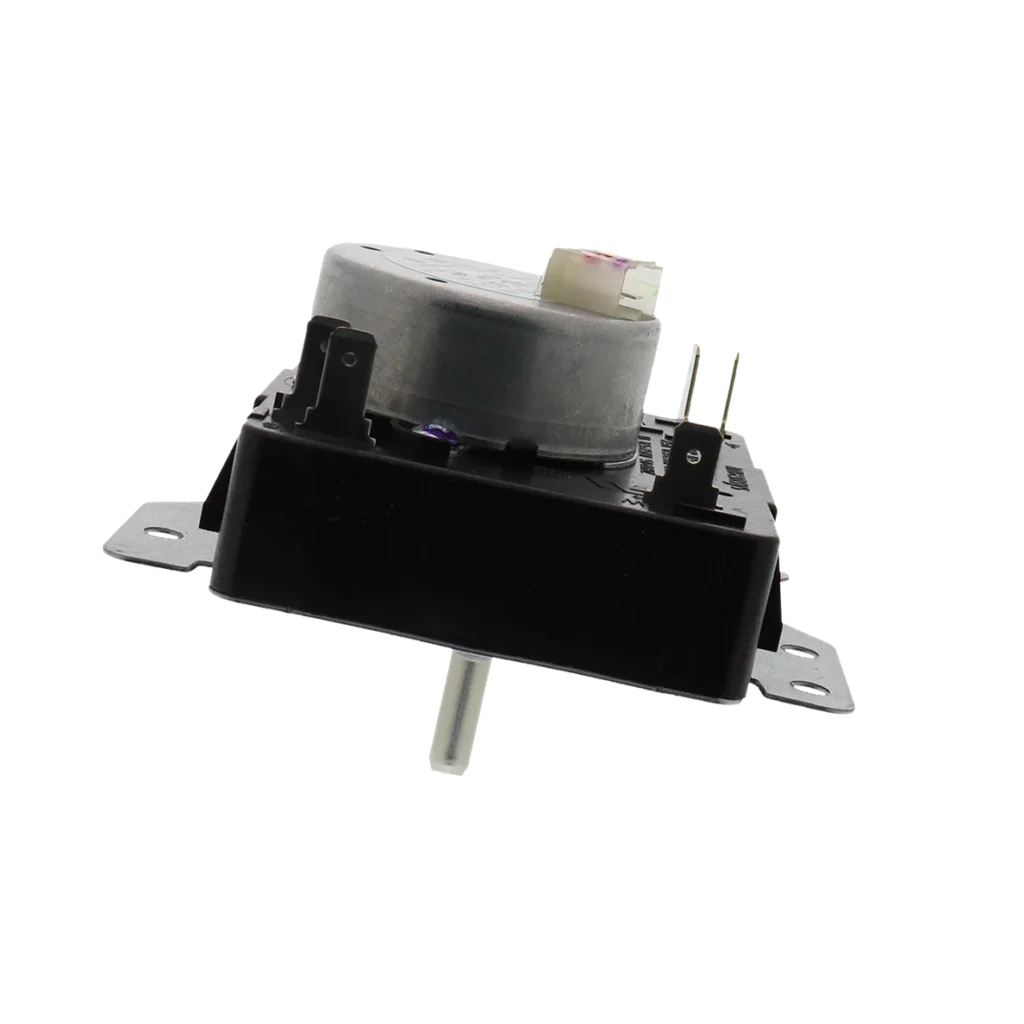
Your Whirlpool dryer's running, but it won't advance through the cycle. Or maybe it's stuck in one position and refuses to shut off automatically. Nine times out of ten, that's your timer going bad — specifically the W10185982, which controls the entire drying sequence on models like the WED4815EW1, WED4995EW1, and dozens of other Whirlpool, Maytag, Kenmore, and Crosley dryers from the mid-2000s through 2010s.
The timer is the brain of your dryer's cycle operation. When it fails, you're stuck babysitting loads or manually advancing the dial every few minutes. Let's fix it.
What You Need Before Starting
This repair takes about 30-45 minutes and requires moderate skill. You'll be working behind the control panel, so you need steady hands and patience with wire connectors.
- 1/4" nut driver or socket
- Phillips screwdriver
- Flathead screwdriver (for prying clips)
- Needle-nose pliers (helpful for wire terminals)
- Masking tape and marker (for labeling wires)
- Phone camera (to photograph wire connections)
Estimated time: 30-45 minutes
Difficulty: Moderate — multiple wire connections require careful attention
Safety First
Unplug the dryer completely before starting. Don't just turn off the circuit breaker — physically disconnect the power cord from the wall outlet. Dryer timers carry 120V when powered, and you'll be working directly with the wire terminals. If your dryer uses gas, there's no need to shut off the gas line for this repair — the timer is electrical only.
Step 1: Access the Control Panel
Open the dryer door and look for two screws at the top corners of the door opening — these secure the top panel. Remove them with your 1/4" nut driver. Once those are out, lift the front edge of the top panel up and tilt it back against the wall. It'll stay propped open on its rear hinges.
Now you can see the control panel from above. Most Whirlpool models have the control console attached with two screws at the outer edges. Remove these screws, then carefully pull the control panel forward and flip it face-down on a towel. You'll see the timer mounted on the back.
Step 2: Document the Wire Connections
Here's where people make mistakes. The W10185982 timer has anywhere from 8 to 12 wire terminals depending on your model's features. Before touching anything, take three clear photos from different angles. Then use masking tape to label each wire with its terminal number — the terminals are usually numbered on the timer body.
Some terminals have multiple wires on the same connection. That's normal. Just make sure your labels indicate which wires go together on the same terminal.
Step 3: Remove the Old Timer
Pull the timer knob straight off the shaft — it's friction-fit and should slide off with firm pressure. If it's stubborn, wiggle it gently side to side while pulling. Behind the knob, you'll find a dial plate or trim ring. Remove any screws holding it in place.
The timer itself is held by two mounting screws through its back plate. Remove these screws and carefully pull the timer away from the control panel. Now disconnect the wires one at a time. Most are push-on terminals that you can pull straight off. If any feel stuck, use your flathead screwdriver to gently pry the connector while pulling.
Step 4: Install the New W10185982 Timer
Position the new timer in the mounting holes and secure it with the two mounting screws. Don't overtighten — you're threading into plastic mounting brackets. Now comes the critical part: reconnecting the wires.
Work from your photos and labels. Push each wire terminal firmly onto its corresponding post until you feel it click into place. Give each one a gentle tug to confirm it's seated properly. If you have terminals with multiple wires, make sure all wires on that terminal are connected before moving to the next one.
Once all wires are connected, reinstall the dial plate and push the timer knob back onto the shaft. Make sure the knob's alignment slot matches the shaft's flat side so it advances correctly through all cycle positions.
Step 5: Reassemble and Test
Flip the control panel back up into position and secure it with the mounting screws. Close the top panel and reinstall the two screws at the door opening. Plug the dryer back in.
Turn the timer to a short cycle — maybe 20 minutes on regular heat. Press start and listen. You should hear the motor engage immediately and the timer start its quiet ticking advance. Let it run for 5 minutes, then check that the dial has advanced slightly. That confirms your timer's working correctly.
Testing After Installation
Run a complete test cycle with a load of damp towels. Watch for these signs of proper operation: the dryer starts when you press the button, the timer advances smoothly through the cycle without sticking, the heat turns on and stays consistent, and most importantly — the dryer shuts off automatically when the timer reaches zero.
If the dryer won't start at all, recheck your wire connections against your photos. A single misplaced wire can prevent operation. If it starts but won't heat, you may have swapped two wires on the heating circuit terminals — usually terminals 5 and 6 on this timer model.
Frequently Asked Questions
Will this timer work on both electric and gas Whirlpool dryers?
Yes, the W10185982 is used on both electric and gas models. The timer controls the cycle timing and motor operation, which is the same for both fuel types. Just verify your model number against the compatibility list — models like WED4815EW1, WED4995EW1, and WED5200VQ1 all use this same timer regardless of whether they're electric or gas versions.
My old timer has a different number of terminals than the new one — is that okay?
Some variations exist based on dryer features. Models with moisture sensors or extended cycle options may use additional terminals. As long as your model number matches the compatibility list and the new timer has mounting holes in the same position, you're good. Just connect the wires that match up and leave any extra terminals on the new timer unused.
The timer advances but my dryer still won't shut off automatically — what's wrong?
If the timer completes its cycle but the motor keeps running, you likely have a stuck or failed door switch that's bypassing the timer's shut-off signal. The timer itself is working correctly — it's telling the dryer to stop, but the door switch is overriding that command. Test the door switch separately or replace it if it's not clicking firmly when the door closes.
Take multiple photos of wire connections from different angles before disconnecting anything. Label each wire with masking tape showing its terminal number — this prevents costly mistakes during reassembly.
Need the part for this repair?
W10185982 · In Stock · Ships next business day