
How to Replace W10131825 Oven Temperature Sensor on Whirlpool & KitchenAid Ranges — Step-by-Step
Turn off power at the circuit breaker, not just the control panel. Allow oven to cool completely for 30 minutes before starting repair.
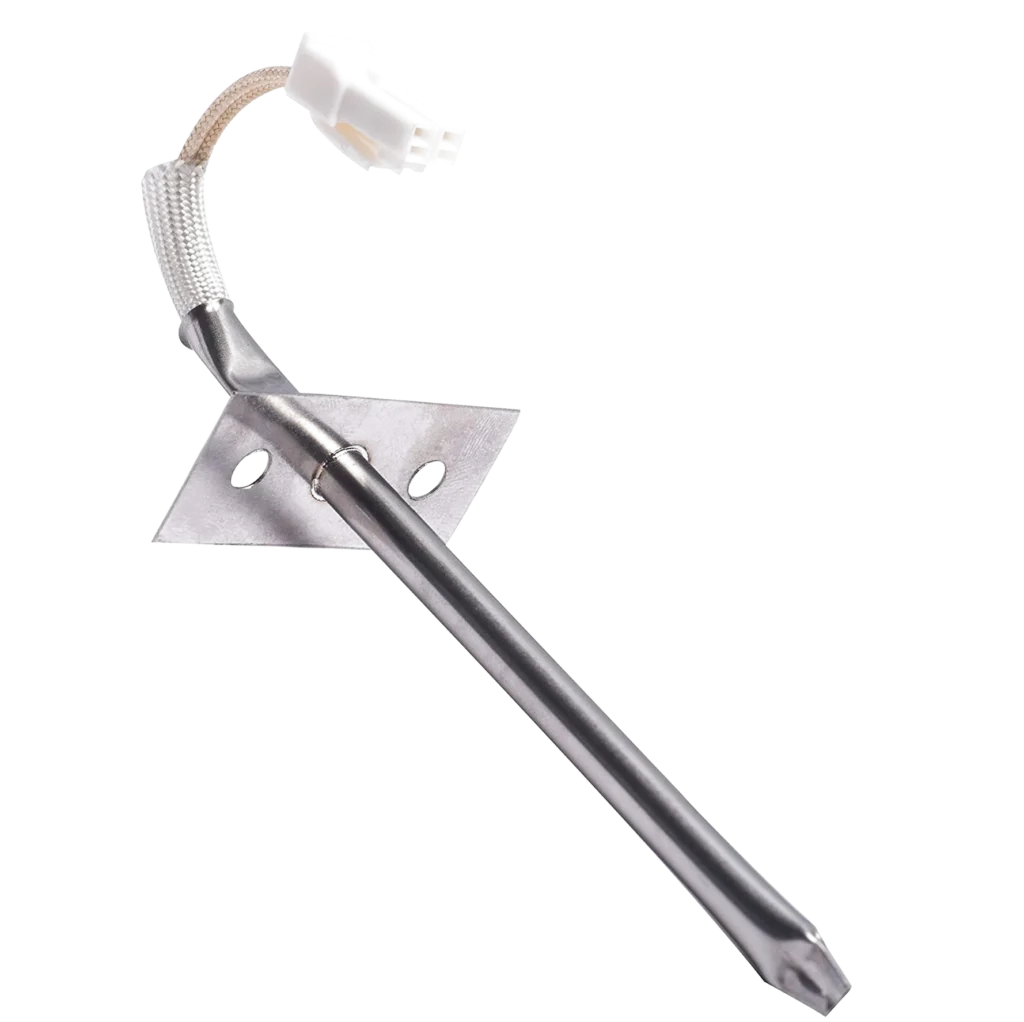
Your KitchenAid range is running 50 degrees hotter than the display says, turning your cookies into charcoal and ruining dinner. Or maybe it's the opposite — you've got the dial cranked to 400°F but your casserole is barely warm after an hour. Both scenarios point to the same culprit: a failed oven temperature sensor. The W10131825 sensor is a two-wire probe that lives inside your oven cavity, constantly feeding temperature data to the control board.
When this sensor drifts out of calibration or shorts out, your oven loses its ability to regulate heat accurately. You'll see symptoms like extreme temperature swings, food that won't cook through, or an oven that refuses to start at all because the control board can't get a valid reading.
What You Need Before Starting
This is one of the easier oven repairs you can tackle. The sensor mounts to the back wall with a simple bracket, and you're only dealing with two wire connections.
- 1/4-inch nut driver or socket
- Needle-nose pliers
- Work gloves (oven interior can have sharp edges)
- Flashlight or headlamp
Repair Time: 15-25 minutes
Difficulty: Easy — No disassembly required beyond the oven racks
Safety First
Turn off the circuit breaker feeding your range. Don't just use the control panel — actually kill power at the breaker box. Gas ranges still have 120V electrical running to them for the clock, lights, and igniter. If you've been using the oven recently, wait 30 minutes for the cavity to cool completely. The sensor probe gets scorching hot during operation.
Step 1: Access the Temperature Sensor
Pull out all oven racks so you've got clear access to the back wall. The W10131825 sensor looks like a metal probe about 3 inches long, sticking through the back wall near the top. On most KitchenAid models like the KEBC208KSS04 or KEMS308SSS05, it's mounted slightly left of center. You'll see the probe tip inside the oven, and the bracket holding it is visible from inside the cavity.
Step 2: Remove the Mounting Bracket
The sensor is held in place by a single bracket secured with one or two hex screws. Use your 1/4-inch nut driver to back out the screws. Keep track of them — they're small and easy to lose in the insulation behind the oven wall. Once the screws are out, gently pull the sensor straight toward you. It should slide out about 6 inches, bringing the wire connector with it.
Step 3: Disconnect the Wire Harness
Behind the oven wall, you'll find a two-wire connector. This is usually a simple plug-and-socket setup. Squeeze the release tab (if there is one) and pull the connector apart. If it's been in there for years and feels stuck, wiggle it gently side to side while pulling — don't yank on the wires themselves. On gas ranges like the KDRP407HSS10, this connector is sometimes tucked under a metal shield, so you might need to reach around a bit.
Step 4: Install the New W10131825 Sensor
Push the new sensor through the mounting hole from inside the oven cavity. The probe should extend into the oven space while the threaded portion and bracket sit flush against the back wall. Behind the oven, plug the wire connector into the sensor terminals — it only goes on one way, so don't force it. Align the mounting bracket with the screw holes and thread the screws back in. Tighten them snug but not gorilla-tight; you're threading into thin sheet metal.
Step 5: Verify Sensor Positioning
The sensor tip should be roughly parallel to the oven floor, pointing slightly downward. It needs to be in the airflow path to get accurate readings, but it shouldn't touch the back wall or any racks. If it's bent or angled weird, you can gently adjust it by hand. These probes are stainless steel — they'll bend if you're careful, but don't go crazy or you'll break the seal where the wire enters the probe.
Testing After Installation
Restore power at the breaker. Set your oven to 350°F and let it preheat. Place an oven thermometer on the center rack (you should have one of these anyway — they're five bucks and incredibly useful). After 20 minutes, check the thermometer reading. It should be within 25 degrees of your set temperature. If your oven still isn't heating, you might have a bad igniter or heating element. If it's running way too hot or too cold, double-check that the sensor connector is fully seated — a loose connection can cause erratic readings.
Frequently Asked Questions
Will this sensor work on my Whirlpool or Maytag oven?
Yes, the W10131825 is a direct replacement for multiple brands under the Whirlpool umbrella. It's compatible with Whirlpool, KitchenAid, Maytag, and Jenn-Air ranges. Check your model number against the compatibility list — it covers dozens of models including the KEBS207SSS00, KESS907SSS02, and KERS807SSS00. The sensor replaces older part numbers like WPW10131825, AP6015486, and 4455636.
How do I know if the temperature sensor is actually bad?
If your oven won't start at all and the display shows an error code (often F3 or F4 on KitchenAid models), the sensor is likely shorted or open. If the oven heats but the temperature is wildly inaccurate — like 100+ degrees off — the sensor has drifted out of spec. You can test it with a multimeter: at room temperature (around 70°F), the sensor should read between 1,000 and 1,100 ohms. If it reads zero or infinite resistance, it's toast.
Can I use my oven without the temperature sensor?
No. Modern ovens use the sensor as a critical safety and control component. Without it, the control board won't allow the oven to heat. On gas models like the KDRP467KSS0, the gas valve won't open. On electric models, the bake element won't energize. The oven needs that feedback loop to prevent runaway heating and potential fires. If your sensor fails, you're stuck until you replace it.
Place an oven thermometer on the center rack after installation to verify accurate temperature calibration. This simple check confirms your repair was successful.
Need the part for this repair?
W10131825 · In Stock · Ships next business day