
How to Replace DD82-01589A Circulation Pump Assembly on Samsung Dishwasher — Step-by-Step
Disconnect power completely before starting. Water will drain from connections—have towels ready. Dishwasher must be tipped backward to access pump from underneath.
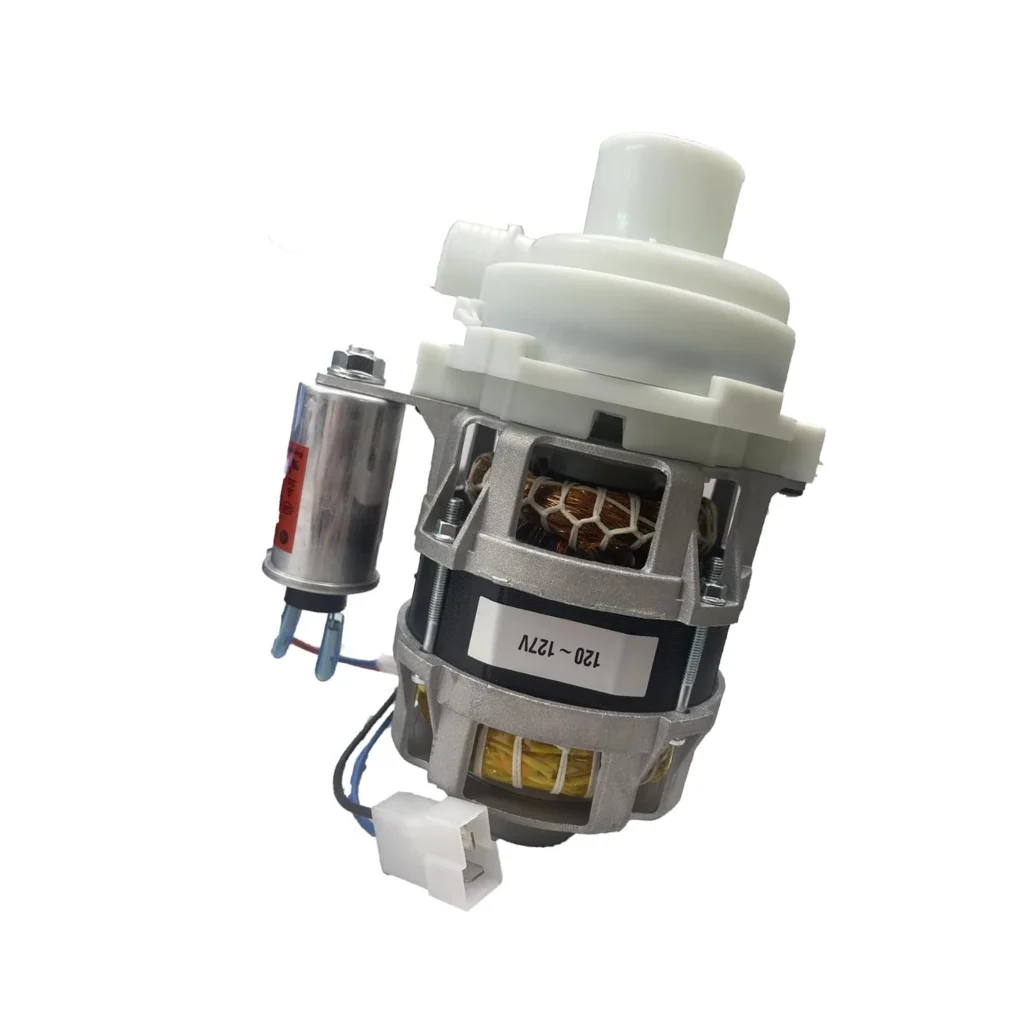
You load the dishwasher, press start, and hear the usual hum—but your dishes come out still dirty, with food particles clinging to plates. The water's filling up fine, but nothing's spraying inside. That's your circulation pump calling it quits. On Samsung models like the DW80M2020US or DW80R2031US, the DD82-01589A pump assembly is what drives water through the spray arms, and when it fails, you're basically hand-washing dishes with extra steps.
What You Need Before Starting
This isn't a quick fix—plan for about 45 minutes to an hour if you're comfortable working on appliances. You'll need:
- Phillips screwdriver
- Flathead screwdriver
- Socket wrench set (10mm socket most likely)
- Towels for water cleanup
- Small bucket or shallow pan
- Needle-nose pliers
Repair Time: 45-60 minutes
Difficulty: Moderate — requires tipping the dishwasher and working underneath
Safety First
Unplug your dishwasher completely or flip the breaker. You'll be working near electrical connections and water lines, so there's no room for shortcuts here. Even if it's been sitting idle, there's still water trapped in the sump area—expect to mop up at least a cup or two during this job. Wear gloves if you're squeamish about old food debris in the sump housing.
Step 1: Access the Pump From Below
Remove the bottom front kickplate panel by releasing the clips or removing screws. You'll need to pull the dishwasher partially out from the cabinet—loosen the mounting brackets at the top corners first. Carefully tip the dishwasher backward (have someone help you) or lay it on its back on a thick blanket. The circulation pump is mounted underneath the tub, center-right area when you're looking from below.
Step 2: Disconnect Water Inlet and Outlet Hoses
You'll see two large rubber hoses connected to the pump assembly with spring clamps. Use needle-nose pliers to squeeze and slide the clamps away from the pump fittings. Gently twist and pull the hoses off—water will dribble out, so have that bucket handy. The inlet hose comes from the sump, and the outlet feeds up to the spray arm system.
Step 3: Remove Electrical Connection and Mounting Hardware
Locate the wire harness plug on the pump motor. Press the locking tab and pull straight off—don't yank on the wires themselves. The pump assembly is held in place by three or four screws around the perimeter of its mounting bracket. Remove these with your socket wrench, supporting the pump with your other hand so it doesn't drop when the last screw comes out.
Step 4: Install the New DD82-01589A Pump Assembly
Position the new pump assembly into the mounting bracket, lining up the screw holes. Thread in all mounting screws finger-tight first, then tighten them in a cross pattern to ensure even pressure—don't overtighten or you'll crack the plastic housing. Reconnect the wire harness until you hear it click. Slide the inlet and outlet hoses back onto their fittings, then reposition the spring clamps about 1/4 inch from the hose ends to secure them.
Step 5: Reassemble and Test Run
Carefully return the dishwasher to its upright position and slide it back into the cabinet opening. Reattach the top mounting brackets and replace the kickplate. Restore power, then run a short rinse cycle with no dishes. Listen for the pump motor to engage smoothly—you should hear water rushing through the spray arms within 30 seconds of the wash cycle starting. Open the door mid-cycle to confirm water is actually spraying from both the upper and lower arms.
Testing After Installation
Run a full normal wash cycle with dishes to verify everything's working properly. Check underneath for any water leaks around the hose connections during the first few minutes of operation. If you hear grinding noises or the pump runs but water doesn't spray, double-check that the outlet hose connection is fully seated and the clamp is tight. On models like the DW80N3030UB and DW80CG4021SR, the control board should throw an error code if the pump motor fails to start, so no error code is a good sign.
Frequently Asked Questions
Will this pump fit my DW80M2020US model?
Yes, the DD82-01589A is the factory-spec pump for the DW80M2020US/AA and AC variants, plus the entire DW80N3030 and DW80R2031 series. It also replaces older part numbers AP6807546 and PS12709106, so if your Samsung dishwasher was made after 2017, this is likely your pump.
Why did my circulation pump fail so quickly?
Hard water deposits are the number one killer. Calcium buildup clogs the impeller and puts strain on the motor bearings. If you live in an area with hard water and don't use rinse aid or periodically run a dishwasher cleaner, you're cutting the pump's lifespan in half. Small debris like toothpicks or broken glass can also jam the impeller, burning out the motor.
Can I replace just the motor instead of the whole assembly?
Not with this part number. The DD82-01589A is a sealed assembly—motor, impeller, and housing all come together. Samsung designs these as complete units to maintain the exact tolerances needed for proper water pressure. Trying to rebuild it yourself will void any warranty and probably won't work anyway since the internal seals aren't sold separately.
Mark the inlet and outlet hoses with tape before removal so you don't mix them up during reinstallation—the pump won't work properly if they're reversed.
Need the part for this repair?
DD82-01589A · In Stock · Ships next business day