
How to Replace DD81-01629A Door Latch Switch on Samsung Dishwasher — Step-by-Step
Always disconnect power at the breaker before removing the door panel. The door's metal edges are sharp — wear gloves throughout the repair.
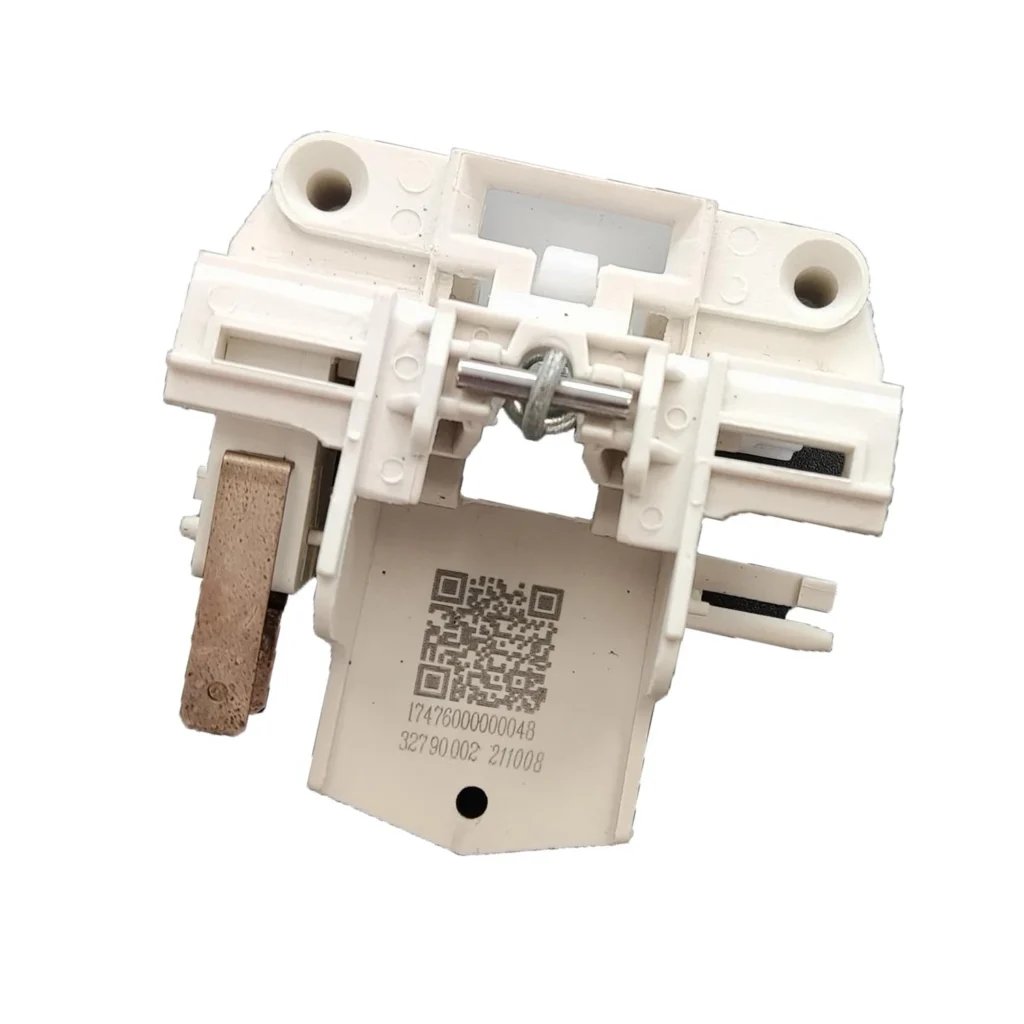
Your Samsung dishwasher door won't latch shut anymore. You push it closed, hear a faint click — maybe — but the dishwasher won't start. The control panel stays dark or flashes an error code. That's the DD81-01629A door latch switch failing, and it's a surprisingly common issue on Samsung DW80F600, DW80J3020, DW80K5050, and DW80K7050 series models.
The door latch switch is what tells your dishwasher's control board that the door is securely closed and it's safe to start a cycle. When this small plastic assembly cracks or the internal microswitch wears out, your dishwasher thinks the door is perpetually open. The good news? This is a straightforward 20-minute repair that doesn't require specialized tools or technical expertise.
What You Need Before Starting
This repair requires minimal tools and preparation:
- Phillips head screwdriver
- Flathead screwdriver (for prying clips)
- Work gloves
- Towel or blanket (to protect your floor)
- Flashlight or headlamp
Estimated repair time: 20-25 minutes
Difficulty level: Easy
Safety First
Before you touch anything, unplug your dishwasher from the wall outlet or shut off the dedicated circuit breaker for the dishwasher. Even though you're working on a low-voltage switch, the dishwasher's heating element and pump run on 120V and you'll have the door panel open. Don't skip this step. Wear work gloves throughout the repair — the metal edges inside the door panel can be surprisingly sharp, and you'll be reaching into tight spaces.
Step 1: Access the Door Latch Assembly
Open the dishwasher door fully so it's horizontal. You'll see screws along the top edge and sides of the inner door panel — typically 6-8 screws total on most Samsung models. Remove all these screws with your Phillips screwdriver and set them aside. On the DW80K7050 series, there's one additional screw hidden behind the detergent dispenser door — open it and look inside.
Once the screws are out, carefully lift the inner door panel up and away from the outer door. It'll still be attached by wires, so don't yank it. Rest it gently against the open dishwasher door.
Step 2: Locate and Disconnect the Failed Latch Switch
Look at the top-right corner of the door cavity (your right when facing the open door). The door latch switch is a white or gray plastic housing about 2 inches long with a wire harness connector attached. You'll see the latch mechanism that the door striker interacts with when you close the door.
Press the release tab on the wire harness connector and pull it straight off the switch. Some resistance is normal — wiggle it gently if it's stubborn. On older DW80F600 models, the connector can be stiff from heat exposure over the years.
Step 3: Remove the Old Latch Switch
The DD81-01629A is held in place by two plastic mounting tabs and sometimes a single screw. If there's a screw, remove it first. Then use your flathead screwdriver to carefully pry the latch switch assembly away from the door frame. The tabs slide into slots — you're releasing them, not breaking them.
Work slowly here. If you crack the door frame's plastic housing, you'll need to order another part. Once the tabs release, the entire latch assembly pulls straight out.
Step 4: Install the New DD81-01629A Switch
Take your new DD81-01629A out of the package and compare it to the old one. The mounting tabs and connector should be identical. Slide the new switch into the door frame, aligning the tabs with their slots. Push firmly until you hear or feel it click into place. If your model uses a mounting screw, reinstall it now and tighten it snugly but not overtight — you're threading into plastic.
Reconnect the wire harness by pushing the connector onto the switch terminals until it clicks. Give it a gentle tug to confirm it's seated properly.
Step 5: Reassemble and Test
Position the inner door panel back onto the outer door, aligning the screw holes. Thread all the screws back in, starting with the top corners and working your way around. Tighten them in a star pattern to ensure even pressure — don't overtighten or you'll crack the plastic panel.
Restore power to the dishwasher and close the door. You should hear a definitive click as the latch engages. The control panel should light up normally. Try starting a rinse cycle to verify the door lock is working correctly.
Testing After Installation
Run a quick rinse cycle and watch for these signs of success: the door locks audibly when the cycle starts, the control panel displays cycle progress normally, and no error codes appear. Open and close the door several times to make sure the latch engages consistently. On models like the DW80K5050US, the control panel will show a door icon if it's not detecting the latch — that icon should disappear completely now.
If the door still won't latch, double-check that the wire harness is fully connected and that you haven't accidentally loosened the door striker on the tub frame (the metal piece the latch grabs onto).
Frequently Asked Questions
Will this part work on all Samsung dishwasher models?
The DD81-01629A is specifically designed for Samsung DW80F600, DW80F800, DW80J3020, DW80K2021, DW80K5050, DW80K7050, and DW80R5060 series dishwashers. It replaces older part numbers AP5800420, PS8764558, DD81-02132A, and AP6287051. Always verify your model number on the label inside the dishwasher door before ordering.
How do I know if the latch switch is bad versus the door striker?
If your door physically closes and latches but the dishwasher won't start, that's the switch. If the door won't stay closed at all or pops open, check the striker assembly on the tub frame first — it might just be loose. You can test the switch with a multimeter set to continuity mode: disconnect it, press the latch mechanism, and check for continuity between the terminals. No continuity means the switch is dead.
Do I need to recalibrate anything after replacing the door latch switch?
No calibration needed. The DD81-01629A is a simple on/off switch — when the door closes and the latch engages, it completes a circuit. Your dishwasher's control board recognizes this instantly. Just close the door and start a cycle. If you're still getting error codes after replacement, you might have a separate control board issue, but that's rare.
Take a photo of the wire harness connection before disconnecting it. If you're working on an older model, the connector colors might have faded and a reference photo prevents confusion during reassembly.
Need the part for this repair?
DD81-01629A · In Stock · Ships next business day