
How to Replace DD62-00084A Water Inlet Valve on Samsung Dishwasher — Step-by-Step
Turn off both electrical power at the breaker and water supply under the sink before beginning. Water will spill when disconnecting the supply line.
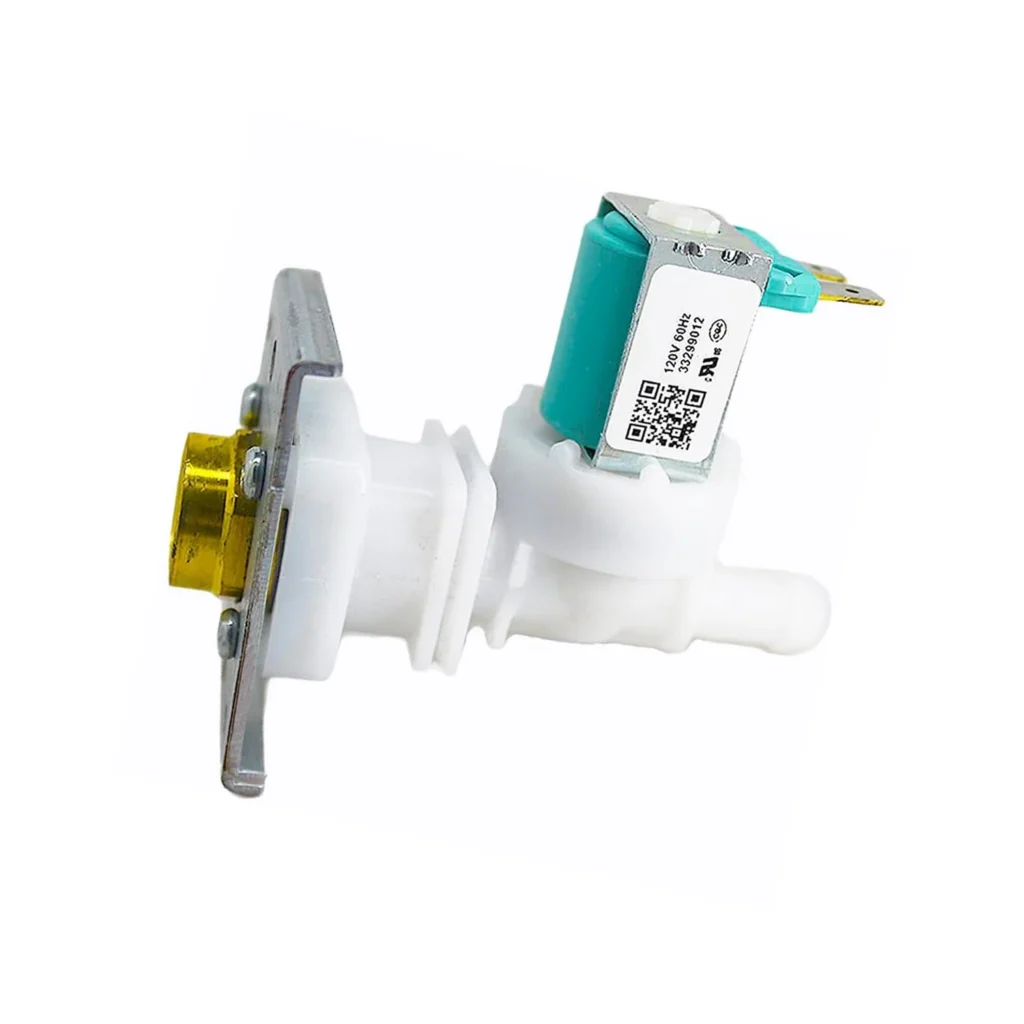
Your Samsung dishwasher starts its cycle, you hear the motor running, but no water flows in. Or maybe it fills way too slowly, turning your 90-minute cycle into a three-hour ordeal. The water inlet valve—part number DD62-00084A—controls water flow into your dishwasher, and when it fails, you're stuck with dirty dishes and a machine that just hums uselessly.
This valve sits at the bottom left of your dishwasher where the water supply line connects. It's an electrically-controlled solenoid valve that opens when your dishwasher needs water and closes when it's got enough. When the solenoid coil burns out or debris clogs the screen, water stops flowing properly.
What You Need Before Starting
This repair takes about 45 minutes to an hour, depending on how accessible your water supply is. You'll need:
- 1/4-inch nut driver
- Phillips screwdriver
- Flathead screwdriver
- Adjustable wrench or channel locks
- Towels (water will spill from the supply line)
- Shallow pan or bucket
- Flashlight
Difficulty: Moderate — requires disconnecting water supply and working in tight space under dishwasher
Estimated Time: 45-60 minutes
Safety First
Turn off power to your dishwasher at the circuit breaker—not just the control panel. Samsung dishwashers typically run on 120V, and the inlet valve carries live current when activated. More importantly, shut off the water supply valve under your sink before disconnecting anything. Have towels ready because even after shutting off water, the supply line holds residual water that'll spill when you disconnect it.
Step 1: Access the Valve Behind the Kick Plate
Open the dishwasher door and locate the two screws at the top corners of the kick plate (the metal panel at the bottom front). Remove these screws with your Phillips screwdriver, then gently pull the kick plate forward and down to remove it. You should now see the water inlet valve on the left side—it's a black plastic component with the water supply line connected to it and two wires running to the solenoid coil.
Step 2: Disconnect Water Supply and Electrical Connections
Place towels and your shallow pan under the work area. Using your adjustable wrench, turn the compression nut counterclockwise where the supply line connects to the inlet valve. Water will drain out—this is normal. Once disconnected, pull the wire harness off the valve's solenoid. On most Samsung models including the DMT400, DMT800, and DW80F600 series, this is a simple push-tab connector you squeeze and pull.
Step 3: Remove the Mounting Hardware
The DD62-00084A valve is held in place by a metal bracket secured with two 1/4-inch hex screws. Use your nut driver to remove these screws. Keep track of them—they're easy to lose in the dark space under your dishwasher. The valve assembly also has a rubber hose connected to its outlet that leads into the tub. Depending on your model, this might be a clamp connection or a press-fit. Use your flathead screwdriver to release the clamp if present, then twist and pull the hose off the valve outlet.
Step 4: Install the New DD62-00084A Valve
Position your new valve in the mounting bracket, making sure the inlet port (where water supply connects) faces the same direction as the old one. The outlet should point toward the tub interior. Secure it with the two hex screws—snug them down but don't overtighten or you'll crack the plastic housing. Reconnect the rubber outlet hose, securing with the clamp if your model uses one. Push the wire harness connector onto the solenoid until you hear it click into place.
Step 5: Reconnect Water and Test
Thread the compression nut from your water supply line onto the new valve's inlet. Hand-tighten it first, then use your wrench to turn it another quarter-turn—you want it snug, not gorilla-tight. Turn the water supply back on and immediately check for leaks around the connection. If you see drips, turn off the water and tighten the nut slightly more. Once dry, turn the circuit breaker back on and run a short rinse cycle to verify the valve opens properly and water fills the tub.
Testing After Installation
Start a normal wash cycle and listen—you should hear water flowing within 10-15 seconds after the cycle begins. Open the door mid-cycle (after the fill should be complete) and check that there's water in the bottom of the tub. Check your connections again for any moisture. If the dishwasher fills properly and completes the cycle without error codes, you're done. Replace the kick plate and you're back in business.
Frequently Asked Questions
Will this valve fit my Samsung dishwasher model?
The DD62-00084A is compatible with dozens of Samsung dishwasher models including DMT400, DMT610, DMT800, DW7933, DW80F600, DW80H9930, DW80J3020, DW80K5050, and DW80M series. Check your model number on the label inside the door frame—if it matches the compatible models list, this valve will work. This part replaces AP5178218, PS4222448, and EAP4222448.
Can I clean my old valve instead of replacing it?
If the valve isn't opening due to debris on the inlet screen, you can try cleaning it. Remove the screen from the inlet port, rinse it thoroughly, and check if the solenoid still has continuity with a multimeter (should read around 500-1500 ohms). But if the solenoid coil is burned out or the valve body is cracked, cleaning won't help—you need a replacement. At seven years old, most inlet valves are at the end of their service life anyway.
Why does my dishwasher still show an error code after replacing the valve?
If you're getting error codes like 4E, 4C, or E4 after installing the new valve, check that the wire connector is fully seated and the supply line doesn't have kinks. Also verify the water supply valve is fully open—restricted flow can trigger fill errors even with a new valve. Run a diagnostic cycle (press and hold Sanitize + Heavy for 3 seconds on most models) to see if the valve activates during the test. If the valve doesn't click or hum during diagnostics, check your electrical connections again.
Place a flashlight under the dishwasher pointing toward the valve area before you start—you'll need both hands free and the workspace is dark.
Need the part for this repair?
DD62-00084A · In Stock · Ships next business day