
How to Replace DC96-00887A Thermal Fuse Assembly on Samsung Dryer — Step-by-Step
Unplug dryer completely before starting repair. Verify no power is flowing to the unit.
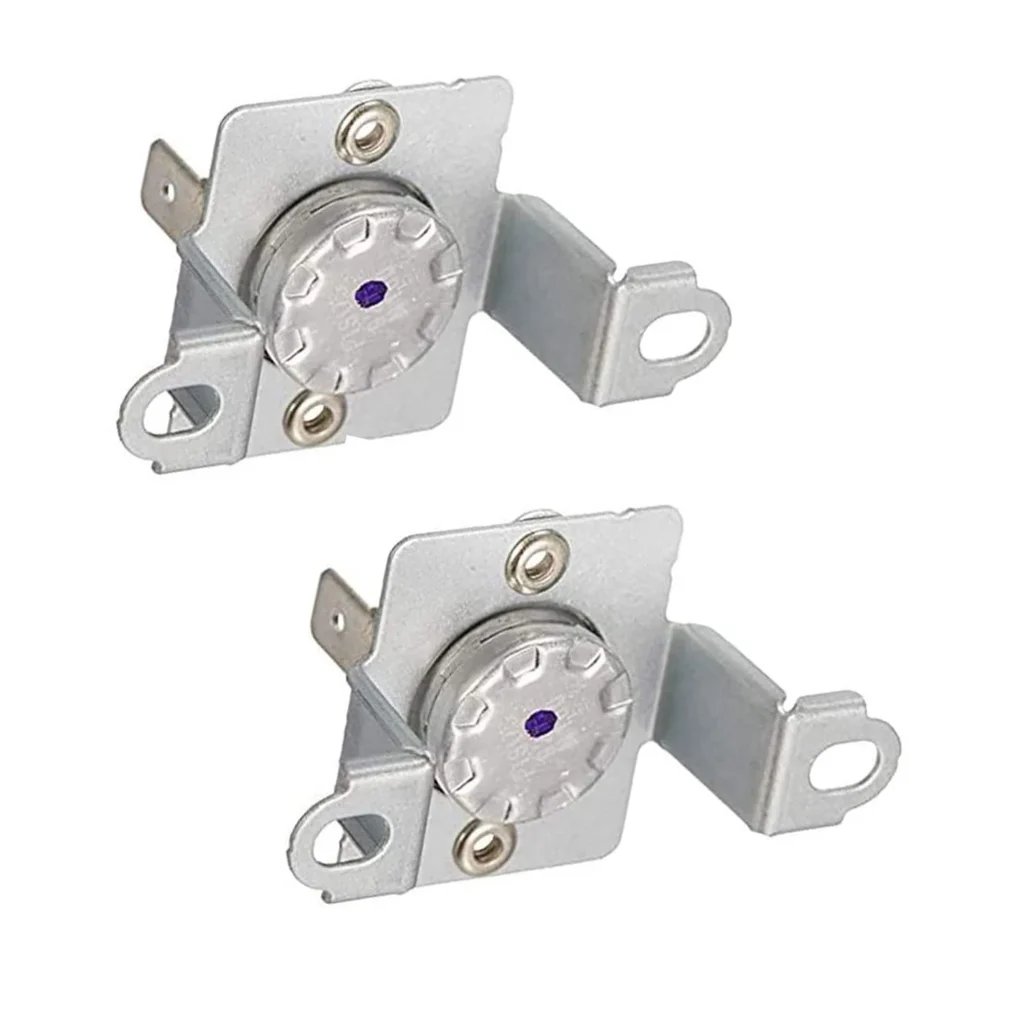
Your Samsung dryer runs through its cycle just fine, tumbles like always, but your clothes come out cold and damp. As one frustrated owner put it: "Dryer work fine except it longer heated up." That's the telltale sign of a blown thermal fuse — specifically the DC96-00887A assembly. This little safety device sits on your heating element housing and cuts power when temperatures get too high. Once it blows, it won't reset. You'll need to replace it.
The good news? This is one of the easiest dryer repairs you can tackle yourself. The thermal fuse assembly is accessible from the back panel on most Samsung models including the DV42H5000EW/A3, DV45H7000EW/A2, and DVE50M7450W/A3. You don't need special skills, just basic tools and about 20 minutes.
What You Need Before Starting
Tools Required:
- Nutdriver set (typically 1/4")
- Phillips and flathead screwdrivers
- Needle-nose pliers
- Multimeter (optional, for testing the old fuse)
Repair Time: 15-30 minutes
Difficulty Level: Easy
The DC96-00887A replaces part numbers DC96-00887C, AP5966894, PS4276292, and 2074129. Make sure you've got the right fuse by checking your model number on the dryer's label inside the door frame.
Safety First
Unplug your dryer completely before you start. If it's hardwired, flip the circuit breaker. Don't just turn it off at the control panel — you need zero electricity flowing to the unit. Also, if you have a gas dryer, you don't need to shut off the gas valve for this repair since you're only working on the electrical heating system. Still, give yourself plenty of light and space to work behind the dryer.
Step 1: Access the Back Panel
Pull your dryer away from the wall so you can get behind it comfortably. You'll see a large back panel secured with screws around the perimeter. Use your nutdriver to remove these screws — there are usually 8 to 10 of them. Keep them in a container so they don't roll away. Once the screws are out, lift the panel off and set it aside. You'll immediately see the heating element housing, which is a large rectangular metal box.
Step 2: Locate the Thermal Fuse Assembly
The DC96-00887A thermal fuse assembly is mounted directly on the heating element housing. It's a white or cream-colored component about 2 inches long with two wire connectors attached. On most Samsung models like the DV48H7400EW/A2 and DV40J3000EW/A2, it's positioned on the top or side of the blower housing. You can't miss it — it's the only component with that distinctive thermal fuse shape.
Step 3: Disconnect and Remove the Old Fuse
Use your needle-nose pliers to carefully pull off the two wire connectors from the thermal fuse terminals. They slide straight off — you might need to wiggle them a bit if they're tight. Don't yank on the wires themselves, just grip the connector. The fuse assembly is held in place by a single screw or clip. Remove this fastener with your screwdriver, then slide the old thermal fuse out of its bracket. Take a look at it — if it's blown, you won't see any visible damage, but you can test it with a multimeter set to continuity. A blown fuse will show no continuity.
Step 4: Install the New DC96-00887A Assembly
Slide your new DC96-00887A thermal fuse into the same bracket where the old one sat. Make sure it's positioned exactly the same way — the terminals should point in the same direction. Secure it with the mounting screw or clip. Now reconnect the two wire terminals. They only fit one way, so push them firmly onto the fuse terminals until you hear or feel them click into place. Give each wire a gentle tug to make sure the connection is solid.
Step 5: Reassemble and Test
Line up the back panel with the dryer cabinet and replace all the screws you removed earlier. Tighten them snugly but don't overtighten — you're working with sheet metal. Push the dryer back into position, leaving a few inches between the back and the wall for airflow. Plug the dryer back in, then run a test cycle with a load of damp towels. Within a few minutes, you should feel warm air coming from the exhaust vent. If your dryer heats properly, you've solved the problem.
Testing After Installation
Run your dryer on high heat for at least 10 minutes with a small load. Open the door mid-cycle and feel inside — the drum should be noticeably warm, and clothes should be starting to dry. Check the exhaust vent outside your house too. You should feel strong, warm air flowing out. If everything works, congrats — you just saved yourself a $200 service call.
One thing to note: if your new thermal fuse blows again quickly, you've got an underlying issue. The most common culprit is a clogged dryer vent that's causing overheating. Clean out your entire vent system from the dryer to the outside termination. A restricted vent forces the dryer to work harder and run hotter, which will keep blowing thermal fuses.
Frequently Asked Questions
Why did my Samsung dryer thermal fuse blow in the first place?
Thermal fuses blow when your dryer overheats, usually due to restricted airflow. The number one cause is a clogged lint filter or exhaust vent. If lint builds up in the vent hose or outside vent, hot air can't escape properly, temperatures spike, and the thermal fuse does its job by cutting power to prevent a fire. Always clean your lint filter after every load and deep-clean your entire vent system at least once a year. A kinked or crushed vent hose can also restrict airflow.
Can I test if the DC96-00887A thermal fuse is actually bad before replacing it?
Yes. Set a multimeter to the continuity or resistance setting. Disconnect the wires from the thermal fuse and touch one probe to each terminal. A good fuse will show continuity (the meter beeps or shows near-zero resistance). A blown fuse shows no continuity at all — infinite resistance. If you don't have a multimeter, just replace it anyway. At $56.99, it's cheaper than a service call, and thermal fuses are a common failure point on models like the DV42H5200EW/A3 and DV448AEW/XAA.
Will this thermal fuse work on my specific Samsung dryer model?
The DC96-00887A is compatible with dozens of Samsung dryer models including the DV42H5000EW/A3, DV45H7000EW/A2, DV48H7400EW/A2, DV40J3000EW/A2, DV42H5200EP/A3, DVE50M7450W/A3, DV393ETPAWR/A1, DV405ETPAWR/AA, and DV331AEW/XAA among many others. Check the model number on the label inside your dryer door and cross-reference it with the compatibility list on the product page. This fuse also replaces older part numbers DC96-00887C, AP5966894, and PS4276292, so if your parts diagram shows any of those numbers, you're good to go.
Clean your entire dryer vent system after replacing the thermal fuse to prevent the new fuse from blowing. A clogged vent is the #1 cause of repeated thermal fuse failures.
Need the part for this repair?
DC96-00887A · In Stock · Ships next business day