
How to Replace DC92-01640B Main PCB Assembly on Samsung Front Load Washer — Step-by-Step
Unplug washer completely and wait 2 minutes before touching any electrical connections. Main PCB connects to 120V power.
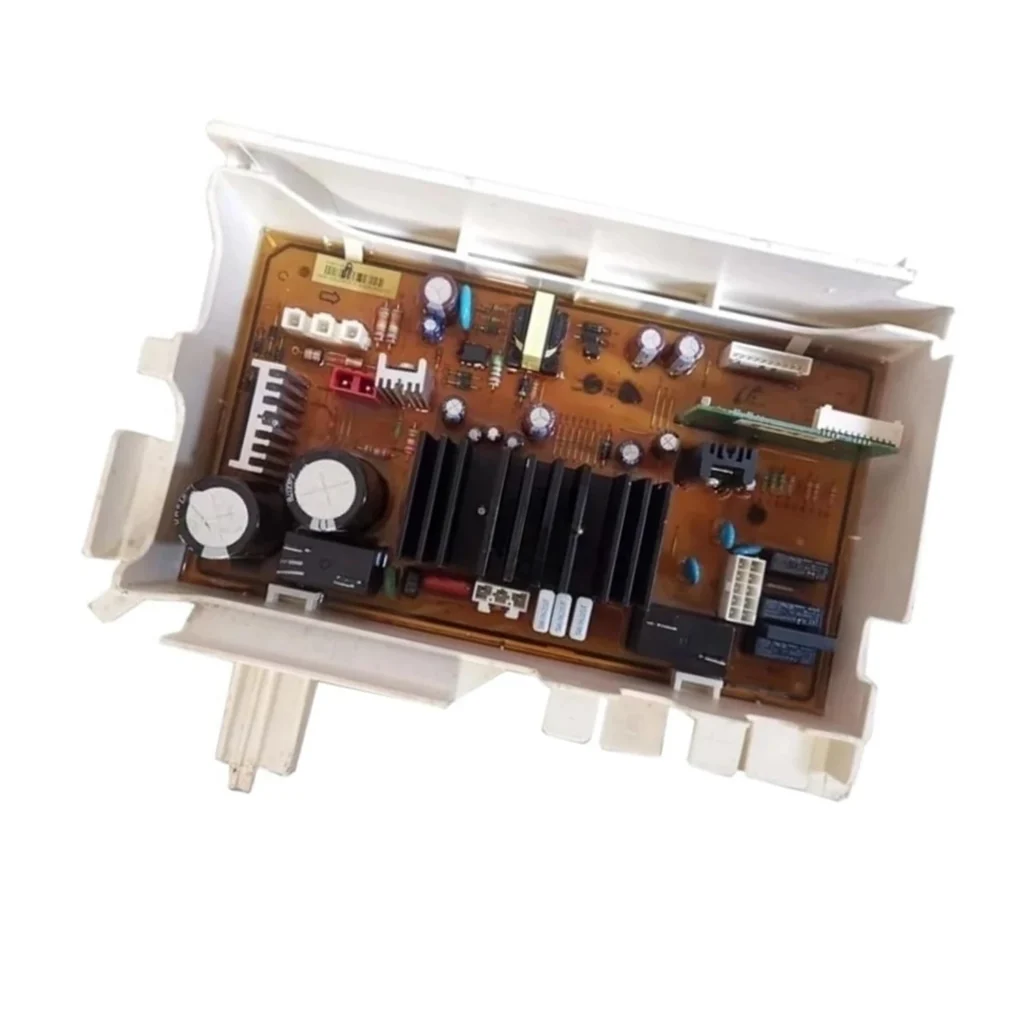
Your Samsung front load washer suddenly won't start, or the control panel lights up but nothing happens when you press buttons. You've already unplugged it, waited, plugged it back in—same problem. Chances are, your main PCB assembly has failed. This DC92-01640B board is the brain of your washer, and when it goes bad, you're dead in the water.
The good news? Replacing this control board is straightforward. No complex wiring diagrams to decode—the connectors only fit one way. If you can handle a screwdriver and take a few photos with your phone, you've got this.
What You Need Before Starting
This isn't a parts-hunting expedition. Here's everything you'll need:
- Phillips screwdriver
- Flathead screwdriver
- Needle-nose pliers (for stubborn connectors)
- Your phone camera (trust me on this)
- New DC92-01640B PCB assembly
Repair Time: Less than 15 minutes
Difficulty: Very Easy
Safety First
Unplug the washer completely. Not just turn it off—pull the plug from the wall. The main PCB connects directly to 120V power, and there's no reset button for electrocution. Wait two minutes after unplugging to let any residual charge dissipate. If your washer is hardwired, flip the breaker and verify power is off with a voltage tester.
Step 1: Access the Control Panel
The control panel is your gateway to the PCB. On most Samsung front loaders like the WF42H5000AW/A2 and WF45H6300AW/A2, you'll find two or three screws along the top rear edge of the panel. Remove these screws, then gently tilt the control panel forward. It'll pivot toward you—don't yank it, since wiring harnesses are still attached to the back.
Step 2: Document Your Connections
Here's where your phone camera earns its keep. Take clear photos of every wire connector on the PCB before touching anything. Get close enough to see which color wires go to which terminals. The connectors are keyed—they physically can't plug in backward—but when you're staring at six identical-looking plugs, you'll thank yourself for these photos. Look for a main power connector (usually the largest), display ribbon cable, and several smaller sensor connectors.
Step 3: Remove the Failed PCB
Disconnect each wire harness by pressing the locking tab and pulling straight out. Some connectors are snug—use needle-nose pliers to grip the plastic housing, never pull on the wires themselves. Once everything's unplugged, locate the mounting screws holding the PCB to the control panel housing. Typically two or three Phillips screws. Remove them and lift the old board free. Notice the standoffs—those plastic spacers keep the board from shorting against metal. Don't lose them.
Step 4: Install the New DC92-01640B Board
Position your new PCB assembly onto the mounting posts, making sure it sits flat against the standoffs. Thread in the mounting screws—snug them down but don't overtighten. You're securing plastic, not building a bridge. Now reconnect the wiring harnesses, referencing your photos. Each connector should click firmly into place. If you're forcing it, stop—you've got the wrong connector or it's rotated 180 degrees.
Step 5: Reassemble and Test
Tilt the control panel back into position and replace the top screws. Double-check that no wires are pinched between the panel and the cabinet. Plug the washer back in. The control panel should light up immediately or after pressing the power button. Run a quick rinse cycle with the drum empty—just enough to verify the board communicates with the motor, water valves, and drain pump.
Testing After Installation
Don't just assume success because the lights come on. Press various buttons—make sure the display responds to every input. Select different cycles and watch that the washer reacts appropriately. Start a short wash cycle and verify water fills, the drum turns, and it drains properly. If error codes appear, write them down—they'll tell you if a connector wasn't fully seated. Most installations work perfectly the first time, but if something's off, recheck your connections against those photos before panicking.
Frequently Asked Questions
Will the DC92-01640B work in my specific Samsung model?
This board replaces DC92-01640A, DC92-01640C, and DC92-01640E, and it's compatible with Samsung WF42H and WF45H series front loaders. Check your model number against the compatibility list—if you've got a WF42H5200AP/A2 or WF45H6300AG/A2, you're golden. The board's physically identical and the firmware is backward-compatible.
My washer works but the display is dim—do I need a new PCB?
Not necessarily. A dim display usually means the LED backlight is failing, which is separate from PCB function. However, if buttons don't respond or cycles won't start alongside the dim display, the PCB could be on its way out. Try unplugging for five minutes first—sometimes these boards need a hard reset.
Can I damage the new board during installation?
Static discharge is your enemy here. Touch a grounded metal surface before handling the board—the washer cabinet works if it's plugged in but turned off at the wall. Don't lay the PCB on carpet or wear synthetic fabrics that generate static. And never force connectors—if it doesn't slide in easily, you're doing something wrong. The board itself is robust, but treat it like the $40 computer it is.
Take detailed photos of all wire connections before disconnecting anything—connector positions look obvious until you're holding six identical plugs.
Need the part for this repair?
DC92-01640B · In Stock · Ships next business day