
How to Replace DC64-02032A Door Lock Switch Assembly on Samsung Washers — Step-by-Step
Unplug washer completely before starting repair. Door lock carries live voltage when plugged in. Wait 5 minutes after unplugging.
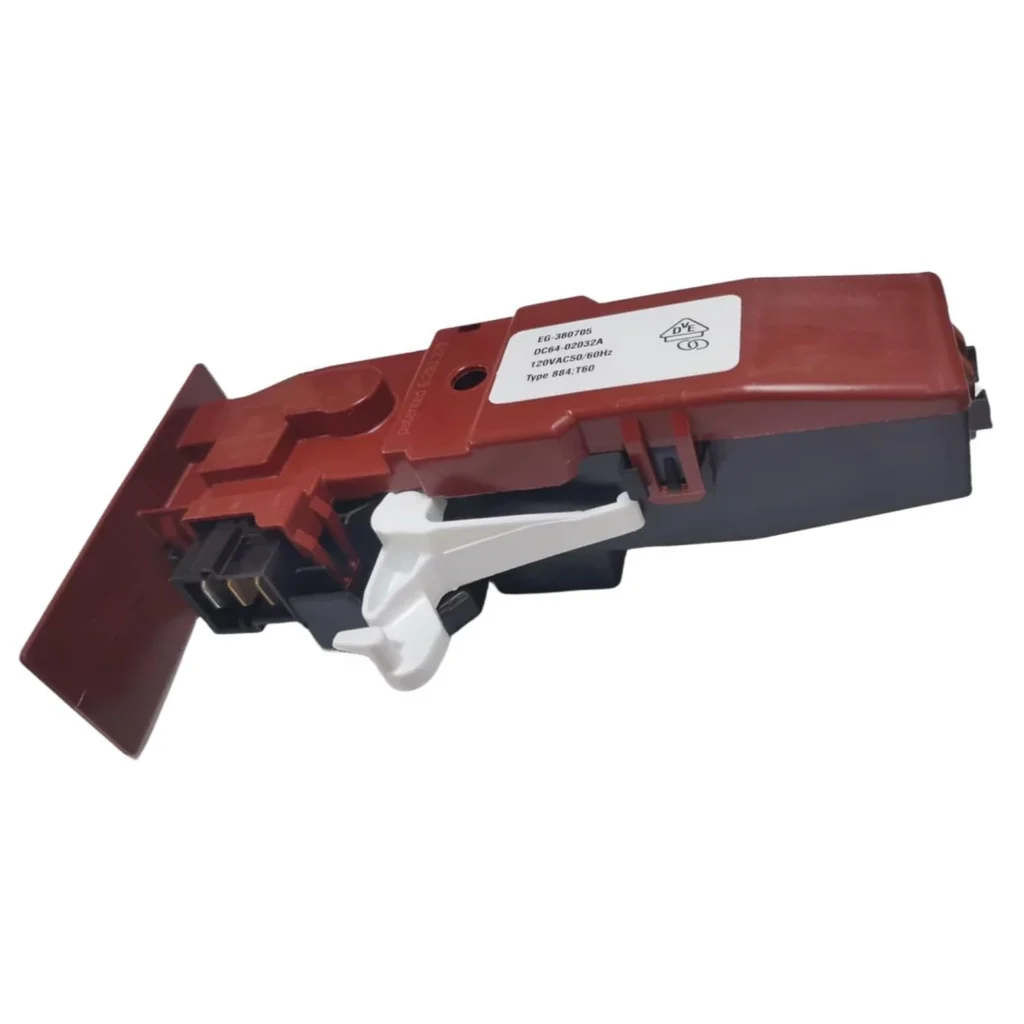
Your Samsung washer won't start, and the door lock light blinks three times before going dark. You press start again. Nothing. The drum sits there full of soapy clothes while the control panel ignores every button you push. This isn't a control board issue—it's almost always the door lock assembly failing to engage.
The DC64-02032A door lock switch assembly controls whether your washer can start a cycle. When it fails, the washer won't recognize that the door is closed and locked, so it refuses to run. This is a common failure point on Samsung front-loaders, especially models WF210ANW, WF220ANW, WF363BTBEUF, and WF365BTBGWR series.
What You Need Before Starting
This repair takes about 45 minutes and requires moderate skill. You'll need:
- Phillips screwdriver (standard and small head)
- Flathead screwdriver for panel clips
- Work gloves (sharp metal edges inside)
- Towel to catch residual water
- Flashlight or headlamp
Repair Time: 45-60 minutes
Difficulty: Moderate
Safety First
Unplug the washer completely—don't just turn it off. The door lock assembly carries live voltage when the washer is plugged in, even when the unit appears off. Wait 5 minutes after unplugging to let residual capacitor charge dissipate. Pull the washer away from the wall so you can work comfortably on the front panel. If there's water in the drum, run a drain cycle first or manually drain using the filter access at the bottom front.
Step 1: Remove the Control Panel Access
Open the washer door. Look along the top edge of the door opening—you'll see 2-3 Phillips screws holding the top panel. Remove these screws and tilt the top panel backward, then lift it off. Some models have plastic clips along the front edge—gently pry with a flathead if the panel won't lift after removing screws. Set the panel aside carefully to avoid scratching your floor.
Step 2: Access the Front Panel
With the top off, you'll see screws along the top edge of the front panel. Remove these (usually 4-6 screws). Next, open the detergent dispenser and remove the screws behind it. Now comes the tricky part: the front panel has clips along the bottom edge. Pull the top of the panel toward you slightly, then lift up to disengage the bottom clips. You don't need to remove the panel completely—just swing it forward enough to access the door lock assembly on the right side of the door opening.
Step 3: Disconnect the Old Door Lock
The door lock assembly mounts to the right side of the door opening with 3 screws. Before removing it, you'll see a wire harness connector—it's usually white or gray with 6 wires. Press the locking tab and pull the connector straight out. Don't yank on the wires themselves. Now remove the 3 mounting screws and pull the old lock assembly out of its housing. You might need to wiggle it slightly because it fits into a recessed slot.
Step 4: Install the New DC64-02032A Assembly
Take your new DC64-02032A out of the package. Check that the striker alignment on the lock matches your old part—there's a hook mechanism that catches the door striker, and it should be in the same position. Slide the new assembly into the mounting slot. It only fits one way, but make sure it's fully seated before starting the screws. Hand-tighten the 3 mounting screws, then snug them down with your screwdriver. Don't overtighten—you're screwing into plastic housing. Reconnect the wire harness until you hear it click.
Step 5: Reassemble and Test
Swing the front panel back into position. Make sure the bottom clips engage first, then push the top flush against the frame. Replace all the screws you removed—top edge screws, dispenser area screws. Reinstall the top panel by setting it on the back edge first, then lowering the front and replacing those screws along the door opening. Before pushing the washer back, plug it in and run a quick test cycle with the drum empty. The door should lock within 3 seconds of pressing start, and you should hear a definite click.
Testing After Installation
Close the door and select any wash cycle. Press start. You should hear the lock engage immediately—it makes an audible click. The door lock indicator on the control panel should light up solid, not blinking. If the washer starts filling, your repair is successful. Try opening the door during the cycle—it should be firmly locked. After the cycle completes, wait 2-3 minutes, and the door should unlock automatically. If the door lock light blinks or the washer doesn't start, double-check that wire harness connection—it's the most common mistake.
Frequently Asked Questions
Will this part work on my Kenmore washer?
Yes, if your Kenmore model begins with 796.xxxx, it's a Samsung-manufactured washer and uses the same DC64-02032A door lock assembly. Check your model number against the compatibility list to be certain, but most Kenmore Elite front-loaders from 2010-2018 use this exact part.
Why does my washer door lock but not start the cycle?
The door lock assembly has two functions: physically locking the door and sending a signal to the control board that it's locked. If the door locks but the washer won't start, the switch contacts inside the assembly have failed while the lock mechanism still works. This is actually the most common failure mode—replacing the assembly fixes both issues at once.
Can I test if the door lock is bad before ordering a replacement?
Yes. Unplug the washer, remove the top panel, and access the door lock wire harness. Using a multimeter set to continuity mode, test between the wire terminals while manually moving the lock striker. You should see continuity change when the lock engages. No change means the switch is dead. However, most people find it easier to just replace the assembly once they've confirmed the door won't lock—diagnostic time equals repair time anyway.
Don't overtighten the mounting screws—you're screwing into plastic housing and can strip the threads easily. Hand-tight plus a quarter turn is plenty.
Need the part for this repair?
DC64-02032A · In Stock · Ships next business day