
How to Replace DC32-00007A Thermistor Temperature Sensor on Samsung Dryer — Step-by-Step
Unplug dryer completely before starting repair. Do not operate dryer with damaged thermistor.
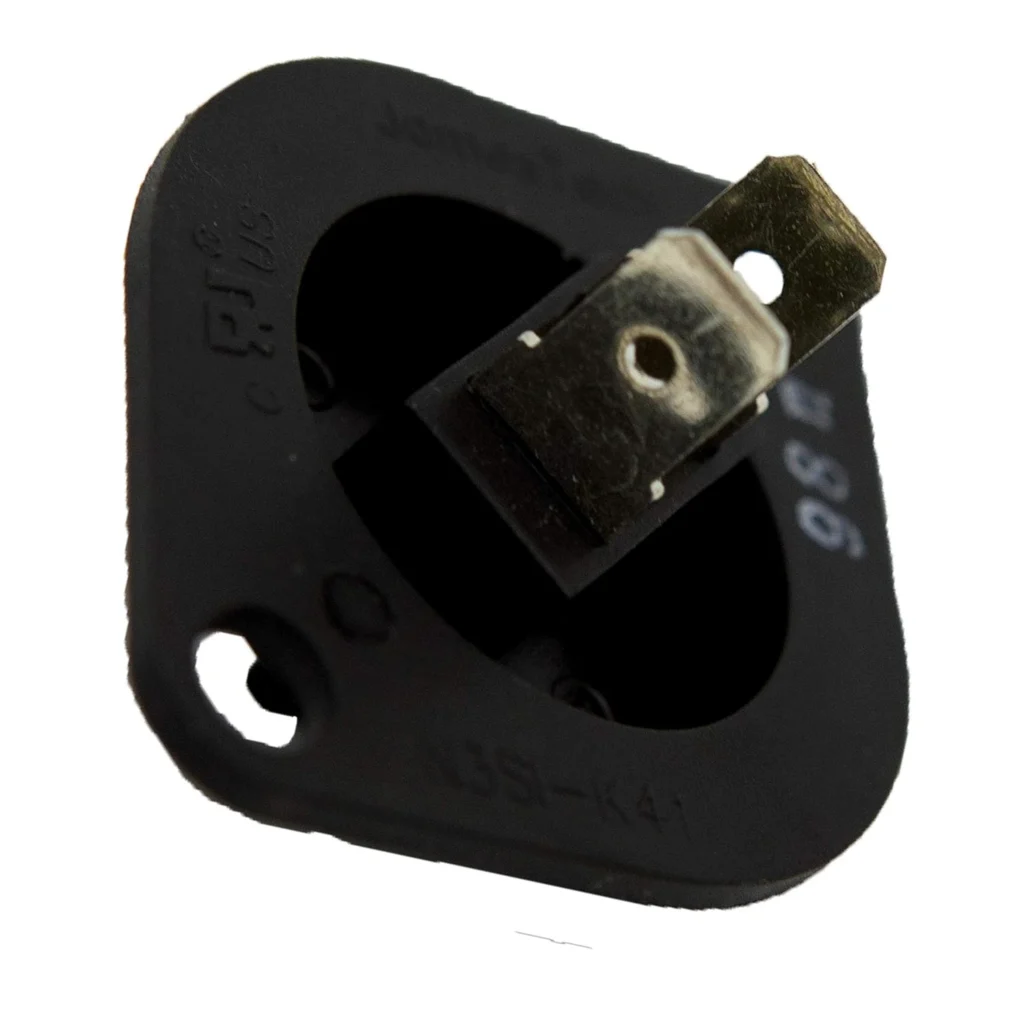
Your Samsung dryer's running, but your clothes are coming out either scorching hot or still damp after a full cycle. That's classic thermistor failure. The DC32-00007A is the temperature sensor that tells your dryer's control board exactly how hot things are inside the drum. When it fails, your dryer loses its ability to regulate heat properly.
What You Need Before Starting
This repair is straightforward if you're comfortable using basic tools. Here's what you'll need:
- Quarter-inch nut driver or socket set
- Flathead screwdriver
- Work gloves (metal edges can be sharp)
- Flashlight or work light
- Your replacement DC32-00007A thermistor
Estimated Time: 20-30 minutes
Difficulty: EASY
Safety First
Unplug your dryer completely before starting this repair. If you have a gas dryer, you don't need to disconnect the gas line for this repair — the thermistor is electrical only. However, make sure you have adequate lighting and workspace around the back of your dryer. The thermistor is located on the blower housing, which means you'll be working near the exhaust duct area.
Step 1: Access the Rear Panel
Pull your dryer away from the wall so you can access the back panel. You'll see multiple screws around the perimeter of the rear access panel — typically 8 to 10 screws depending on your model. Remove all of these screws with your nut driver and set the panel aside. You should now see the blower housing, which is the large cylindrical or rectangular metal housing where the exhaust duct connects.
Step 2: Locate the Thermistor
The DC32-00007A thermistor is mounted directly on the blower housing. It's a small sensor with two wire connectors attached to it. On most Samsung models like the DV42H5000EW, DV45H7000EW, and DV40J3000EW series, you'll find it on the side of the blower housing closest to the heating element. It looks like a small cylindrical component, about the size of your thumb, with a wire harness plugged into it.
Step 3: Disconnect and Remove the Old Thermistor
Disconnect the wire harness by pressing the locking tab and pulling it straight off. Don't yank on the wires themselves. The thermistor is typically held in place by a single screw or a metal clip bracket. Remove this fastener and carefully pull the old thermistor out of its mounting hole. Sometimes these sensors get stuck from heat cycling over the years — a gentle twist while pulling usually breaks them free.
Step 4: Install the New DC32-00007A Thermistor
Insert your new thermistor into the same mounting hole. Make sure it's seated flush against the blower housing — proper contact is critical for accurate temperature readings. Secure it with the mounting screw or clip. Reconnect the wire harness until you hear or feel it click into place. Give it a gentle tug to confirm it's locked on.
Step 5: Reassemble and Test
Reattach the rear access panel with all the screws you removed earlier. Push your dryer back into position and reconnect the power. Run a test cycle on medium heat with a few damp towels. The dryer should heat up normally and shut off automatically when the load is dry. If it's cycling properly and clothes are coming out dry without being overheated, you've successfully replaced the thermistor.
Testing After Installation
Run a timed dry cycle first to verify the heating element engages. Then run an automatic moisture-sensing cycle. The dryer should heat up, sense the moisture level through the thermistor's temperature readings, and shut off when the load reaches the selected dryness level. If the dryer shuts off too early or runs too long, double-check that the wire harness is fully connected and the thermistor is properly seated in its mounting hole.
Frequently Asked Questions
Will this thermistor work on both Samsung and Kenmore dryers?
Yes. The DC32-00007A replaces AP4201716 and PS4204984, which are used across Samsung-manufactured dryers sold under both Samsung and Kenmore brand names. It's compatible with dozens of models including the DV42H5200EW, DV48H7400GW, and DV50F9A7EVW series. Always verify your model number against the compatibility list before ordering.
How do I know if my thermistor is bad versus another component?
Thermistor failures typically cause temperature-related issues: clothes coming out damp even after extended cycles, or extremely hot loads that never shut off. If your dryer isn't heating at all, that's more likely a heating element or thermal fuse issue. You can test a thermistor with a multimeter — it should show resistance that changes when heated. At room temperature, expect around 50,000 ohms of resistance.
Can I run my dryer with a faulty thermistor?
Not recommended. A malfunctioning thermistor can cause your dryer to overheat, potentially damaging clothes or creating a fire hazard. It can also cause the dryer to run indefinitely without shutting off, wasting energy and putting unnecessary wear on other components. Replace it as soon as you notice temperature regulation problems.
If thermistor is stuck in mounting hole, gentle twisting while pulling will break it free without damaging the blower housing.
Need the part for this repair?
DC32-00007A · In Stock · Ships next business day