
How to Replace 4680JB1026H Condenser Fan Motor on LG Kenmore Refrigerators — Step-by-Step
Always unplug refrigerator before repair. Wait 5 minutes for compressor depressurization. Wear gloves to protect from sharp edges.
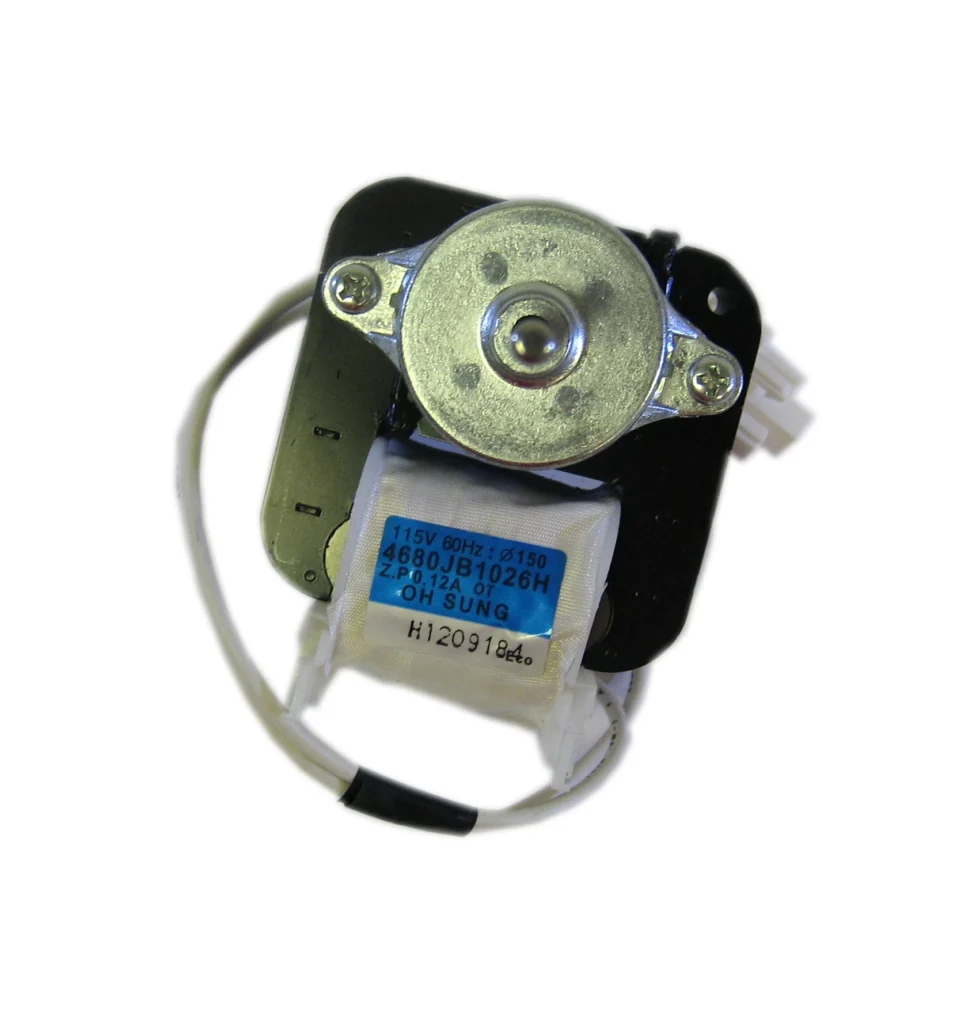
Your LG refrigerator started making a grinding noise from the back, and now it's running warmer than usual. You check behind the fridge and hear nothing — the condenser fan motor has stopped completely. This is the 4680JB1026H motor, and it's one of the most common failures on models like the LSC27910ST and LSC26905SW. The good news? This repair is straightforward and you can do it yourself in under an hour.
What You Need Before Starting
Gather these tools before you begin:
- 1/4" nut driver or socket wrench
- Phillips head screwdriver
- Flathead screwdriver (for wire harness clips)
- Work gloves
- Flashlight or headlamp
Estimated repair time: 30-45 minutes
Difficulty level: Moderate — requires some disassembly but no specialized skills
Safety First
Always unplug your refrigerator before starting this repair. The condenser fan motor runs on 120V AC power, and you'll be working near the compressor which can have sharp edges. Wait at least 5 minutes after unplugging to allow the compressor to depressurize. Wear gloves to protect your hands from sharp metal edges on the back panel and fan housing.
Step 1: Access the Condenser Fan Compartment
Unplug the refrigerator and pull it away from the wall — you'll need about 3 feet of clearance. Remove the lower back panel by unscrewing the 1/4" hex head screws along the perimeter. On most LG models like the LSC27910TT, there are 6-8 screws holding this panel. Set the panel aside and you'll see the compressor on one side and the condenser fan motor on the other.
Step 2: Disconnect the Old Motor
Locate the wire harness connecting the motor to the control board. It's usually a two-wire connector with a small plastic clip. Press the clip tab and pull the connector straight off — don't yank on the wires themselves. Take a photo with your phone before disconnecting so you remember the orientation. The motor is typically held in place with two mounting screws or a bracket clip.
Step 3: Remove the Fan Blade and Motor
The fan blade is attached to the motor shaft with either a set screw or a push-on clip. If there's a set screw, loosen it with your flathead screwdriver while holding the blade steady. Some LG models use a spring clip — just pull the blade straight off the shaft. Once the blade is off, remove the two screws holding the motor bracket to the condenser housing. The entire motor assembly should lift right out.
Step 4: Install the New 4680JB1026H Motor
Position the new motor in the bracket with the shaft pointing toward where the fan blade mounts. Make sure the mounting holes line up perfectly — forcing it can crack the plastic housing. Secure it with the two mounting screws, but don't overtighten. Slide the fan blade onto the motor shaft and tighten the set screw (or press the clip back on). The blade should spin freely without wobbling or scraping against anything.
Step 5: Reconnect and Test
Plug the wire harness back into the motor — you should hear a distinct click when it seats properly. Double-check that no wires are near the fan blade or compressor where they could get pinched. Reattach the lower back panel with all the screws. Plug the refrigerator back in and listen. The condenser fan should start running within 30 seconds. It'll be quieter than the old noisy motor, and you should feel air movement if you hold your hand near the back.
Testing After Installation
Let the refrigerator run for 15 minutes and check these things: The fan should spin continuously when the compressor is running. Feel the condenser coils — they should start getting warm as refrigerant flows through them. Listen for any unusual noises like scraping or grinding, which would indicate the blade is hitting something. Check your refrigerator temperature after a few hours — it should return to the normal 37°F range. If the fan isn't running, verify the wire harness connection is fully seated and check that you didn't accidentally leave the fridge in defrost mode.
Frequently Asked Questions
Will this motor work on my Kenmore refrigerator model?
The 4680JB1026H is compatible with many LG-manufactured Kenmore models. Check the compatible models list on the product page — if your model number is listed (like LSC27910ST or LSC26905SB), it'll fit. This motor replaces part numbers AP4440743, PS3523107, 1330001, and AH3523107, so if your old motor has any of those numbers, this is your replacement.
Why is my new condenser fan motor not spinning?
First, verify the wire harness is fully connected — it needs to click into place. Second, make sure the fan blade isn't rubbing against the housing or condenser coils. If the motor hums but doesn't spin, the blade might be hitting something. If there's no sound at all, check the control board connection and verify power is reaching the motor with a multimeter set to 120V AC.
How long does a condenser fan motor typically last?
Most LG condenser fan motors last 8-12 years under normal conditions. If yours failed earlier, it's usually because of dust buildup causing overheating, or a voltage surge. Clean the condenser coils every 6 months to help your new motor last longer. Excessive dust makes the motor work harder and shortens its lifespan significantly.
Take a photo of wire connections before disconnecting to remember proper orientation during reassembly.
Need the part for this repair?
4680JB1026H · In Stock · Ships next business day