
Whirlpool Washer F32 Error Code — What It Means & How to Fix
Water temperature sensor circuit failure
The F32 error code indicates the washer's control board cannot receive proper readings from the water temperature sensor (thermistor). This prevents the machine from regulating wash temperatures and causes the cycle to stop. Common on Whirlpool Duet, Maytag, and KitchenAid front-load washers.
Always unplug the washer before accessing internal components. Water and electricity don't mix—even residual voltage in the control board can cause shock.
You load the washer, hit start, and about three minutes in the machine stops dead. F32 flashes on the display. You try resetting it—unplug, wait, plug back in. Same error. The washer won't advance past the initial fill. One user described it perfectly: "Every time I moved the wires the washer would stop running and the error code would flash."
The F32 error code on Whirlpool, Maytag, and KitchenAid front-load washers means the water temperature sensor (thermistor) isn't sending proper readings to the control board. The machine literally can't tell if the water's cold, warm, or hot—so it shuts down rather than risk damage.
What F32 Actually Means
The F32 code specifically indicates a problem with the pressure switch or water temperature sensor circuit. In most cases, it's the temperature sensor itself—a thermistor that changes electrical resistance based on water temperature. When this sensor fails, sends erratic readings, or loses electrical continuity, the control board can't regulate wash temperatures. You'll see incomplete cycles, failure to advance between wash steps, or the machine won't start at all.
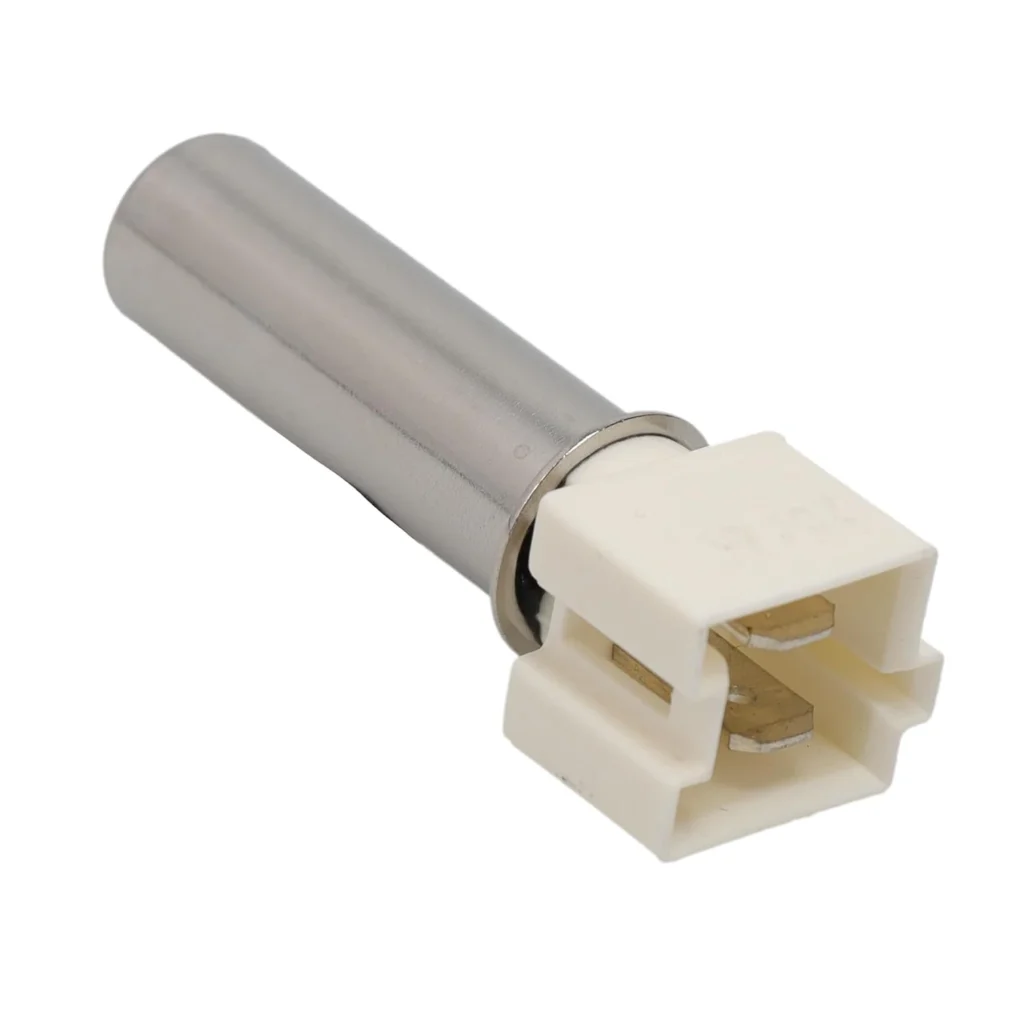
Models like the WFW9400SW01, WFW9400SW02, WFW97HEXR0, WFW97HEXW0, and WFW95HEXW0 commonly throw this code when the W10467289 temperature sensor degrades.
Most Likely Causes
1. Failed Water Temperature Sensor (High Probability)
Thermal stress and mechanical wear kill these sensors over time. The thermistor's resistance drifts out of spec, or the internal connections break. The sensor sits in constant contact with water at varying temperatures—cold rinse to hot wash cycles—which eventually causes electronic component failure.
2. Damaged Wiring at the Sensor (Medium Probability)
Vibration from spin cycles can fray or split the black wires near the sensor connection point. One repair tech found the wire had separated at a zip tie location: "The vibration from the machine had split the wire. I spliced the wire back together and have not had a problem since." Check for visible wire damage before replacing the sensor.
3. Corroded Connector Terminals (Medium Probability)
Leaks or high humidity inside the washer cabinet can corrode the electrical connections at the sensor plug. Even minor corrosion increases resistance enough to trigger the F32 code.
4. Control Board Failure (Low Probability)
Rarely, the control board's thermistor input circuit fails. This is uncommon—replace the sensor first since it's the wear item.
Step-by-Step Fix
What you'll need: Nut drivers, the W10467289 sensor, and possibly WP8540766 seal if yours is damaged.
Step 1: Access the sensor
Unplug the washer. On most Whirlpool Duet and front-load models, the temperature sensor is on the rear of the machine, not the front. Remove the back access panel using a nut driver. If you have a Duet Sport model, ignore videos showing front panel removal—you're working from the back.
Step 2: Locate the sensor
The W10467289 sensor mounts near the bottom of the outer tub, typically on the right side. It's a small black component with two black wires running to a connector. Before disconnecting anything, inspect these wires carefully for splits, fraying, or damage near zip tie locations.
Step 3: Test for wire damage
Gently wiggle the wires while tracing them back to the harness. If you see any breaks or the insulation has worn through, you might have found your problem. Splice and repair any damaged sections with heat-shrink butt connectors before assuming the sensor itself has failed.
Step 4: Remove the old sensor
Unplug the wire connector. The sensor typically twists counterclockwise or pulls straight out of its mounting grommet. Note: the sensor does not include the rubber seal (WP8540766). If your seal is cracked or missing, order it separately to prevent future leaks.
Step 5: Install the W10467289
Press the new sensor firmly into the mounting hole—it should seat flush. Make sure the seal is properly positioned. Reconnect the wire harness until it clicks.
Step 6: Clear error codes and test
Reassemble the back panel. Plug in the washer. Run a rinse/spin cycle to clear stored error codes from memory. Then run a full hot wash cycle to verify the sensor is reading correctly. The F32 code should not reappear, and the machine should advance through all wash steps normally.
When the Fix Doesn't Work
If you replaced the sensor and the F32 code persists, check three things: wire continuity from sensor to control board (use a multimeter), corrosion at the connector (clean with electrical contact cleaner), and proper sensor seating (reseat the sensor). If all connections test good and the sensor is genuine Whirlpool part W10467289 or equivalent WPW10467289/8181705, the control board's thermistor circuit may have failed. At that point, you're looking at either a board-level repair or control board replacement—typically $200-400 installed.
Frequently Asked Questions
How much does it cost to fix F32 error?
DIY repair costs $30-45 (sensor plus seal if needed). Professional repair runs $150-250 including service call and labor. The sensor replacement itself takes 15-30 minutes once you have the back panel off.
Can I run the washer with F32 error code?
No. The washer won't complete cycles—it'll stop mid-wash when it can't verify water temperature. Forcing it to run risks improper washing (cold water when hot is selected) or potential control board damage from continued fault conditions.
Do I need to replace the seal with the temperature sensor?
The W10467289 sensor doesn't include the WP8540766 seal. Inspect your existing seal when removing the old sensor. If it's cracked, brittle, or damaged, replace it. A bad seal can cause internal leaks that'll corrode connections and cause the F32 code to return.
Before replacing the sensor, wiggle the black wires while tracing them back to the harness. Vibration-induced wire breaks at zip tie points cause F32 codes as often as failed sensors—and splicing a wire costs nothing.
Need the control board or touchpad?
Genuine OEM & aftermarket options in stock