
Whirlpool Dryer F01 Error Code — What It Means & How to Fix
Primary control failure or EEPROM communication error
The F01 error code indicates the electronic control board can no longer communicate with its internal memory chip (EEPROM). This prevents the dryer from running cycles, reading sensors, or controlling the motor and heating element. It's caused by power surges, electrical shorts, or component wear after years of heat cycling and use.
Always disconnect power at the breaker before removing the dryer's top panel. Dryers use 240V which can cause serious injury or death. Do not attempt repair while the unit is plugged in.
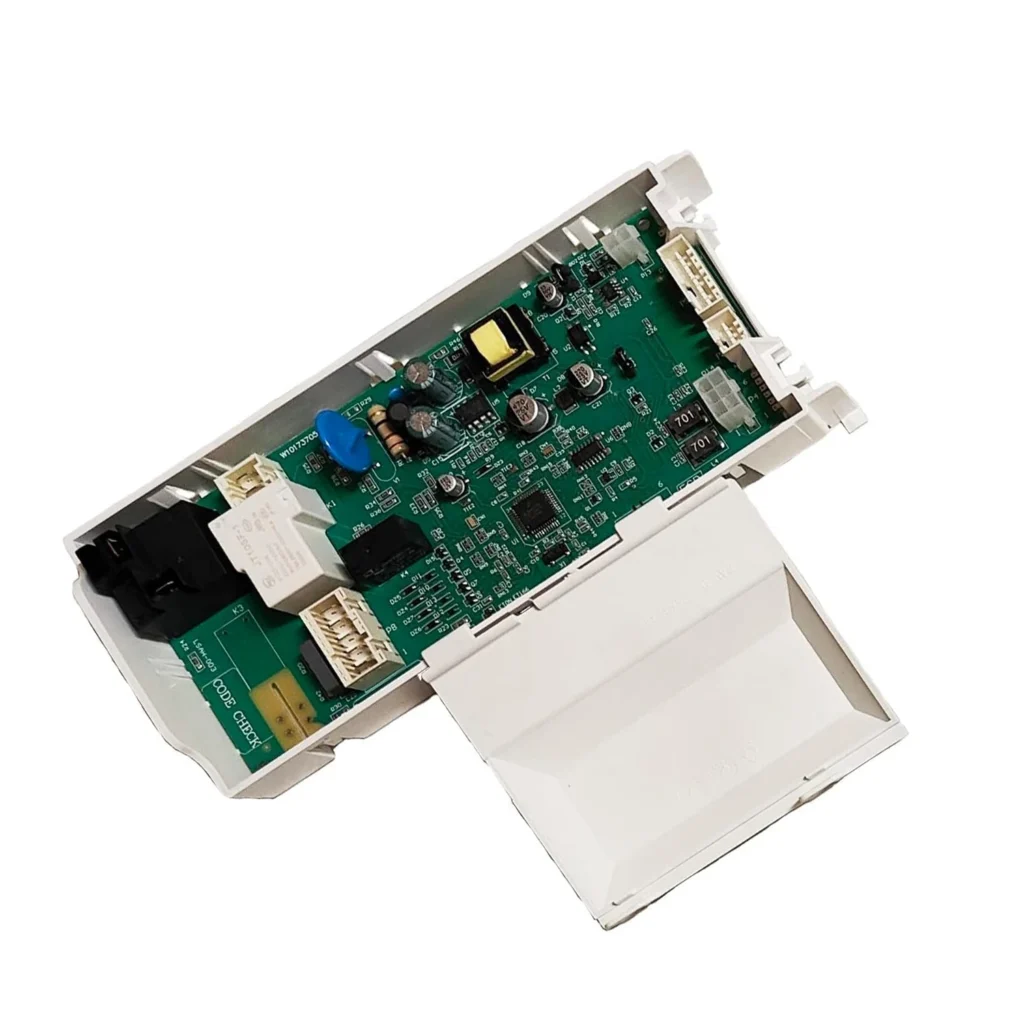
You load wet towels, hit start, and instead of that familiar hum, your Whirlpool dryer flashes F01 on the display and goes silent. One user described it perfectly: "I quickly determined from Googling around that F01 on the Whirlpool dryer was an indication that the controller board was having some issues." You're not alone — this is one of the most common error codes on Whirlpool, Maytag, Kenmore, and Amana dryers built in the last decade.
The good news? It's a specific failure with a specific fix. The bad news? The part isn't cheap, but it beats a $400 service call.
What F01 Actually Means
F01 translates to "Primary Control Failure" or "EEPROM Communication Error." In plain English, the electronic main control board — the computer that runs your dryer — can no longer communicate with its internal memory chip. This happens when the board experiences electrical stress, power surges, or simply wears out after thousands of cycles.
The control board (part number W10174745) manages everything: reading moisture sensors, controlling the motor speed, regulating heat, and timing the cycle. When it fails, you'll see erratic behavior beyond just the error code. Your dryer might not turn on at all, shut off mid-cycle without warning, or display the F01 code intermittently before failing completely.
Most Likely Causes (Ranked)
1. Failed Electronic Control Board (90% probability): The EEPROM chip on the board has corrupted memory or a failed solder joint. Power surges, electrical shorts, and heat cycling over time cause this. Common on models WED9400SW1, WED9400SW2, WGD9400SW1, WED9200SQ1, and dozens of others built between 2008-2016.
2. Power Supply Issue (8% probability): A tripped breaker, loose connection at the terminal block, or failing household voltage can trigger false F01 codes. Check your breaker panel first — dryers need both legs of 240V to function properly.
3. Wiring Harness Damage (2% probability): Rodent damage, pinched wires during installation, or corroded connectors at the control board can mimic a board failure. Inspect all visible wiring before replacing the board.
Step-by-Step Fix
Tools you'll need: Phillips screwdriver, 1/4" nut driver, smartphone camera
Step 1: Verify the diagnosis. Unplug the dryer completely for 5 minutes. Plug it back in and try to run a cycle. If F01 returns immediately or within minutes, the control board is toast. Don't skip this step — you might just need to reset the board.
Step 2: Unplug and access the control board. Disconnect power at the breaker for safety. Remove the two screws on the back of the dryer near the top corners. Lift the top panel up and tilt it back — it's hinged at the front. The control board sits inside a metal bracket on the right side.
Step 3: Document your wiring. Take clear photos of every wire connector on the board before touching anything. They're keyed so you can't connect them wrong, but a photo saves frustration. One DIYer said: "I googled the code and came up with a bad control board, took a picture, and unplugged then replugged only one at a time. All was well, works perfectly!"
Step 4: Remove the old board. The board is mounted to a large metal bracket. You can either work with it in place or remove two more screws to detach the entire bracket from the chassis (easier if you have limited hand space). Remove the single screw holding the board to the bracket. Push in on the plastic tab at the bottom with a flathead screwdriver and slide the board down to release the plastic feet from their slots.
Step 5: Install the new W10174745 board. Slide the new board onto the mounting bracket until the plastic feet click into the slots. Reinstall the mounting screw. Reconnect all wire harnesses firmly — you should hear and feel each connector click into place. If you removed the bracket, reattach it to the chassis.
Step 6: Test before reassembly. Plug the dryer back in (or flip the breaker) before putting the top panel back on. Run a test cycle. The display should light up normally with no error codes. If it works, shut it down, unplug, and reinstall the top panel.
Total repair time: 15-30 minutes for most people, even if you've never opened a dryer before.
When the Fix Doesn't Work
If you install the new board and still get F01, check these things:
- Voltage at the outlet: Use a multimeter to verify 240V across both hot legs. A missing leg will cause communication errors.
- Corroded connectors: Inspect each wire connector for green corrosion or melted plastic. Clean with electrical contact cleaner or replace the harness.
- Faulty user interface board: On some models, a separate touchpad board talks to the main control. If that board is bad, you'll still get errors.
If none of that helps, you likely have a wiring fault inside the dryer cabinet that needs professional diagnosis.
Frequently Asked Questions
Can I repair the control board instead of replacing it?
Technically yes, if you're skilled with a soldering iron and can identify failed capacitors or EEPROM chips. Realistically, no. The board costs $278.99 and takes 20 minutes to swap. Repair attempts often fail within weeks, and you'll have wasted hours troubleshooting. After thousands of repair calls, I've never seen a board repair outlast a replacement.
Will unplugging the dryer for 24 hours reset the F01 error?
Sometimes, but it's temporary. A hard reset (unplug for 5+ minutes) can clear a one-time glitch caused by a power surge. If the error returns after the next cycle, the board has permanent damage. Don't waste a day waiting — test after 5 minutes. If F01 comes back, order the part.
Is W10174745 the right part for my Kenmore or Maytag dryer?
Yes, this board works across Whirlpool brands. It replaces WPW10174745, W10182366, and W10200473. Compatible models include WED9400SW1, WED9400SU2, WGD9400SW1, WED9200SQ1, and over 100 others. Check the data plate inside your door or on the back panel for your exact model number, then cross-reference with the compatibility list on the product page. If your model starts with WED, WGD, MEDB, MGDB, or 110.6 (Kenmore), this is likely your part.
Before ordering a new control board, try a hard reset: unplug the dryer for 5 full minutes, then plug it back in. If F01 returns immediately or within one cycle, the board is definitely bad. This saves you from replacing a board that just needed a reset after a power surge.
Need the control board or touchpad?
Genuine OEM & aftermarket options in stock