
How to Replace WB24T10058 Dual Element Infinite Control Switch on GE Range — Step-by-Step
Unplug range or flip breaker OFF before starting — you'll be working with 240V electrical connections
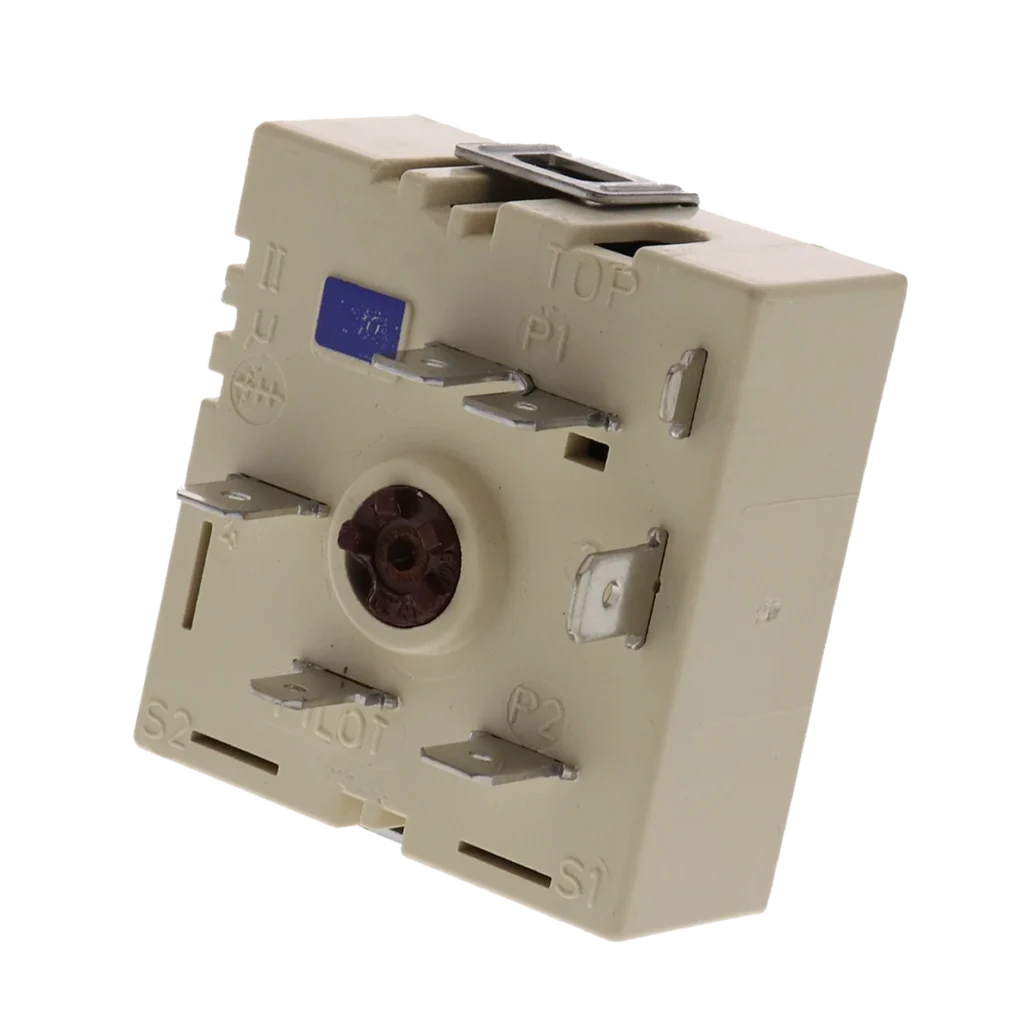
Your GE range burner won't heat, no matter which setting you turn the knob to. You've checked the element itself — it looks fine, no visible damage. The issue isn't the heating element; it's the infinite control switch that regulates power to it. When the WB24T10058 dual element control switch fails, you're left with a burner that either won't heat at all or cycles erratically between temperatures.
This switch controls both the inner and outer heating elements on dual-element burners, which is why it's called a "dual element" switch. When it goes bad, you'll notice one specific symptom: the element simply won't heat. The good news? Replacing this switch takes about 30-45 minutes and doesn't require any specialized tools.
What You Need Before Starting
Gather these tools before you begin:
- ¼-inch nut driver or socket wrench
- Phillips head screwdriver
- Flathead screwdriver (for wire terminals)
- Work gloves (sharp metal edges behind the control panel)
- Phone camera (to photograph wire connections)
Repair Time: 30-45 minutes
Difficulty: Moderate
Safety First
Unplug your range completely from the wall outlet. If it's hardwired, flip the dedicated breaker in your electrical panel to the OFF position. Verify power is off by trying to turn on a burner. Do not skip this step — you'll be working directly with electrical connections behind the control panel, and 240V can be lethal.
Step 1: Remove the Control Knobs and Back Panel
Pull off all the control knobs from the front of the range. They should pull straight off with firm pressure. If one's stuck, gently wiggle it side to side while pulling. Once the knobs are off, remove the screws securing the back control panel (typically 4-6 screws along the top edge). Lift the panel up and away to expose the switches mounted behind it.
Step 2: Photograph and Disconnect the Wire Terminals
Here's where your phone camera becomes critical. Take a clear photo of how the wires connect to the old switch before you touch anything. The WB24T10058 has multiple wire terminals — typically 4 to 6 connections depending on your model. Each wire should have a push-on connector. Use a flathead screwdriver to gently pry each connector off the terminal. Note that some wires may be stiff from heat exposure over the years.
Step 3: Remove the Mounting Screws
The infinite control switch is held in place by two mounting screws on the front of the control panel bracket. Use your ¼-inch nut driver to remove these screws. The switch body will have a shaft that extends through the front panel where the knob attaches — you may need to angle the switch slightly to maneuver it out of the mounting hole once the screws are removed.
Step 4: Install the New WB24T10058 Switch
Position your new switch so the control shaft goes through the front panel hole. Align the mounting holes and reinstall the two mounting screws — snug them firmly but don't overtighten. Now reconnect the wire terminals to match your reference photo. Push each connector firmly onto its terminal until you feel it click into place. Give each wire a gentle tug to verify it's secure.
Step 5: Reassemble and Test
Replace the back control panel and secure it with all screws. Push the control knobs back onto their respective shafts until they seat completely. Restore power to your range. Turn the burner control to medium and wait 2-3 minutes — you should see the element begin to glow. Test both the inner and outer element settings if your burner has dual zones.
Testing After Installation
Run the burner through all heat settings from low to high. The element should respond smoothly without flickering or failing to heat. If the burner still won't heat, double-check that all wire connections are fully seated on their terminals. A loose connection is the most common installation mistake.
Frequently Asked Questions
Will this switch work on my Hotpoint or Kenmore range?
Yes, the WB24T10058 is compatible with GE, Hotpoint, and Kenmore ranges. It replaces part numbers AP2622889, WB24T10031, and PS236780. Check your model number against the compatibility list — this switch fits models like JBP78WOB2WW, JB850DP2WW, JB710S0K4SS, and dozens of others in the JB and JBP series.
Can a bad switch damage the heating element?
No, a failed infinite control switch won't damage your heating element. The switch simply stops sending power to the element when it fails. However, if you've been running the burner trying to get it to heat, you may have put unnecessary stress on other electrical components, so it's best to replace the switch as soon as you notice the problem.
Why is my new switch getting warm during use?
Infinite control switches generate some heat during normal operation because they're regulating high-amperage current to the element. Warm to the touch is normal. If the switch body becomes too hot to hold your hand on for more than a second, you may have loose wire connections that need to be reseated, or you're dealing with a higher-amperage element than this switch is rated for.
Take a clear photo of wire connections before disconnecting anything — this reference photo will save you troubleshooting time later
Need the part for this repair?
WB24T10058 · In Stock · Ships next business day