
How to Replace DC34-00025B Washer Door Lock Switch on Samsung Washers — Step-by-Step
Always unplug your washer or shut off the dedicated breaker before working on door lock switches — you'll be handling electrical connections near potential water sources
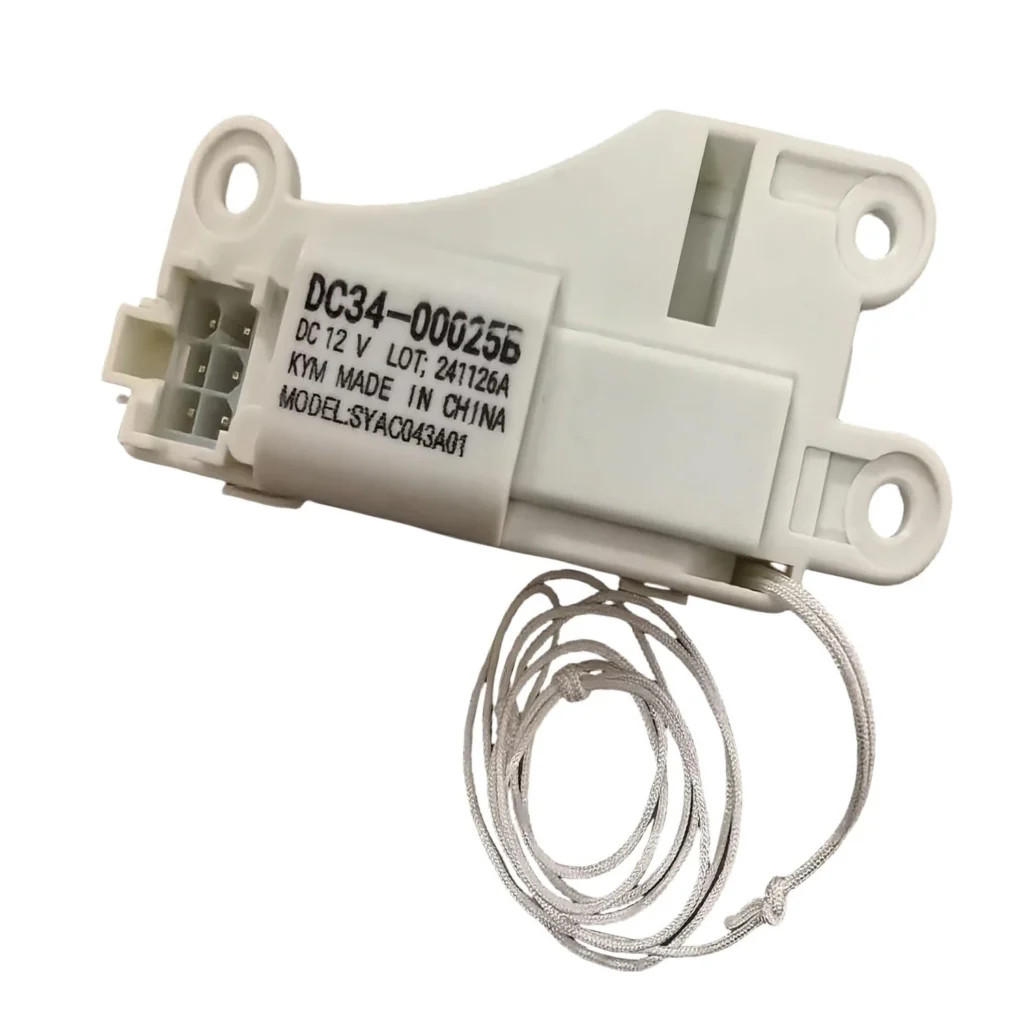
Your Samsung washer won't start, and you hear clicking sounds near the door. The control panel lights up, but nothing happens when you press start. You've closed the door firmly three times already. This is the classic signature of a failed door lock switch — specifically the DC34-00025B assembly that controls the electrical connection telling your washer the door is secure.
This switch fails on models like the WF42H5000AW/A2 and WF42H5400AW/A2 after hundreds of wash cycles. The good news? It's one of the simpler washer repairs you can tackle yourself.
What You Need Before Starting
- Phillips screwdriver (#2 size works for most Samsung models)
- Flathead screwdriver or trim removal tool
- Needle-nose pliers
- Towel (to protect floor and catch any water)
- Replacement DC34-00025B door lock switch
Estimated Repair Time: 20-30 minutes
Difficulty Level: Easy — No special skills required
Safety First
Unplug your washer completely before starting. Don't just turn off the cycle — pull the plug from the wall outlet. If your washer is hardwired, flip the dedicated breaker at your electrical panel. Water and electricity don't mix, and you'll be working near wiring harnesses. Even though the repair itself is straightforward, skipping this step is how people get hurt.
Step 1: Access the Door Lock Assembly
Open the washer door fully. You'll see the rubber door boot (gasket) around the opening. Pull the front edge of this boot away from the washer frame — it's held by a wire clamp underneath. Use your flathead screwdriver to carefully pry the wire clamp loose, working your way around until you can pull the boot's outer lip into the drum. You don't need to remove the boot completely, just fold it back enough to see the door lock mechanism mounted on the front panel.
Step 2: Remove the Old Door Lock Switch
The DC34-00025B lock assembly is held by three screws on Samsung front-load models. Remove these Phillips screws, but don't pull the assembly out yet. There's a wiring harness connected to the back. Gently pull the lock forward just enough to reach behind it. Press the release tab on the wire connector and unplug it. Now the old lock switch comes free. If the connector feels stuck, don't yank it — wiggle it side to side while pulling.
Step 3: Install the New DC34-00025B Switch
Connect the wiring harness to your new DC34-00025B switch first — you'll hear a click when it seats properly. Position the new lock assembly into the mounting holes where the old one came from. Thread in the three screws and tighten them firmly, but don't overtighten. Samsung uses plastic mounting tabs that can crack if you muscle the screws too hard.
Step 4: Reinstall the Door Boot
Pull the rubber door boot back over the front panel edge. Make sure it's seated evenly all the way around — lumps or gaps will cause leaks. Stretch the wire clamp back into its groove in the boot, starting at the top and working your way around. Use your needle-nose pliers to pull the clamp tight. The boot should sit flush against the panel with no wrinkles at the front.
Step 5: Test the Door Lock Function
Plug your washer back in. Close the door and start any wash cycle. You should hear a distinct click or clunk as the new lock engages — that's the solenoid activating. The door should feel locked when you try to pull it open. Let the washer run for two minutes, then cancel the cycle. The door should unlock within 30 seconds. If it stays locked longer, you may have a control board issue, but that's rare with this specific part failure.
Testing After Installation
Run a quick rinse cycle with no clothes to verify everything's working. Watch for leaks around the door boot area during the fill cycle. The control panel shouldn't show any error codes. On Samsung models, a persistent door lock error code (typically dE, dE1, or dE2) after replacing the switch usually means there's a wiring problem or the switch wasn't fully connected.
Frequently Asked Questions
Will this DC34-00025B switch work on my specific Samsung washer model?
This part fits dozens of Samsung front-load washer models including the WF42H5000AW/A2, WF42H5200AF/A2, WF42H5400AW/A2, WF42H5600AP/A2, and WB09H7300GP/A1 series. Check the compatible models list on the product page, or look for the original part numbers AP5799391 or PS8763546 in your washer's service manual. If your model's listed, it's a direct fit.
Why did my door lock switch fail in the first place?
The DC34-00025B contains a solenoid and plastic locking mechanism that cycles every single wash. After 3-5 years of regular use, the internal contacts wear out or the plastic latch weakens and cracks. Hard water areas see faster failure because mineral deposits can gum up the locking mechanism. Slamming the washer door repeatedly also accelerates wear on the switch components.
Can I just bypass the door lock and run my washer without it?
No — and you really shouldn't try. The door lock is a safety interlock that prevents the washer from spinning with the door open. Modern Samsung washers won't operate at all without a functioning door lock signal. Even if you could bypass it electrically, you'd risk the door flying open during high-speed spin cycles, which creates a serious safety hazard and water damage risk.
Take a photo of the wire connector orientation before unplugging the old switch so you know exactly how the new one connects
Need the part for this repair?
DC34-00025B · In Stock · Ships next business day