
How to Replace ABQ75742501 Dishwasher Drain Pump on LG Dishwashers — Step-by-Step
Disconnect power at the breaker and shut off water supply before working on dishwasher components. Residual water in the pump and lines can spill during removal.
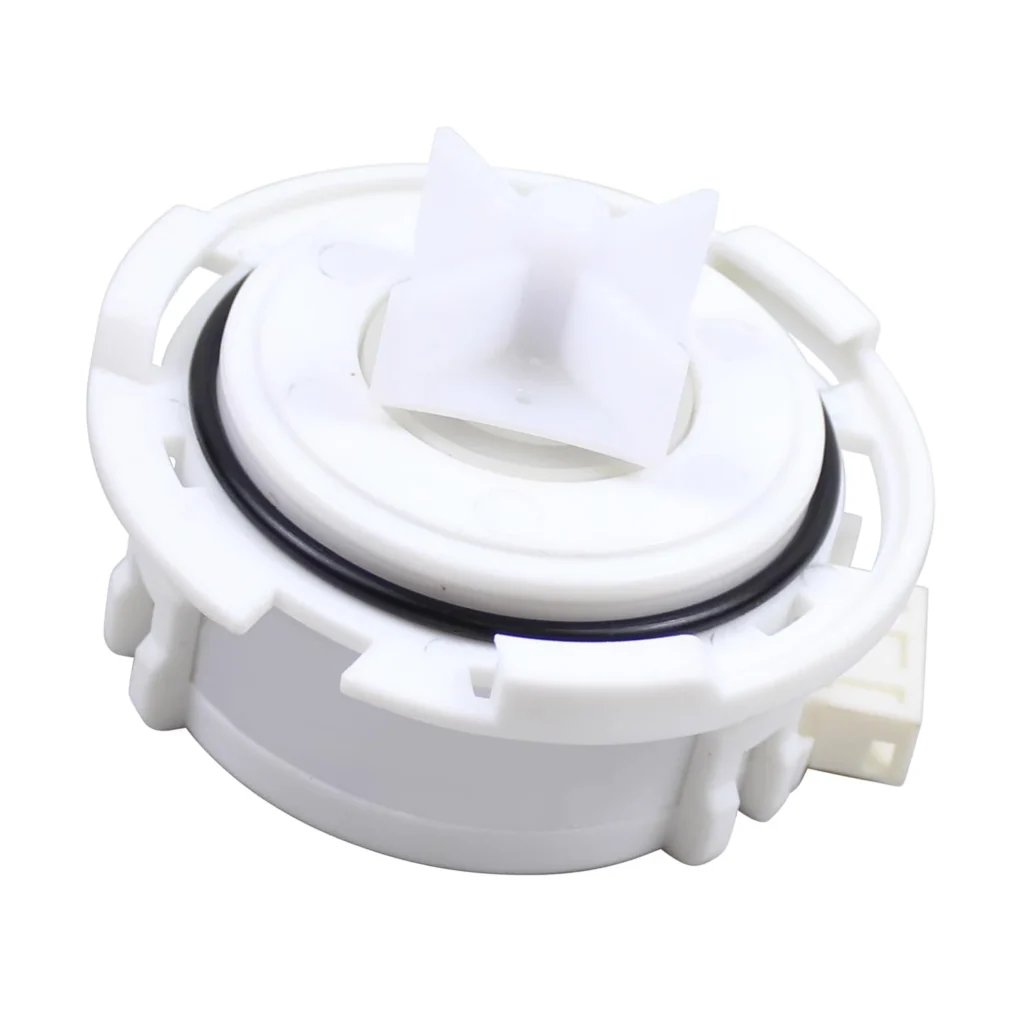
You load the dishwasher, start the cycle, and walk away. Twenty minutes later, you open the door to find three inches of standing water and your dishes still covered in soap. If you're hearing a grinding noise during the drain cycle or noticing water pooling at the bottom after every wash, your LG's drain pump assembly is likely shot.
This happens on LDF5545SS, LDP6797BD, and dozens of other LG models when the internal impeller wears out or the pump motor finally gives up after years of pushing soapy water through the drain line. The good news? You can replace the ABQ75742501 drain pump yourself in about 45 minutes with basic tools.
What You Need Before Starting
Gather these items before you disconnect power:
- Phillips screwdriver
- Flathead screwdriver
- Needle-nose pliers
- Towels (there will be residual water)
- Shallow pan or bowl
- Work gloves
Repair Time: 45-60 minutes
Difficulty: Moderate
Safety First
Dishwashers operate on 120 volts and connect directly to your home's drain system. Before you touch anything, flip the breaker that controls your dishwasher or unplug it from the wall outlet if accessible. Turn off the water supply valve under your sink. You'll be working with electrical connections and water lines — skip this step and you're asking for trouble.
Step 1: Access the Dishwasher's Bottom Panel
Pull out the bottom dish rack completely. Remove the spray arm by turning it counterclockwise — most LG models have a simple twist-off mechanism. Take out the filter assembly next. You'll see a cylindrical filter in the center of the tub floor — lift it straight up. Now remove the fine mesh screen underneath. This exposes the sump area where the drain pump sits.
Step 2: Remove the Lower Spray Arm Tower
The spray arm tower (the plastic column in the center) needs to come out. There's usually a single screw at the base — remove it with your Phillips screwdriver. Lift the entire tower assembly straight up and set it aside. You now have clear access to the pump housing below the tub.
Step 3: Disconnect the Old Drain Pump
Tip the dishwasher back slightly or remove the lower front panel to access underneath. You'll see the drain pump mounted to the bottom of the tub with the drain hose attached. Use your pliers to squeeze the spring clamp on the drain hose and slide it back. Pull the hose off — expect some water to spill out, which is why you brought towels. Disconnect the wire harness by pressing the tab and pulling straight out. Remove the mounting screws holding the pump to the sump housing (typically two or three screws).
Step 4: Install the New ABQ75742501 Pump Assembly
Position your new ABQ75742501 pump assembly onto the mounting points. Thread in the mounting screws and tighten them evenly — don't overtighten or you'll crack the plastic housing. Reconnect the wire harness until you hear it click into place. Slide the drain hose back onto the pump outlet and reposition the spring clamp. Give the hose a gentle tug to confirm it's seated properly.
Step 5: Reassemble and Test
Reinstall the spray arm tower and secure it with the mounting screw. Drop the mesh screen back into position, followed by the cylindrical filter. Twist the lower spray arm back on clockwise until it locks. Slide the bottom rack back in. Turn on the water supply and restore power at the breaker.
Run a quick rinse cycle without dishes. Listen carefully — you should hear the pump activate with a smooth humming sound, not the grinding or squealing noise you had before. Check underneath for leaks during the drain cycle. If water's flowing out and the tub's emptying completely, you're done.
Testing After Installation
After your test cycle completes, open the door and check the bottom of the tub. It should be completely dry with no standing water. Run your hand along the pump connections underneath — everything should be bone dry. If you notice moisture, recheck your hose clamp and make sure it's positioned correctly over the ribbed section of the pump outlet.
Run one full normal cycle with dishes to confirm everything's working under real-world conditions. The drain cycle should be noticeably quieter than before, and your dishes should come out clean without soap residue from sitting in undrained water.
Frequently Asked Questions
Can I replace just the gasket instead of the entire pump assembly?
No, the gasket isn't sold separately. LG only offers the complete ABQ75742501 pump assembly as a replacement part. The gasket is molded into the housing and can't be purchased on its own.
My dishwasher squeals every time it pumps water — is this definitely the pump?
That squealing noise almost always means the pump's internal bearings or impeller are worn out. The motor still runs, but damaged components inside create that high-pitched sound. Replacing the entire pump assembly fixes it.
The pump motor runs when I test it with direct power, but the dishwasher still won't drain — what gives?
If the motor spins with 120 volts applied directly but the dishwasher doesn't drain during normal cycles, check if the pump's actually getting power during the drain phase. Use a multimeter to verify voltage at the pump connector when the cycle reaches the drain step. No voltage means your control board's faulty, not the pump itself.
Place towels under the pump area before disconnecting the drain hose — there's always more water trapped in there than you expect, and it'll save your floor.
Need the part for this repair?
ABQ75742501 · In Stock · Ships next business day