
How to Replace W10467289 Water Temperature Sensor on Whirlpool Washer — Step-by-Step
Unplug washer and turn off water supply valves before accessing internal components. Water and electrical connections near the inlet system create shock hazards.
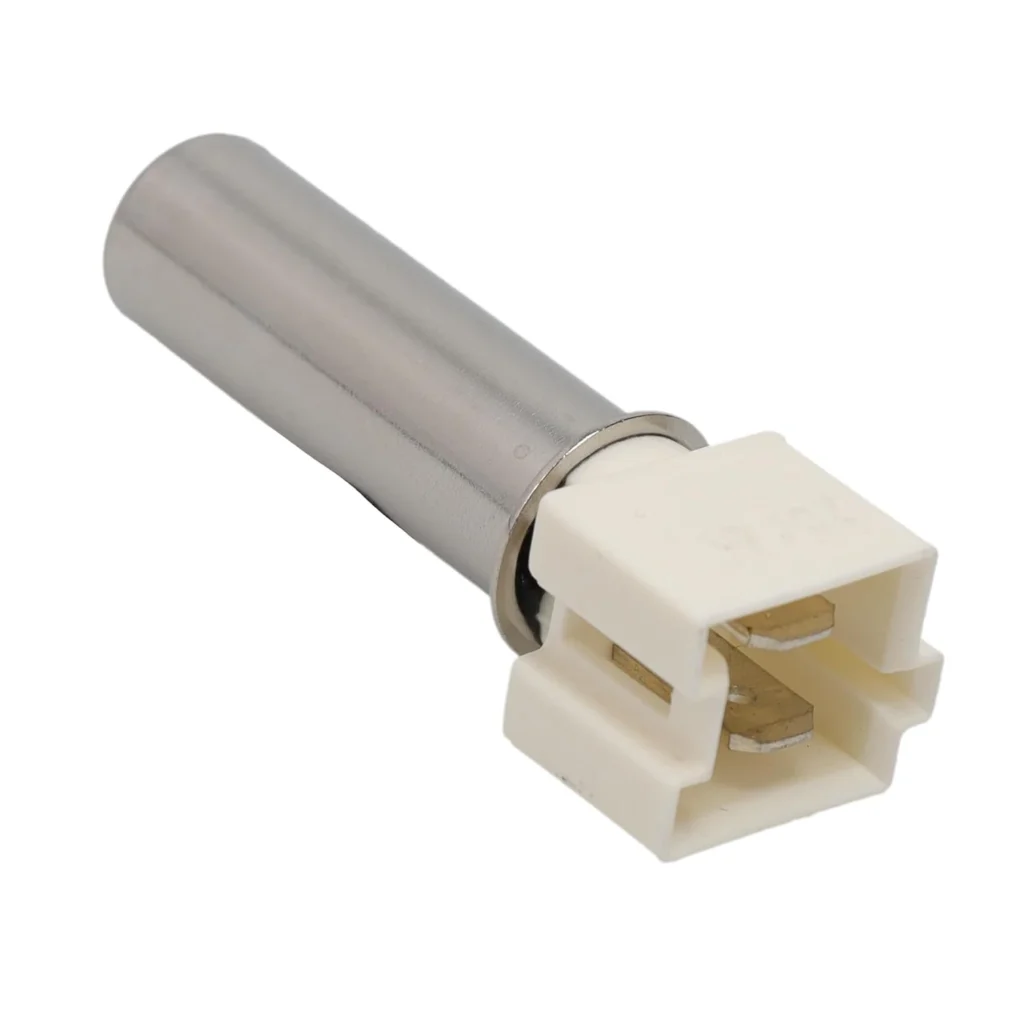
Your Whirlpool washer flashes an error code, refuses to advance past the wash cycle, or runs through an entire load on cold water even when you've selected hot. Before you call a repair tech for $200, here's what you need to know: the water temperature sensor (W10467289) fails more often than most people realize, and you can swap it yourself in about 20 minutes.
One user put it perfectly: "Replaced the water temperature sensor and cleared out the error codes. Washer has been working fine. Turned out to be a very easy fix." That's the experience most people have with this repair — straightforward, no special skills required.
What You Need Before Starting
Tools required:
- Nut driver set (1/4" most common)
- Flashlight
- Towel or small container (to catch residual water)
Estimated time: 15-30 minutes
Difficulty: Very Easy
Important note: This sensor does NOT include the seal (WP8540766). If your original seal is cracked or damaged, order it separately before starting.
Safety First
Unplug your washer completely before touching anything inside. Even though you're working with low-voltage sensor wiring, you'll be accessing areas near the water inlet system. Water and electricity don't mix. Also, turn off both hot and cold water supply valves to prevent accidental flooding when you're working around the inlet area.
Step 1: Access the Sensor Location
Here's where a lot of people get tripped up. Most YouTube videos show front-panel removal, but if you've got a Whirlpool Duet Sport or similar model, the sensor is actually at the rear. As one frustrated DIYer discovered: "Our washer is a whirlpool duet sport and the video they have on here said to remove the front but not on this model you do have to remove the back to get to the sensor."
Pull your washer away from the wall far enough to work comfortably. Remove the screws holding the back service panel (usually 4-6 screws around the perimeter). The temperature sensor sits near the water inlet valves — look for a small cylindrical component with two wire connectors.
Step 2: Inspect the Wiring Before Removing Anything
This step saves people from ordering parts they don't actually need. One user traced their "bad sensor" problem to something completely different: "I traced the black wires from the temperature sensor and wiggled them as the washer was running. At one zip tie every time I moved the wires the washer would stop running and the error code would flash. Sure enough, like many others posted, the vibration from the machine had split the wire."
Before disconnecting anything, visually inspect the wiring harness from the sensor all the way to the main control board. Look for frayed insulation, pinched wires at zip ties, or any spots where vibration might have caused wear. If the wiring is damaged, you might just need a splice repair instead of a new sensor.
Step 3: Disconnect and Remove the Old Sensor
Press the locking tab on the wire harness connector and pull straight off. Don't yank on the wires themselves. The sensor typically twists counterclockwise to unlock from its mounting bracket, or it may be held by a single screw or clip depending on your exact model (WFW9400SW01, WFW97HEXR0, WFW95HEXW0, etc.).
Have your towel ready — a small amount of water may dribble out from the inlet manifold where the sensor sits. This is normal residual water, not a leak you caused.
Step 4: Install the New W10467289 Sensor
Check the rubber seal on the new sensor before installation. It should be seated properly in the groove. Line up the sensor with the mounting hole and twist clockwise (or secure with the retaining clip). You'll feel it click or seat firmly — don't overtighten if it's a threaded type.
Push the wire harness connector onto the new sensor until you hear or feel the locking tab engage. Give it a gentle tug to confirm it's secure. This connection failure causes as many "sensor problems" as actual bad sensors.
Step 5: Reassemble and Test
Reinstall the back panel, push the washer back into position (but not all the way — leave access in case you need to troubleshoot). Turn the water valves back on and plug in the washer.
Run a quick diagnostic cycle or just start a normal wash on hot water. The washer should now advance through all cycle stages without error codes. If your model has a diagnostic mode (usually accessed by a specific sequence of button presses — check your manual), run it to verify the sensor is reading correctly.
Testing After Installation
Start a small load using the hottest water setting available. Within the first few minutes, carefully touch the inlet hoses — the hot side should feel noticeably warm. The washer should transition from fill to wash to rinse without stopping or displaying error codes. Common error codes related to this sensor include F8E1, F8E2, or F26 on Whirlpool models.
If the error persists after sensor replacement, recheck your wiring inspection from Step 2. Damaged wiring between the sensor and control board causes identical symptoms to a failed sensor.
Frequently Asked Questions
Why does my washer work fine sometimes but throw errors randomly?
Intermittent connection problems cause this more often than the sensor itself. Temperature sensors fail due to thermal stress and mechanical wear over time, but loose wire connectors or damaged harnesses create sporadic issues. That's why the wiring inspection in Step 2 is critical — vibration from spin cycles can crack wire insulation at stress points, especially near zip ties.
Will this sensor fit my Maytag or KitchenAid washer?
Yes, W10467289 replaces WPW10467289, 8181705, 8182291, 8540225, and 8540226 across Whirlpool, Maytag, and KitchenAid models. Compatible models include the WFW9400 series, WFW97HEXR series, WFW95HEXL series, and dozens of others. Check the full compatibility list on the product page or match your model number against the replacement part numbers listed on your current sensor.
Can a bad temperature sensor cause the washer not to start at all?
Absolutely. Modern washers run extensive pre-cycle checks, and if the control board can't get a valid reading from the temperature sensor, it won't start the cycle. You'll usually see an error code displayed, but some models just refuse to start without explanation. Other symptoms include erratic temperature readings, failure to switch between cycle stages, or incomplete washing even on high heat settings because the washer thinks the water is a different temperature than it actually is.
Inspect wiring harness for vibration damage before replacing the sensor — damaged wires at zip tie points cause identical symptoms and waste your money on an unnecessary part.
Need the part for this repair?
W10467289 · In Stock · Ships next business day