
How to Extend Your Whirlpool Refrigerator Control Board Life — W10503278 Maintenance Guide
Always disconnect power at the circuit breaker before inspecting or replacing control boards. Capacitors can hold lethal charge even after power disconnection. Never spray cleaners directly on electronic controls.
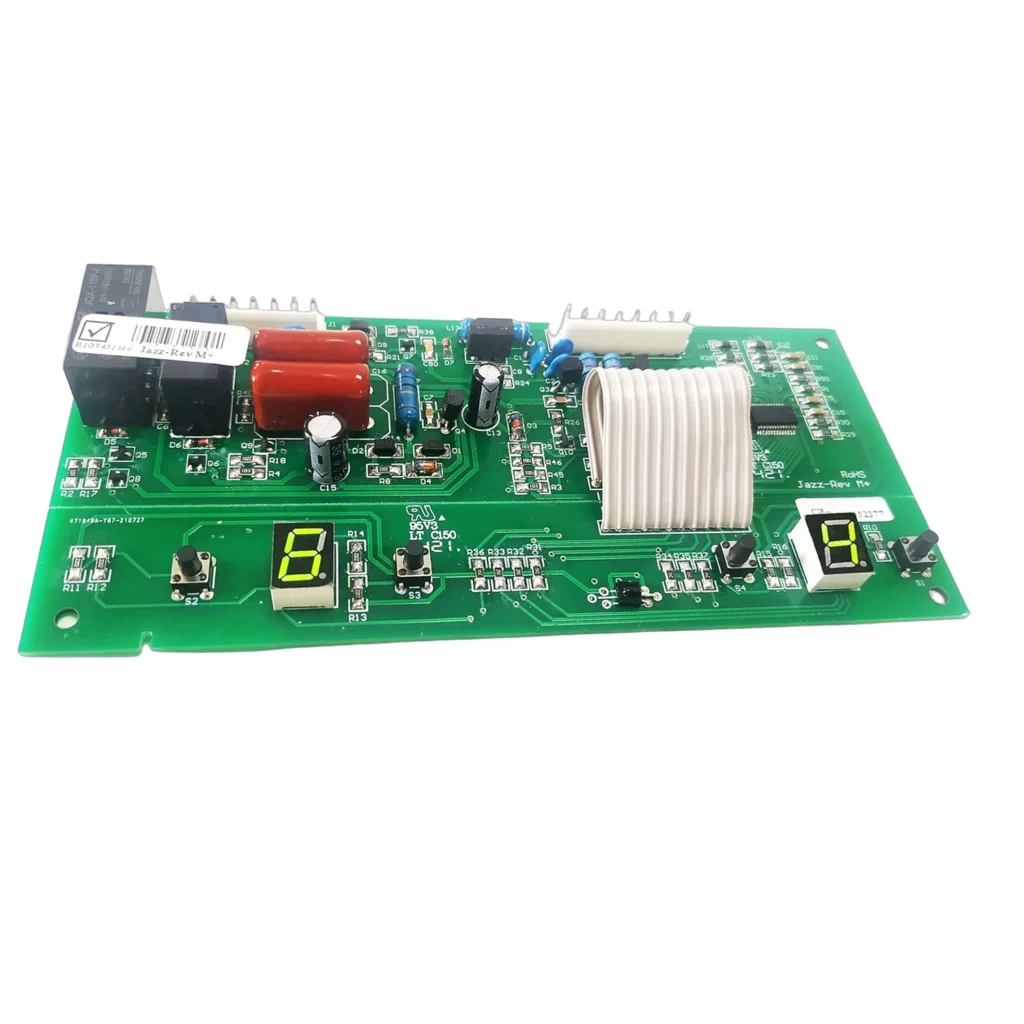
Here's the brutal truth about the W10503278 Jazz control board: most fail between 5-8 years, but I've seen properly maintained units running strong past 12 years. The difference? It's not luck — it's knowing what kills these boards and stopping it before it happens.
This electronic control board manages your Whirlpool, Maytag, KitchenAid, Kenmore, Amana, or Jenn-Air refrigerator's temperature regulation, defrost cycles, and compressor operation. When it goes, you're looking at $119 for the part alone. Let's make that replacement interval as long as possible.
How Long Should It Last?
Under ideal conditions, the W10503278 control board should deliver 10-15 years of service. Reality? Most homeowners see failure around the 6-8 year mark. The gap between these numbers comes down to three main factors:
Power quality. Voltage spikes from storms, utility switching, or heavy appliances on the same circuit gradually degrade capacitors and solder joints. Each spike is like a tiny hammer blow to delicate circuits.
Temperature extremes. This board sits behind your refrigerator's control panel, where ambient temperature swings stress electronic components. Summer garage installations are particularly brutal — ambient temps above 90°F accelerate component aging exponentially.
Humidity exposure. Coastal homes and humid climates allow moisture to creep into connector pins and circuit traces. You won't see corrosion immediately, but after 5-7 years, resistance builds up until connections fail intermittently.
Here's what actually affects lifespan: consistent power delivery extends life by 40-50%, proper ventilation adds 2-3 years, and keeping the board's environment stable (60-75°F, under 60% humidity) can push that 15-year maximum into reality.
Signs It's Wearing Out
Control boards rarely die instantly — they give warnings. Learning to recognize early symptoms means you can plan the replacement instead of discovering it when your freezer's thawed and you've lost $300 in food.
Temperature Fluctuations That Come and Go
Your refrigerator runs 3-4 degrees warmer than set, then corrects itself for a few days. This intermittent behavior screams early relay failure or capacitor degradation on the board. The relay contacts are developing resistance, causing inconsistent compressor operation. When it starts, temperatures swing 5-8 degrees before stabilizing. When it worsens, the swings become permanent and your compressor runs constantly trying to compensate.
Display Glitches or Partial Blackouts
The LED display shows partial segments, flickers when the compressor cycles, or dims randomly. This indicates voltage regulation problems on the board — typically failing capacitors in the power supply section. I've seen boards where the display works perfectly for 20 minutes after door opening, then dims as internal components heat up. That temperature-dependent failure tells you solder joints are cracking from thermal expansion cycles.
Defrost Cycle Problems
You notice frost building up on the back wall of your fresh food section, or ice forming around the freezer vents. The board controls defrost timing — when it's failing, defrost cycles skip or run too long. Check behind the crisper drawers for frost accumulation that shouldn't be there. Normal defrost leaves zero visible frost. If you're scraping ice monthly, the board's defrost timer circuit is compromised.
Unresponsive or Laggy Controls
You press temperature adjustment buttons and nothing happens for 3-5 seconds, or the board doesn't register your input at all. This microprocessor issue indicates the board's brain is struggling. Fresh boards respond instantly — any delay means the processor's clock circuit or memory is degrading. This symptom typically appears 12-18 months before complete failure.
Preventive Maintenance Schedule
Control boards don't need hands-on maintenance like mechanical parts, but they absolutely benefit from environmental management. Here's your realistic schedule:
Monthly: Check that your refrigerator's control panel area isn't accumulating dust. Dust traps heat and moisture. Wipe the panel with a dry microfiber cloth — never spray cleaner directly on controls. Verify the display shows stable numbers without flickering. Press each control button to confirm immediate response.
Quarterly: Pull the refrigerator forward and vacuum the condenser coils. Dirty coils force the compressor to run longer, which means more heat cycles for the control board. Each extended run cycle ages the board faster. Clean coils = shorter compressor cycles = cooler control board environment = longer board life.
Annually: Inspect the power cord and outlet for any signs of overheating — discoloration, melted plastic, loose connections. Check the outlet with a multimeter for consistent voltage (should read 115-125V). Consider installing a whole-appliance surge protector if you're in an area with frequent storms or power quality issues. This $30-50 investment can add years to your control board's life.
After any power outage: Once power returns, monitor your refrigerator for 24-48 hours. Note any unusual noises, temperature inconsistencies, or display anomalies. Power surges during restoration frequently damage control boards — catching symptoms early means you can replace the board before food loss occurs.
When to Replace vs Maintain
Let's be honest about the decision point. If your control board shows any of these symptoms and the unit is over 7 years old, replacement is smarter than waiting:
Replace immediately if: Display is completely dead with power confirmed at outlet, compressor won't start at all, or you smell burning plastic from the control panel area. These aren't maintenance issues — the board is done.
Replace proactively if: You're seeing multiple minor symptoms (occasional flicker + slow response + one temperature swing incident). Multiple symptoms indicate cascading component failures. The board might limp along for months, but failure during a vacation or holiday costs more than preventive replacement.
Maintain and monitor if: You have a single intermittent symptom that occurs less than once weekly, the unit is under 5 years old, and you've addressed power quality and environmental factors. Set a phone reminder to check weekly. Document each occurrence. Three occurrences in one month = time to order the replacement.
The W10503278 board fits dozens of Whirlpool family models, including WRF535SWHZ, WRB322DMBM, and WRB329DMBM series. If you're unsure about compatibility, the model tag inside your fresh food section lists your exact model number — match it against the compatible models list before ordering.
Environmental Factors That Kill Boards Fast
Where your refrigerator lives matters more than most people realize. These situations accelerate control board aging:
Garage installations in hot climates: Ambient temperatures above 90°F stress electronic components severely. If your garage hits 95-100°F in summer, your board is aging twice as fast as an indoor installation. Consider adding ventilation or moving the unit to a climate-controlled space if possible.
Near laundry equipment: Dryers create humidity spikes and vibration. Both are bad for control boards. The combination of steam from washing and vibration from spin cycles creates the perfect board-killing environment. Maintain at least 24 inches of separation if you must keep them in the same space.
Kitchens with poor GFCI protection: Old wiring or outlets without proper grounding leave your board vulnerable to every power fluctuation. If your kitchen wiring is over 20 years old and hasn't been updated, you're playing Russian roulette with a $119 control board. An electrician can test outlet quality for $50-75 — cheaper than early board replacement.
The Surge Protector Question
You'll see debate about whether surge protectors help refrigerators. Here's the straight answer: basic power strips do nothing useful because refrigerators draw too much current. You need an appliance-rated surge protector designed for motor loads — these handle the 15-20 amp draw and protect against voltage spikes.
I recommend them for two scenarios: areas with frequent thunderstorms or rural areas with overhead power lines. Both situations create regular voltage spikes that slowly kill control boards. The $40-60 investment in a proper appliance surge protector can extend board life by 3-5 years. That's a 3:1 return on investment.
Don't use surge protectors if: you're in a modern building with quality electrical service, you're in an urban area with underground utilities, or your electrical panel already has whole-house surge protection. Double protection doesn't help, and improper surge protectors can actually cause nuisance tripping.
What Actually Fails on These Boards
Understanding the failure points helps you recognize early symptoms. The W10503278 board has four common failure modes:
Relay contacts: These mechanical switches control compressor and fan operation. They click hundreds of thousands of times over the board's life. Eventually contacts pit and develop resistance, causing intermittent operation. You'll hear this as inconsistent clicking patterns or delayed compressor starts.
Electrolytic capacitors: These components smooth power delivery but have limited lifespans. They dry out over 7-10 years, causing voltage regulation problems. Symptoms include display dimming, erratic behavior when other appliances start, or complete board shutdown during compressor start cycles.
Solder joints: Thermal cycling expands and contracts the board material, eventually cracking solder connections. This creates intermittent failures that worsen over time. Temperature-dependent symptoms — works when cold, fails when warm — indicate solder joint issues.
Microprocessor degradation: The board's computer chip simply wears out. Response delays, forgotten settings, or random errors indicate processor problems. There's no maintenance for this — when the processor starts failing, replacement is your only option.
Frequently Asked Questions
Can I Clean a Control Board to Fix Problems?
Cleaning rarely fixes electronic control board issues because failures are internal to components, not surface contamination. However, if you have a board that's been exposed to kitchen grease or moisture, gentle cleaning with 90%+ isopropyl alcohol and a soft brush can sometimes restore function. Power off completely, remove the board, clean both sides, let it dry 24 hours, and reinstall. This works maybe 5% of the time — usually for boards that failed due to contamination rather than component wear. Don't waste time cleaning if the board is over 8 years old or shows physical damage like burned components or swollen capacitors.
Will a Voltage Stabilizer Extend Control Board Life?
If you're experiencing frequent power fluctuations — lights dimming when appliances start, digital clocks losing time regularly — a voltage stabilizer or AVR (automatic voltage regulator) can definitely help. These devices maintain consistent voltage delivery even when utility power varies. For refrigerators, this means steadier operation and less stress on the control board's power supply section. Expect 20-30% lifespan extension in areas with poor power quality. However, if your power is already stable (test with a multimeter over several days), a stabilizer won't provide additional benefit. They're a solution to a specific problem, not a universal upgrade.
How Do I Know If It's the Control Board or Another Component?
This is the expensive question — misdiagnosing the control board costs you $119 and doesn't fix the problem. Start with basics: verify power at the outlet, check that the circuit breaker hasn't tripped, and confirm the door switches work (interior light comes on). If those are good, test whether the compressor runs when you bypass the board's relay (requires multimeter skills). Temperature sensor failures mimic control board issues — test sensor resistance with an ohmmeter and compare to the service manual specs. When multiple symptoms appear together (dead display plus no cooling plus no fan), the board is likely culprit. Single isolated symptoms (just temperature issues, just fan problems) often indicate specific component failures rather than board failure. If you're not confident diagnosing, the $100-150 for a service call beats the cost of wrong-part purchases.
Element showing wear?
W10503278 · Replace before it fully fails