
How to Replace MCK49049101 Lint Filter Cover on LG Dryer — Step-by-Step
Unplug dryer before starting repair. Check that new cover clips are fully engaged before operating dryer.
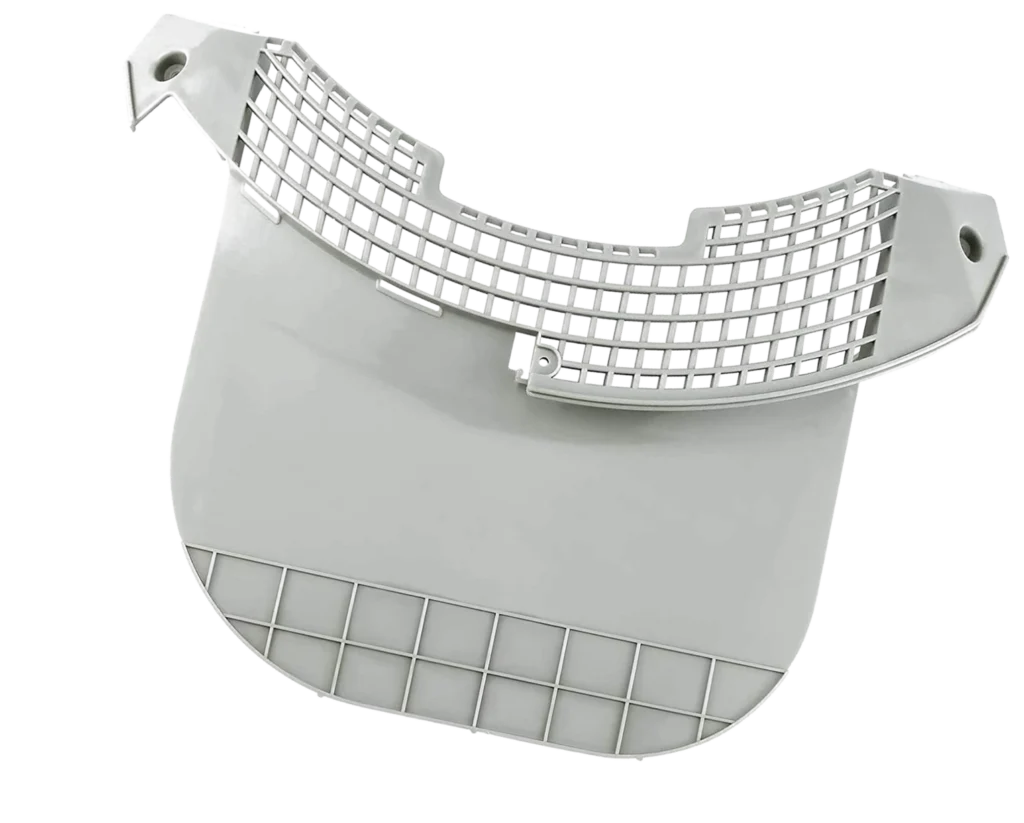
Your LG dryer's lint filter cover cracked right down the middle, and now it won't seal properly. You're pulling lint from places it shouldn't be, and you're worried about fire risk. This is one of those repairs that looks intimidating but takes about 15 minutes once you know the trick.
What You Need Before Starting
The beauty of this repair is you probably won't need any tools at all. The lint filter cover on models like the DLEX3570V, DLE2601W, and DLEX3001W is designed to snap in and out.
- New MCK49049101 lint filter cover
- Flathead screwdriver (optional, for stubborn clips)
- Vacuum with hose attachment
- Damp cloth
Time needed: 10-15 minutes
Difficulty: EASY
Safety First
Unplug your dryer before starting. Even though this is a simple plastic cover replacement, you'll be reaching into areas near electrical connections. If your dryer is gas-powered, you don't need to shut off the gas for this repair — the cover is nowhere near the burner assembly.
Step 1: Remove the Old Lint Filter and Cover
Pull out the lint screen completely from the housing. You'll see the lint filter cover surrounding the opening where the screen slides in. On most LG models, this cover has two clips at the top and sometimes a tab at the bottom. Look closely — you might see small notches where the clips engage.
Step 2: Release the Retention Clips
Press inward on both sides of the cover near the top while pulling forward gently. The clips should disengage. If they're stubborn, slide a flathead screwdriver behind the cover at the clip points and gently pry outward. Don't force it — these clips can be tight from years of heat cycling, but they will release. Once the top clips are free, the bottom should pivot out easily.
Step 3: Clean the Housing Area
With the cover removed, you're looking at the lint duct opening. Use your vacuum to pull out any accumulated lint from the housing area and the edges where the new cover will sit. Wipe the mounting surface with a damp cloth. Built-up residue here will prevent the new cover from seating properly and can cause air leaks.
Step 4: Install the New MCK49049101 Cover
Line up the new cover with the opening. Start with the bottom edge — there's usually a small lip or tab that tucks in first. Once the bottom is positioned, push the top of the cover firmly until you hear both retention clips snap into place. Give it a tug to confirm it's secure. The cover should sit flush with the dryer front panel with no gaps.
Step 5: Test the Lint Screen Fit
Slide your lint screen back into the housing. It should glide in smoothly without binding or scraping. The handle should sit flush when fully inserted. If there's any resistance or the screen doesn't seat all the way, pop the cover back off and check that the mounting clips engaged properly on both sides.
Testing After Installation
Plug the dryer back in and run it empty on air fluff for two minutes. Open the door and check around the lint filter area — you shouldn't feel any air escaping from behind the cover. Pull the lint screen out and inspect the seal. A properly installed cover creates an airtight seal that forces all exhaust air through the screen, not around it.
Frequently Asked Questions
Will this cover fit my Kenmore dryer that was made by LG?
Yes. Many Kenmore 796-series dryers were manufactured by LG and use the exact same lint filter assembly. Check your model number against the compatibility list. Models like the DLEX3570V, DLEX3001W, and DLE2601W all use this same cover design. The part number AP5071745 crosses to multiple Kenmore models.
My old cover isn't cracked — it just doesn't stay in place anymore. Do I still need to replace it?
Absolutely. If the retention clips have worn down or broken internally, the cover can't maintain the seal needed for proper airflow. This forces your dryer to work harder and can lead to overheating. A loose lint filter cover is actually more dangerous than a cracked one because lint escapes into the cabinet where it accumulates near heating elements.
Can I super glue the crack in my old cover instead of replacing it?
Don't. The plastic in these covers is exposed to heat cycles between 120-160°F. Adhesives break down quickly under these conditions, and when they fail, you'll have plastic fragments potentially blocking your exhaust duct. For $40.99, the MCK49049101 replacement gives you a proper factory fit that'll last another decade. Plus, cracked covers usually have compromised retention clips too — glue won't fix that.
Clean the entire lint duct pathway while you have the cover off. Use a dryer vent brush to reach deep into the housing for maximum airflow.
Need the part for this repair?
MCK49049101 · In Stock · Ships next business day