
How to Replace DA97-08519A Dispenser Lever Assembly on Samsung Refrigerator — Step-by-Step
Work carefully when removing dispenser panel clips — excessive force can crack the plastic housing permanently
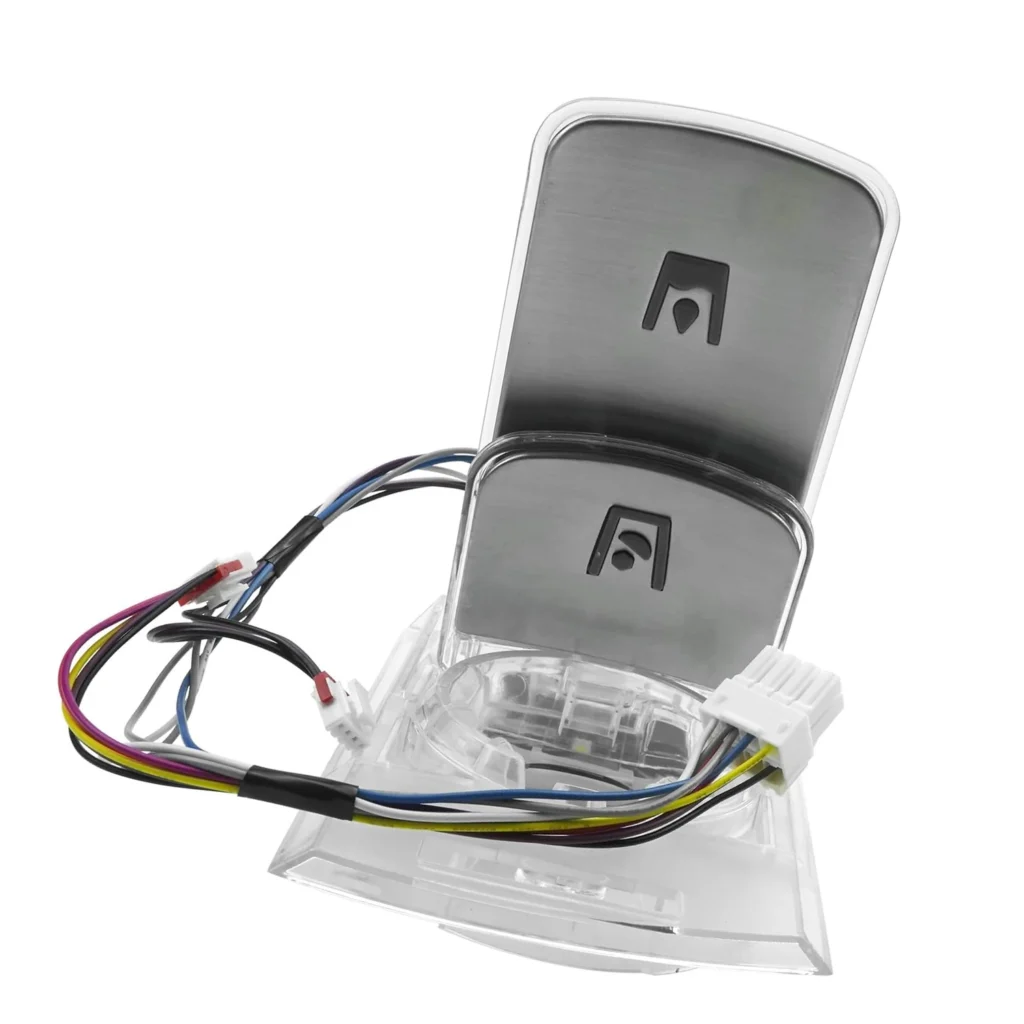
You press the lever expecting ice, and nothing happens. The ice maker's running fine, the bin's full, but that dispenser lever just won't trigger the mechanism. This is exactly what owners of Samsung RF4287HARS and RF4289HARS models experience when the DA97-08519A dispenser lever assembly fails — it's a mechanical issue, not an ice maker problem.
What You Need Before Starting
This repair requires minimal tools and takes about 15-20 minutes once you understand the dispenser panel removal process. You'll need:
- Phillips head screwdriver
- Flathead screwdriver (for trim clips)
- Towel or soft cloth (to protect surfaces)
- Your replacement DA97-08519A lever assembly
Difficulty: Moderate — Panel removal requires care
Estimated Time: 15-20 minutes
Safety First
You don't need to disconnect power for this repair since you're working on the exterior dispenser assembly. However, if you're uncomfortable working around the dispenser housing where wiring connects, unplug the refrigerator or turn off the circuit breaker. The main risk here is cracking the dispenser panel during removal — work slowly with the trim clips.
Step 1: Remove the Dispenser Control Panel
Open the left refrigerator door fully. You'll see the dispenser panel on the front. Look for Phillips screws at the top corners of the panel — usually two screws hidden under small caps or visible at the edges. Remove these screws carefully. Once the screws are out, gently pull the panel forward from the top, then lift up slightly. There are retaining clips at the bottom, so don't force it straight out.
Step 2: Disconnect the Lever Assembly Wiring
With the panel tilted forward, you'll see the back side. The lever assembly connects to a small wire harness that powers the micro switch. Press the tab on the connector and pull it straight off — don't yank on the wires themselves. If the connector is tight, wiggle it gently while pressing the release tab. Set the panel face-down on a towel to protect the finish.
Step 3: Remove the Old Lever Assembly
The DA97-08519A lever assembly is held in place by plastic mounting tabs that snap into the dispenser housing. You'll see two or three tabs depending on your model. Press these tabs inward while pushing the lever assembly forward from behind. It should release with moderate pressure. If it's stuck, check for any additional hidden clips around the perimeter — some Samsung models have a fourth retention point.
Step 4: Install the New Lever Assembly
Take your new DA97-08519A assembly and align it with the mounting holes in the dispenser panel. Push firmly until you hear the tabs click into place on all sides. The lever should move freely with a slight spring resistance. Connect the wire harness — it only fits one way, so don't force it. You should hear a definite click when it seats properly.
Step 5: Reinstall the Dispenser Panel
Hook the bottom clips of the panel back into the refrigerator door first, then rotate the top portion back into place. Replace the Phillips screws at the top corners and tighten them snug but not overtight — you're threading into plastic. Press around the edges of the panel to ensure all clips are seated flush.
Testing After Installation
Press the dispenser lever with an empty glass first. You should hear the dispenser motor activate even without ice flowing. If nothing happens, recheck the wire harness connection — that's the most common mistake. Once you confirm the motor activates, test with ice. The lever should trigger consistently with light pressure. If it requires excessive force, the assembly may not be fully seated in the mounting tabs.
Frequently Asked Questions
Will this lever assembly work on all Samsung French door refrigerators?
No, the DA97-08519A is specific to certain models like the RF4287HARS, RF4289HARS, RF4287HABP, and RF4287HAWP. Check your model number on the label inside the refrigerator door or use the compatibility list. Samsung uses different lever designs across their product lines, and installing the wrong one won't mount properly.
My ice dispenses but water doesn't after replacing the lever — what's wrong?
The lever assembly has two separate switch mechanisms — one for ice, one for water. If only one function works, the wire harness may not be fully connected, or you received a defective part. Disconnect and reconnect the harness, ensuring you hear it click. If the problem persists, the issue may be with the dispenser control board, not the lever itself.
Can I replace just the lever paddle instead of the whole assembly?
Samsung doesn't sell the paddle separately for this assembly. The DA97-08519A includes the complete lever, mounting bracket, and micro switches as one unit. Attempting to modify or glue a broken paddle won't restore proper switch function and will likely fail again quickly. The whole assembly replacement ensures reliable operation.
Place the dispenser panel face-down on a towel while working to prevent scratching the finish
Need the part for this repair?
DA97-08519A · In Stock · Ships next business day