
GE Oven Not Heating on Bake — 5 Causes & How to Fix
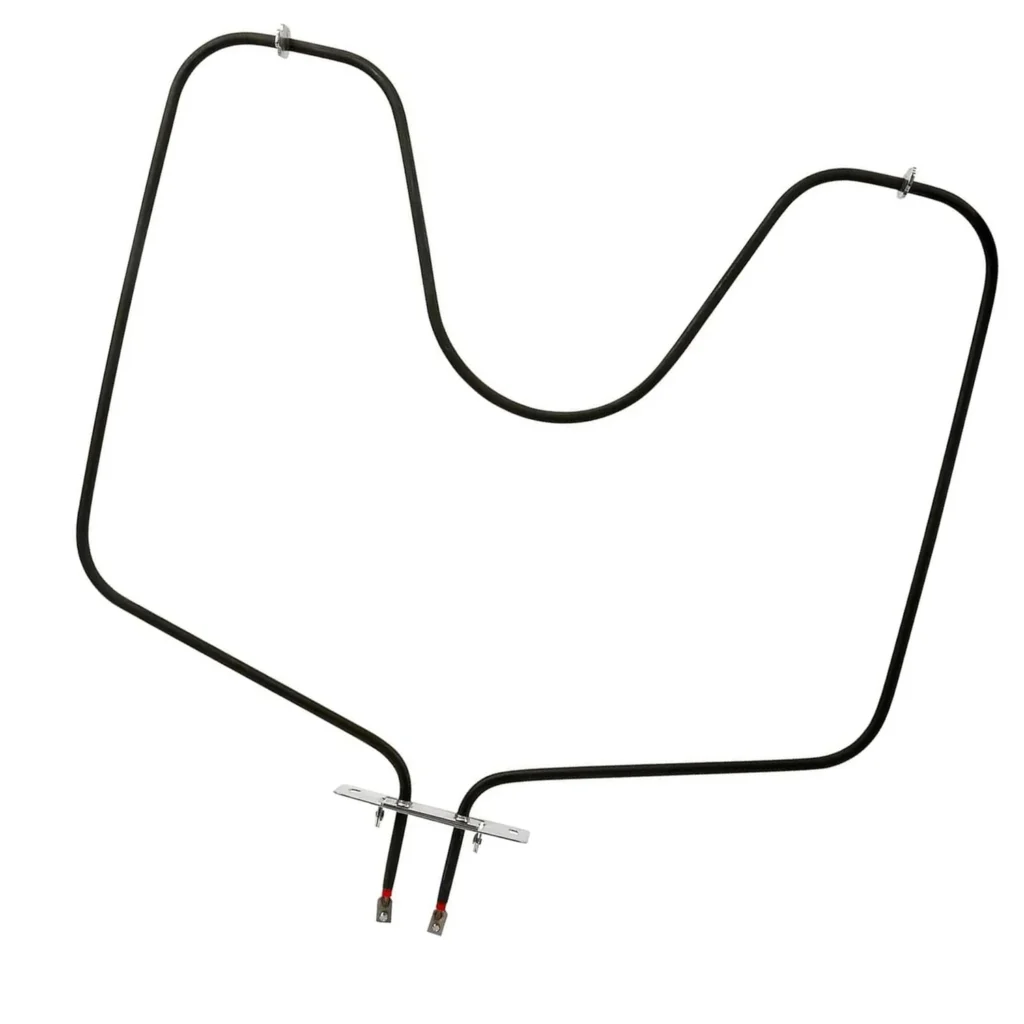
You're preheating your GE oven for dinner, the indicator light comes on, but 20 minutes later the oven's still cold. The broiler works fine, but bake mode? Nothing. This is the classic signature of a failed bake element — the most common failure point in any electric oven.
The bake element (part WB44X5082 for most GE, Hotpoint, and RCA models from the late 90s to early 2010s) sits at the bottom of your oven cavity and provides the primary heat for baking. When it fails, you're left with an expensive box that can't cook.
Here's how to diagnose what's actually wrong, starting with the most likely culprit.
Quick Symptom Check
Before you pull the oven out or order parts, confirm you're dealing with a bake element issue:
- Oven won't heat in bake mode — temperature stays at room temp or barely warm
- Broiler still works normally — proves the oven has power and control board is functional
- No glow from bottom element — a working bake element glows bright orange-red within 90 seconds
- Visible damage on element — blistering, breaks, or separation in the metal coil
- Tripped breaker after turning oven on — indicates a short to ground in the element
If three or more of these match your situation, you're almost certainly looking at element replacement.
Cause #1: Burned Out Bake Element (85% of Cases)
The bake element itself fails more than any other component. It's a resistive heating coil encased in metal, and after 8–15 years of thermal cycling, the resistance wire inside breaks.
How to diagnose:
- Turn oven to bake mode at 350°F
- Watch the bottom element through the oven window for 2 minutes
- A working element glows bright orange-red; a failed one stays dark
- If only part of the element glows, it's partially failed and needs replacement
Probability: 85% — This is your issue if the element doesn't glow at all or shows visible breaks, blistering, or separation. Elements don't "partly work" — once the coil breaks internally, current can't flow.
The fix: Replace with WB44X5082. It's a 15-minute job requiring only a ¼" nut driver. Unplug the oven, remove the two screws at the back of the element, pull it forward, disconnect the two wire terminals, and reverse the process with the new element. No calibration needed.
Cost: $47.99 for the part, $0 if you DIY or $120–180 for a service call.
Cause #2: Loose or Corroded Wire Connections (8% of Cases)
The bake element connects to your oven's wiring with two spade terminals at the back. These connections can loosen from vibration or corrode from moisture (especially if you're a heavy self-clean cycle user).
How to diagnose:
- Unplug the oven and pull it out from the wall
- Remove the lower oven back panel (usually 4–6 screws)
- Locate the bake element wire connections — they're where the element disappears through the back wall
- Look for discoloration, burn marks, or loose spade connectors
Probability: 8% — More likely if your oven worked intermittently before failing completely, or if it's in a humid environment.
The fix: If connections are just loose, disconnect them, clean with fine sandpaper, and reconnect firmly. If terminals are melted or heavily corroded, you'll need to replace the element anyway — those terminals are part of the element assembly.
Cause #3: Faulty Oven Sensor (4% of Cases)
Your oven has a temperature sensor probe (usually mounted on the upper back wall) that tells the control board when to cycle the element on and off. If this sensor fails or drifts out of calibration, the board won't energize the bake element.
How to diagnose:
- Test the element first — if it glows normally, the sensor's your problem
- Use a multimeter to check sensor resistance: disconnect it and measure across its two terminals
- At room temperature (70°F), it should read 1,080–1,120 ohms
- Readings below 1,000 or above 1,150 mean replacement
Probability: 4% — Suspect this if your oven heats erratically, overshoots temperature, or displays error codes (F2, F3, or F10 on GE models).
The fix: Replace the sensor probe. It's usually a $25–40 part held in with one screw and a plug connector. Takes 10 minutes.
Cause #4: Failed Relay on Control Board (2% of Cases)
The electronic control board has a relay that switches power to the bake element. That relay can fail, usually with a distinctive click when you start a bake cycle but no element glow.
How to diagnose:
- Confirm the element itself tests good with a multimeter (15–30 ohms resistance)
- Listen carefully when starting bake mode — you should hear a soft click from the control board
- If you hear the click but get no heat, and the element tests good, it's likely the relay contacts are burned
Probability: 2% — Rare, but possible on ovens 12+ years old. More common if you've had power surges.
The fix: Control board replacement, typically $150–250 for the part plus labor if you're not comfortable with it. This is getting into "might be time for a new oven" territory depending on age.
Cause #5: Tripped Thermal Fuse (1% of Cases)
Some GE models have a one-time thermal fuse that blows if the oven overheats dangerously. Once blown, it cuts power to the bake circuit permanently until replaced.
How to diagnose:
- This almost always happens after a self-clean cycle gone wrong
- The fuse is usually located on the back wall near the element connections
- Test continuity with a multimeter — it should show 0 ohms; infinite resistance means it's blown
Probability: 1% — Only if you recently ran self-clean and it shut off mid-cycle, or if you smelled burning.
The fix: Replace the thermal fuse ($15–25). But also investigate why it blew — usually means the oven sensor failed first and let temperature run away.
When to Call a Pro
Most bake element replacements are genuinely DIY-friendly if you're comfortable unplugging an appliance and using a screwdriver. But call a tech if:
- You're getting error codes along with no heat (F2, F3, F10) — may indicate board issues
- The breaker trips immediately when you turn on bake mode — possible short to chassis requiring meter diagnosis
- Your oven is hardwired (no plug) and you're not comfortable working with junction boxes
- Multiple components test bad — at that point, replacement vs. repair math shifts
For a simple element swap on models like the JBP26, JBP66, JBP75, or JBS03 series, you'll spend 15 minutes and $48. A service call for the same job typically runs $150–220.
Frequently Asked Questions
How long should a bake element last in a GE oven?
Typically 8–15 years depending on use frequency. Heavy users (daily baking) or frequent self-clean cycle users see the shorter end. The element experiences extreme thermal stress every cycle — expanding when hot, contracting when cool — which eventually fatigues the resistance wire inside.
Can I use my oven with a partially working bake element?
No. If part of the element glows but part stays dark, the internal coil has broken. The oven will heat slowly and unevenly, and the break point can arc internally, potentially damaging the control board or wiring. Replace it before using bake mode again. Broiler's fine to use in the meantime.
Will the WB44X5082 element fit my Hotpoint or Kenmore oven?
Probably, if your oven's from the 1995–2015 era. This element replaces part numbers WB44X5061, WB44X5072, and WB44X5085, which were used across GE, Hotpoint, RCA, and some Kenmore models built by GE. Check your model number against the compatibility list — common fits include JBP26, JBP66, JBS03, RB525, RB526, RB720, and most 24" and 30" freestanding ranges from that period. If your old element has the same physical mounting hole spacing (usually 9.5" apart) and similar wattage rating (around 2600W), it'll work.
Diagnosed the problem?
WB44X5082 · In Stock · Fast shipping