
GE Microwave Won't Turn On — 5 Causes & How to Fix Door Latch Issues
You press the start button on your GE microwave and... nothing. Not a beep, not a light, not even a hum. The clock might be working fine, so you know it's getting power, but the microwave refuses to run. Before you start shopping for a replacement, there's a surprisingly common culprit: the door latch housing.
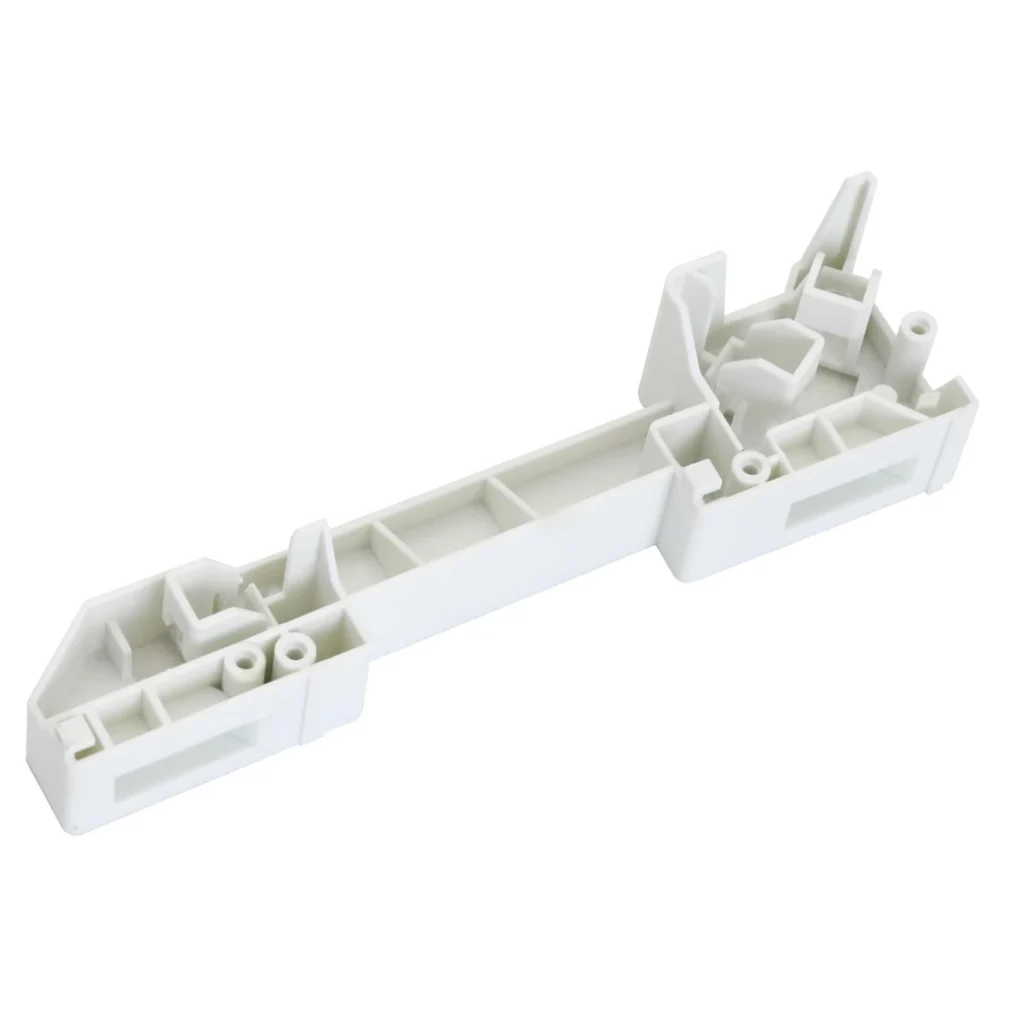
The door latch housing (part number WB06X10610) contains the safety switches that tell your microwave "the door is closed and locked — okay to operate." When this component fails, your microwave thinks the door is open even when it's firmly shut. It's a $48 part that can save you from buying a $400 microwave.
Quick Symptom Check
Before diving into repairs, confirm you're dealing with a door latch issue:
- Display works but microwave won't run: Clock and buttons light up normally, but pressing start does nothing
- No error codes: Unlike some failures, door latch problems typically don't trigger error messages
- Door feels loose or misaligned: The door might not close with the same firm "click" it used to
- Interior light doesn't turn on: When you open the door, the cavity light stays dark (connected to same switch system)
- Intermittent operation: Sometimes it works if you slam the door or push on it while starting
This issue affects dozens of GE, Hotpoint, and Profile models including the JVM1630 series, JVM3160DF series, and JNM3160 models. If your model number starts with JVM or JNM, you're likely dealing with this exact door latch design.
Cause #1: Failed Door Latch Switch Assembly (70% Probability)
The door latch housing contains three micro-switches that must all activate in sequence for the microwave to operate. Over time — typically after 5-8 years — these switches wear out from thousands of door openings.
How to diagnose:
- Unplug the microwave completely
- Open the door and locate the latch assembly on the right side of the door opening
- Look for the plastic housing with wire connectors (it's black and about 3 inches tall)
- With the door closed, listen carefully — you should hear three distinct clicks as the door latches
- If you hear fewer clicks, or a grinding sound, the switch assembly has failed
You can test with a multimeter, but honestly, if you've gotten this far and the symptoms match, replacement is the smart move. These switches don't partially fail — they're either working or they're not.
The fix: Replace the WB06X10610 door latch housing. It's a 20-minute job with just a screwdriver.
Cause #2: Broken Door Hook or Strike (15% Probability)
The door hook is the plastic or metal piece that extends from the door itself and engages with the latch housing. If this hook breaks or bends, it won't push the switches inside the latch housing.
Diagnosis: Open the door and inspect the hook mechanism on the door's edge (right side, about halfway up). Look for cracks, breaks, or bent metal. Close the door slowly while watching — the hook should slide smoothly into the latch housing opening.
If the hook is damaged, you'll need both the door hook assembly AND potentially the latch housing, because a broken hook often damages the switches on its way out.
Cause #3: Misaligned Door (8% Probability)
Sometimes the door itself gets tweaked — maybe someone leaned on it while open, or it was installed slightly off after a previous repair. When the door is misaligned, the hook doesn't engage the switches properly.
Check for this:
- Close the door and look at the gap around all edges — it should be even
- The door should sit flush against the frame with no visible light gaps
- When you close it, you shouldn't have to push harder on one side than the other
Door realignment requires adjusting the hinges, which is doable but finicky. If the latch housing is already old (5+ years), replace it anyway — you're in there already.
Cause #4: Failed Main Control Board (5% Probability)
Less common, but worth mentioning: the main control board receives signals from the door switches. If the board's switch input circuit fails, you get the same symptom even with a perfectly good latch.
How to tell: This is the culprit if you've replaced the door latch housing and the problem persists. Control board failures typically come with other symptoms — erratic display behavior, buttons that don't respond, or error codes.
Control boards run $150-300. Get a proper diagnosis before buying one.
Cause #5: Thermal Fuse Failure (2% Probability)
The thermal fuse is a safety device that cuts power if the microwave overheats. When it blows, the symptom looks identical to a door latch failure — the display works, but the microwave won't run.
Test this: You'll need to remove the cabinet (unplug first!) and test the thermal fuse with a multimeter for continuity. It's usually located near the magnetron. If it's blown (no continuity), replace it — but also figure out WHY it blew, because thermal fuses don't fail without reason.
The Smart Diagnostic Sequence
Here's how to diagnose efficiently without buying unnecessary parts:
- Listen to the door: Close it slowly and count the clicks. Three clicks = good switches. Anything else = bad latch housing.
- Check the hook: Visually inspect for damage (30 seconds, free).
- Replace the latch housing: At $48 and 20 minutes of work, this is your highest-probability fix. The WB06X10610 comes with the complete housing and all three switches.
- If problem persists: NOW start looking at control board or thermal fuse issues.
DIY this repair and you're out $48 plus 20 minutes. Call a pro and you're looking at $150-200 minimum, plus the part. The latch housing is genuinely easy to replace — you're removing two screws and swapping connectors.
When to Call a Pro
Call a technician if:
- You're not comfortable working around unplugged appliances (microwaves store dangerous voltage even when unplugged)
- You've replaced the door latch housing and the problem continues
- You see any burn marks, smell burning plastic, or the microwave is tripping breakers
- The microwave is showing error codes beyond just not starting
But for a straightforward "won't start, everything else works" situation? This is absolutely a DIY repair. The door latch housing is an external part — you don't need to open the actual microwave cavity or deal with the high-voltage components.
Frequently Asked Questions
Why does my GE microwave work sometimes but not others?
Intermittent operation is classic door latch switch failure. The switches have worn contacts that sometimes make connection and sometimes don't. Slamming the door or pushing on it changes the pressure on the switches, which is why it occasionally works. This will get progressively worse until it stops working entirely — replace the latch housing now before you're completely without a microwave.
Can I bypass the door switches to test if that's the problem?
Technically yes, but don't. The door switches are critical safety devices that prevent the magnetron from running with the door open (which would expose you to microwave radiation). For testing purposes, you can ohm-test the switches with a multimeter to confirm they're bad, but never operate the microwave with bypassed door switches. Just replace the housing — it's $48 and guaranteed safe.
Will this part work on my specific GE microwave model?
The WB06X10610 fits over 90 GE, Hotpoint, and Profile over-the-range microwave models manufactured between 2005 and 2018. Check the compatible models list on the product page, but if your model starts with JVM, JNM, or is a Profile series from that era, it's almost certainly compatible. The part number supersedes AP3866945, PS1019899, and EA1019899 — if you see those numbers in your microwave's documentation, this is your part.
Diagnosed the problem?
WB06X10610 · In Stock · Fast shipping