
KitchenAid Stand Mixer Won't Turn — 5 Causes & How to Fix
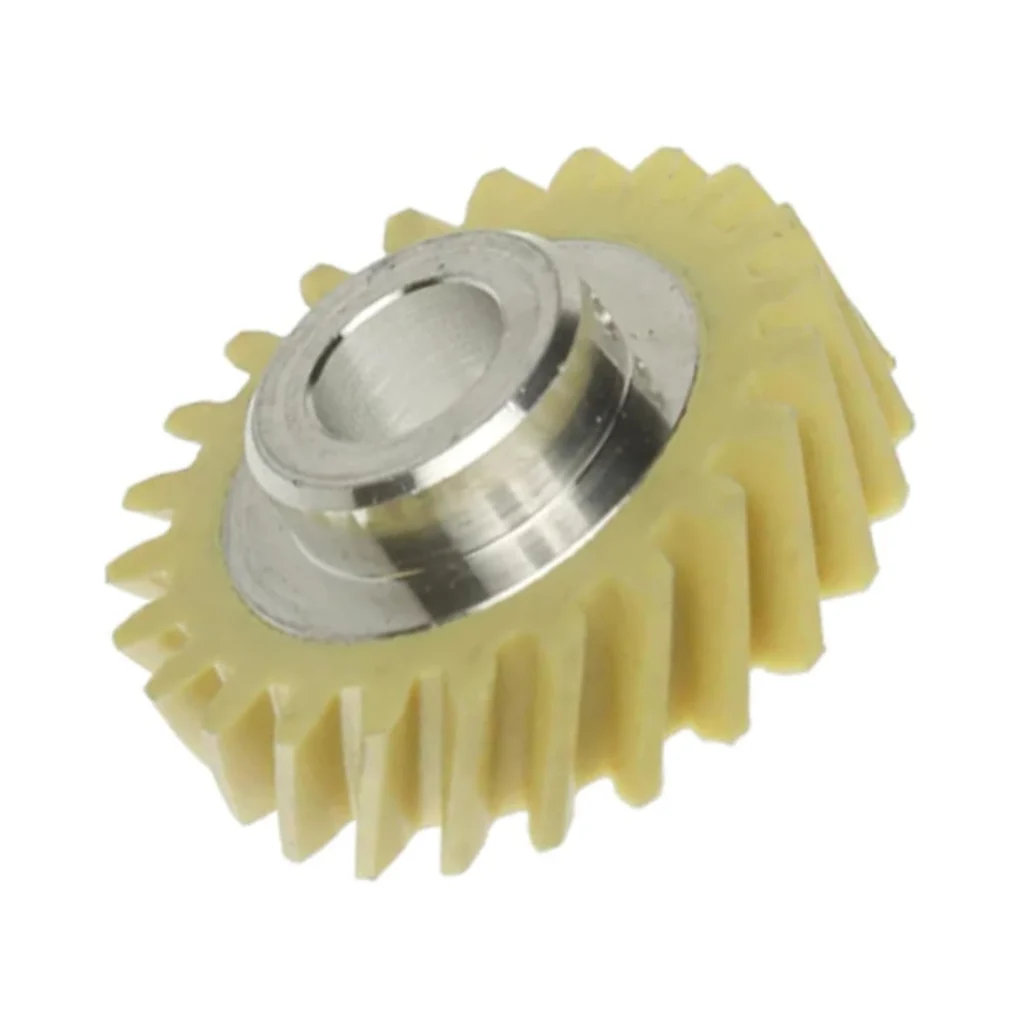
You're halfway through kneading bread dough when you hear the motor running but the dough hook just sits there, motionless. The mixer's on, it's making noise, but nothing's spinning. That's the classic sign of a stripped worm gear — and it's actually designed to fail this way to protect your motor.
I've seen this dozens of times on KSM150PSMH0, KSM153PSQGA0, and pretty much every KitchenAid tilt-head model. The good news? It's a fixable problem, and you can usually diagnose it yourself in about 10 minutes.
Quick Symptom Check
Before you tear into your mixer, confirm what you're dealing with:
- Motor runs but mixer doesn't turn — you hear the motor, but the planetary head stays still
- Dough hooks won't rotate — attachments don't move even though the machine is on
- Planetary head no longer rotates — the spinning motion that moves attachments around the bowl has stopped
- Mixer won't turn at all — complete loss of movement despite power
- Grinding or clicking noises — sounds like plastic on metal
If you've got two or more of these, keep reading. You're probably looking at an internal mechanical failure.
Cause #1: Stripped Worm Gear (Most Likely — 75% of Cases)
Probability: Very High
The worm gear (part number W10112253) is a white plastic gear that's intentionally designed as a sacrificial component. When your mixer gets overloaded — think heavy bread dough, thick cookie batter, or a jammed beater — this gear strips out instead of letting the motor burn up.
As one repair customer put it: "Our mixer stopped operating due to the blade getting jammed on an item that should not have been in the mixing bowl. All my fault."
How to diagnose:
- Unplug the mixer completely
- Tilt the head back and remove the bowl
- You'll need to remove the planetary housing (the silver cone at the bottom)
- Look for white plastic debris or visible teeth missing from the gear
- If the gear spins freely without engaging, it's stripped
The fix: Replace the worm gear with W10112253. This fits KSM150PSBV0, KSM88RBQ2BY0, 3KSM150PSTCB0, and most tilt-head models. Budget 30-60 minutes and expect a moderate difficulty level. The hardest part isn't the gear itself — it's removing the pin that locks it in place. You'll need a good punch and hammer to drive that pin out.
Critical installation note: Remove ALL the old grease before installing the new gear. Old grease mixed with plastic debris will cause premature failure. Use food-grade grease only.
Cause #2: Broken Drive Pin
Probability: Moderate
The drive pin goes through the center shaft and locks the worm gear assembly in place. If this pin shears or works loose, you'll have the same symptom — motor runs, nothing turns.
How to diagnose:
Once you've got the planetary housing off (see Cause #1), inspect the pin that goes through the main shaft. If it's missing, bent, or broken off, that's your culprit. Sometimes this fails at the same time as the worm gear, especially if something jammed hard.
The fix: Order a replacement pin (often part number 4162897). As one installer noted: "There is a pin that goes through the center shaft" — and you'll need to sand it slightly before installation for a proper fit. Don't skip this step or you'll fight it the whole way.
Cause #3: Planetary Gear Assembly Failure
Probability: Lower
The planetary gear set inside the head can crack or lose teeth, though this is less common than worm gear failure. You'll typically see metal shavings or hear a grinding sound that's different from the usual plastic-on-plastic noise of a stripped worm gear.
How to diagnose:
With the planetary housing removed, manually rotate the beater shaft. If you feel binding, skipping, or see visible damage to the metal gears, you've found it.
The fix: This requires the full planetary gear assembly. It's a bigger job and might push you into "call a pro" territory unless you're comfortable with mechanical work.
Cause #4: Old Grease Turned to Cement
Probability: Moderate (especially in older units)
Over 10-15 years, the factory grease breaks down and hardens. It stops lubricating and starts acting like glue, preventing gears from turning properly. The motor's strong enough to eventually overcome this, but it puts massive stress on the worm gear.
How to diagnose:
If your mixer has been getting progressively slower over months or years, and now won't turn at all, old grease is likely a contributing factor. You'll see dark, crusty grease when you open it up.
The fix: Complete teardown, clean everything with degreaser, and repack with food-grade grease. Do this even if you're replacing the worm gear — it's preventative maintenance that'll buy you another decade.
Cause #5: Jammed Speed Control or Motor Issue
Probability: Low
If the motor's not running at all, you might have a speed control failure or burned-out motor. But based on your symptoms (motor runs, mixer doesn't turn), this is unlikely.
How to diagnose:
Does the motor sound normal? Can you vary the speed? If yes, the motor's probably fine. The problem's mechanical, not electrical.
When to Call a Pro
Here's my honest take: if you're comfortable with a socket set and following a video tutorial, you can handle the worm gear replacement yourself. One customer said it perfectly: "I followed the ereplacementparts.com Youtube video and am so thankful for it! You saved me the cost of a new KitchenAid."
Call a pro if:
- You've never disassembled small appliances before
- The planetary gears need replacement (more complex)
- You're dealing with a bowl-lift model (different design, trickier)
- You don't have the tools (socket set, pin punch, hammer)
The worm gear itself costs under $20. Professional repair runs $150-250 depending on your area. A new mixer is $350+. Do the math that makes sense for your situation.
Frequently Asked Questions
How do I know if it's the worm gear or something else on my KitchenAid mixer?
If the motor runs but the dough hooks or beaters won't rotate, it's almost always the worm gear. To confirm, you'll need to dismantle the mixer and check the worm gear, drive assembly, and retainer pin. Look for stripped teeth on the white plastic gear or visible debris.
What's the part number for the worm gear in a 5-quart Artisan tilt mixer?
The part number is W10112253 (also sold as WPW10112253). This fits KSM150 series, KSM88, KSM153, and most KitchenAid tilt-head models including the 5-quart Artisan. Always verify against your specific model number to be sure.
Why does the worm gear keep stripping on my KitchenAid?
The worm gear is designed to fail when the mixer is overloaded — it protects the motor from burning out. If yours keeps stripping, you're likely exceeding capacity (heavy bread dough is the usual culprit), not cleaning out old grease during replacement, or your beaters are hitting something in the bowl. Scale back recipe sizes and always use fresh food-grade grease during repairs.
Diagnosed the problem?
W10112253 · In Stock · Fast shipping