
Samsung Front-Load Washer Won't Start or Lock — 5 Causes & How to Fix DC64-00519B
You load the laundry, close the door, press start — and nothing happens. The Samsung washer just sits there, display lights blinking but the drum won't spin. You push the door harder. Still nothing. That clicking sound you used to hear when the door locked? Gone.
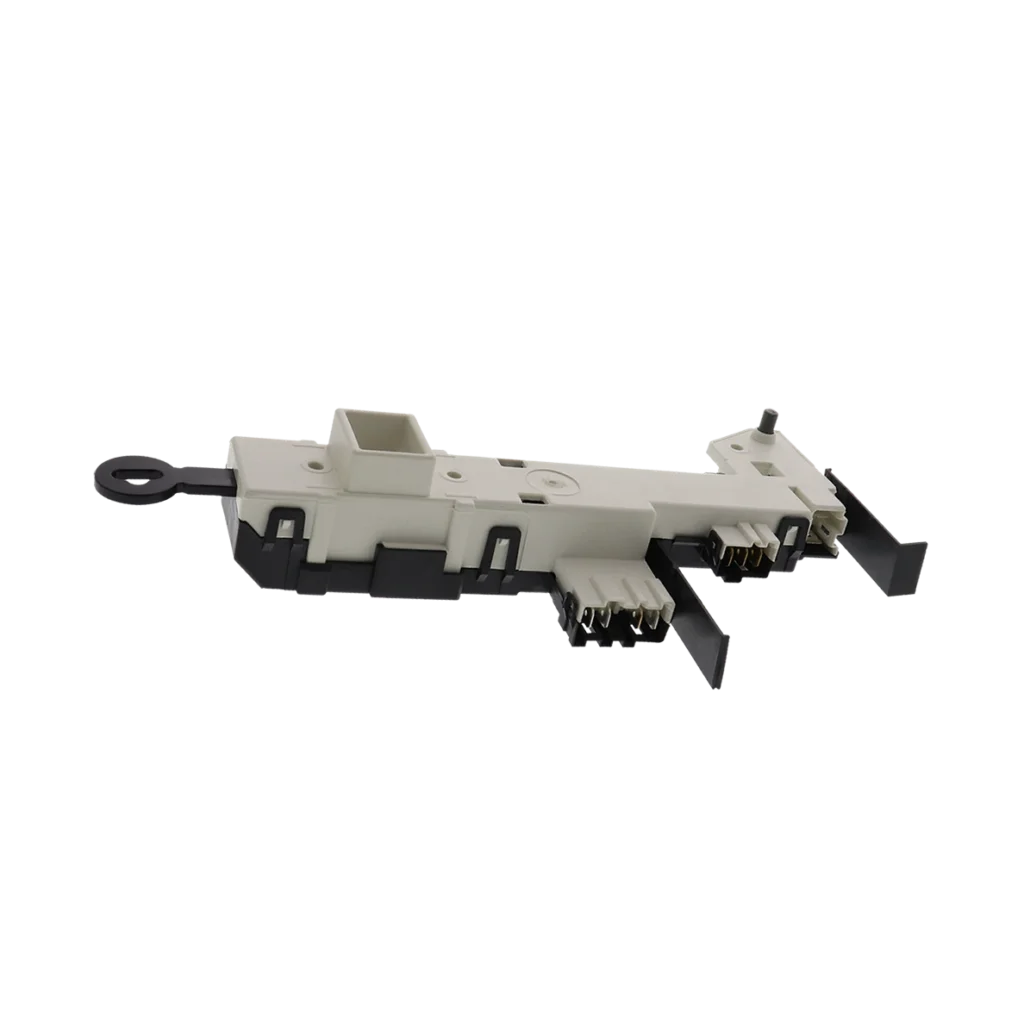
This is the classic symptom of a failed door lock assembly, and on Samsung front-loaders like the WF419AAW, WF42H5200AP, WF45H6300AG, and dozens of other models, it's almost always the DC64-00519B door lock switch assembly that's quit working.
The door lock does more than keep your washer sealed — it's a safety interlock that tells the control board "it's safe to start the wash cycle." When it fails, your washer won't run even if everything else works perfectly. Here's how to diagnose the problem and fix it yourself.
Quick Symptom Check
Your Samsung washer has a door lock problem if you're experiencing:
- Door won't latch or lock when closed — you hear no click, or the door bounces back open
- Washer won't start — control panel lights up, but pressing Start does nothing
- "dE" or "dE1" error code on the display
- Door won't unlock after cycle — you're stuck waiting 5+ minutes or have to unplug the machine
- Intermittent starting — sometimes it works, sometimes you have to slam the door multiple times
If you're seeing any combination of these, you're likely dealing with a faulty door lock assembly. Let's walk through the causes from most to least common.
Cause #1: Failed Door Lock Switch Assembly (75% of Cases)
The DC64-00519B assembly contains both a mechanical latch and an electrical switch. Over time — usually after 5-7 years of use — the plastic components wear down, the electrical contacts corrode, or the thermal element that activates the lock burns out.
How to diagnose:
- Unplug the washer completely
- Open the door and locate the door lock assembly on the front panel (right side on most Samsung models)
- Remove the two screws holding the lock in place
- Disconnect the wire harness and pull the assembly out
- Inspect for visible damage: melted plastic, burn marks, or broken latch mechanism
- Use a multimeter set to ohms — test continuity across the switch terminals (with door striker inserted, you should read 0-2 ohms)
Probability: 75% — This is the most common failure point on Samsung front-loaders built between 2008-2020.
Fix: Replace the entire DC64-00519B assembly. Don't try to repair the switch itself — the $43.99 replacement part includes the full mechanism and will last another 5-7 years. Installation takes about 15 minutes with a Phillips screwdriver.
Cause #2: Damaged Door Strike or Misaligned Door (15% of Cases)
The door lock can only engage if the door striker (the plastic piece on the door itself) properly aligns with the lock assembly. If the door hinges are loose, the striker is cracked, or something's knocked the door out of alignment, the lock can't make contact.
How to diagnose:
- Close the door slowly and watch the striker — does it slide smoothly into the lock opening?
- Check the door striker for cracks or wear on the contact surface
- Open and close the door 10 times — does it feel consistent, or does the alignment vary?
- Look for gaps between the door and the front panel when closed
Fix: If the striker is damaged, you'll need to replace the entire door assembly (Samsung doesn't sell the striker separately). If it's an alignment issue, tighten the door hinge screws — they're located inside the door frame and often work loose over time.
Cause #3: Wiring Harness Connection Issues (7% of Cases)
The door lock connects to the main control board via a wire harness that runs through the front panel. Vibration, moisture, or previous repair attempts can loosen these connections or corrode the terminals.
How to diagnose:
- Unplug washer and remove the top panel (two screws at the back)
- Locate the wire harness connected to the door lock (usually white or gray connector)
- Disconnect and inspect the terminals for corrosion or bent pins
- Reconnect firmly — you should hear a distinct click
- Wiggle the connection while someone else watches the display for error codes
Fix: Clean corroded terminals with electrical contact cleaner. If pins are bent or the connector is cracked, you'll need to replace the wire harness section — these run about $15-25 and splice into the existing wiring.
Cause #4: Failed Main Control Board (2% of Cases)
Rarely, the control board's door lock relay or circuit fails. This usually happens after a power surge or water leak that damaged the electronics.
How to diagnose:
- You've already replaced the door lock assembly and verified wiring is good
- The washer shows other intermittent error codes or display glitches
- Testing the old door lock assembly on another Samsung washer — it works fine
Fix: Replace the main control board. On models like the WF45H6300AG, this runs $150-300 depending on the board version. This is typically when you'd call a pro unless you're comfortable with electronics.
Cause #5: Foreign Object Blocking the Lock (1% of Cases)
Sometimes a sock, rubber gasket piece, or other debris gets lodged in the door lock mechanism, preventing the striker from fully engaging.
How to diagnose:
- Use a flashlight to inspect the lock opening with the door open
- Feel around inside the lock cavity with your finger (washer unplugged)
- Try manually triggering the lock with a screwdriver while watching for obstructions
Fix: Remove the obstruction with needle-nose pliers. If something's jammed deep inside, you may need to remove the lock assembly to fully clear it.
When to Call a Pro
This is honestly one of the easier washer repairs. If you can use a screwdriver and multimeter, you can replace the DC64-00519B door lock yourself in under 30 minutes.
Call a technician if:
- You've replaced the door lock and the problem persists (likely a control board issue)
- You're seeing water leaks around the door along with the locking problem (could indicate a deeper front panel issue)
- The washer is still under warranty — let Samsung handle it
- You're not comfortable working with electrical connections
Professional repair typically costs $150-250 including the part, so you'll save about $100-150 doing it yourself.
Frequently Asked Questions
How long does the DC64-00519B door lock assembly typically last?
Most Samsung front-load washers see door lock failure between 5-8 years of regular use. If you run heavy loads daily or frequently interrupt cycles, it may fail sooner. The good news: it's a wear item, not a design flaw, and the replacement should last just as long.
Can I bypass the door lock to use my washer temporarily?
No — and don't try. The door lock is a critical safety feature that prevents the washer from spinning with the door open (which would flood your laundry room). Bypassing it could cause injury or serious water damage. The part is $43.99 and arrives in 2-3 days — just wait for the replacement.
My Samsung washer door won't unlock after the cycle finishes — is that the same part?
Yes, usually. The DC64-00519B controls both locking and unlocking. When it fails, you'll often see intermittent problems in both directions. If your door is currently stuck closed, unplug the washer for 5 minutes to reset the lock, then open the door by pulling the manual release tab (located behind the small access panel at the bottom front of the washer). Then replace the lock assembly before running another load.
Diagnosed the problem?
DC64-00519B · In Stock · Fast shipping