
Kenmore Dryer Sparking or Won't Heat — Terminal Block Failure Guide
You're folding laundry when you smell something burning. You open the dryer door and there's a scorch mark near the back panel where the power cord connects. Or maybe your Kenmore dryer just stopped heating altogether, and when you pulled it out to check, you noticed the wire connections look melted or discolored.
This is classic terminal block failure — one of the most dangerous dryer problems because it can actually start a house fire if ignored. The terminal block is where your home's 240V power cord connects to the dryer's internal wiring. Over years of use, these screw connections can loosen, corrode, or overheat, creating resistance that generates extreme heat.
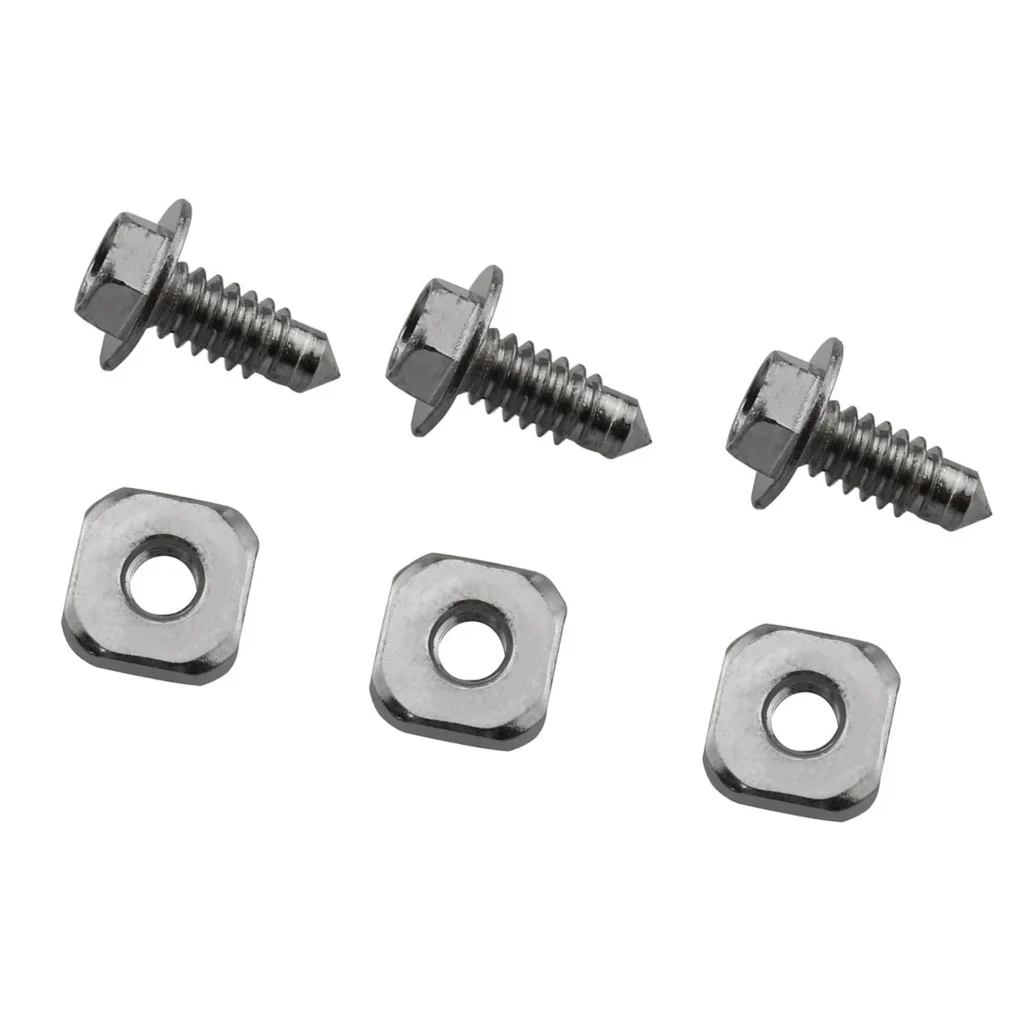
The 279393 terminal block screw kit fits most Kenmore, Whirlpool, Maytag, and KitchenAid dryers manufactured between 2000–2015. If your model starts with 110.6 (Kenmore) or you've got models like 10686294140, 10687884100, or similar, you're in the right place.
Quick Symptom Check — Is Your Terminal Block Failing?
Check off what you're experiencing:
- Burning smell near the back of the dryer — especially plastic or electrical odor
- Visible scorch marks or melted plastic around where the power cord enters
- Dryer won't heat at all but the drum still tumbles
- Intermittent heating — works sometimes, not others
- Tripped breaker when you try to run the dryer
- Visible sparks or arcing when you pull the dryer away from the wall
If you checked two or more, keep reading. If you saw actual sparks or flames, unplug the dryer immediately and don't use it until repaired.
Cause #1: Loose Terminal Block Screws (60% of Cases)
Probability: Very High
The most common issue isn't a broken part — it's screws that have worked loose over time. Every time your dryer heats up and cools down, the metal expands and contracts slightly. After hundreds of cycles, the screws connecting your power cord wires to the terminal block can loosen just enough to create a high-resistance connection.
High resistance = extreme heat. We're talking 300°F+ at the connection point, enough to melt the insulation and the plastic terminal block housing itself.
How to diagnose:
- Unplug the dryer (or flip the breaker if it's hardwired)
- Pull the dryer away from the wall
- Remove the rear access panel (usually 4–6 screws)
- Locate the terminal block where the power cord connects
- Look for discoloration, melted plastic, or burnt wire insulation
- Try gently wiggling the wires — if they move at the connection, they're too loose
The fix: If the terminal block itself isn't damaged, you might get away with just tightening the screws. But here's the thing — if there's any visible damage to the plastic housing or the wires, you need to replace the entire assembly. The 279393 kit includes new screws and the terminal block components needed for a proper repair.
Cause #2: Corroded or Burned Terminal Block (30% of Cases)
Probability: High
Once a terminal block overheats, the damage compounds fast. The plastic insulation melts, exposing bare copper. The copper oxidizes and creates even more resistance. The screws themselves can become pitted and corroded, making it impossible to get a solid connection even after tightening.
If you see any of these signs, tightening won't fix it:
- Black or brown discoloration on the terminal block housing
- Melted or bubbled plastic around the screw terminals
- Wire insulation that's brittle, cracked, or missing
- Green corrosion on the copper wire or brass screws
- Screws that strip out or won't tighten properly
The fix: Full terminal block replacement. The 279393 kit gives you everything you need. You'll also want to inspect the power cord itself — if the wire ends are badly burned, you may need to cut back 1–2 inches of wire to expose fresh copper, or replace the entire cord.
Cause #3: Undersized or Damaged Power Cord (10% of Cases)
Probability: Moderate
Sometimes the terminal block fails because someone installed the wrong power cord. Electric dryers need a 10-gauge, 30-amp rated cord. If you've got a 12 or 14-gauge cord (thinner wire), it can't handle the current load and will overheat at the connection point.
Also check if you're using a 3-prong cord on a modern dryer that should have 4-prong. The adapter setup can create additional connection points that fail over time.
How to check: Look at your power cord. It should be clearly marked with gauge and amperage rating. If it says anything less than 10AWG or 30A, that's your problem.
Step-by-Step Terminal Block Replacement
Time required: 30–45 minutes
Difficulty: Moderate — you're working with 240V wiring
Tools needed: Phillips screwdriver, flathead screwdriver, wire strippers (maybe), needle-nose pliers
Safety first: Unplug the dryer completely. If it's hardwired, flip the breaker AND test with a voltage tester to confirm power is off. 240V can kill you.
- Access the terminal block: Remove rear panel (or bottom front panel on some Kenmore models)
- Take a photo: Before disconnecting anything, photograph the wire configuration
- Disconnect power cord: Loosen the three screws holding the power cord wires to the terminal block
- Remove old terminal block: It's usually held by clips or screws to the dryer frame
- Inspect the wires: If the ends are burned, strip back 1/2" to expose fresh copper
- Install new terminal block: The 279393 kit includes the block and new screws
- Reconnect wires: Center wire to center terminal, outer wires to outer terminals. Follow your photo.
- Tighten properly: Screws should be snug but not over-torqued (about 35 in-lbs if you have a torque screwdriver)
- Check ground connection: Make sure the green ground wire is securely attached to the dryer frame
- Test before reassembly: Turn power on, run a heat cycle for 2 minutes, then check if terminal block gets hot to touch (it shouldn't)
When to Call a Pro
Look, I've walked dozens of people through this repair, and most handle it fine. But call an appliance tech or electrician if:
- You're not comfortable working with 240V circuits at all
- The wiring inside your dryer looks modified or different from standard configurations
- You have a gas dryer (different electrical setup entirely)
- The damage extends beyond the terminal block into the internal harness
- Your home has aluminum wiring (requires special anti-oxidant compound)
This repair typically costs $150–$250 if you hire it out. The 279393 kit is $29.99, so you're saving $120+ doing it yourself, but only if you're confident with the electrical work.
Preventing Future Terminal Block Failure
Once you've replaced the terminal block, make it last:
- Check connections annually: Pull the dryer out once a year and verify screws are still tight
- Don't overtighten: Stripped screws are worse than slightly loose ones
- Upgrade your power cord: If you're still using an old 3-prong setup, switch to 4-prong
- Clean the lint system: Clogged dryers run hotter and longer, increasing electrical stress
- Watch for early warning signs: Any burning smell means stop and inspect immediately
Frequently Asked Questions
Can I just tighten the screws instead of replacing the terminal block?
Only if there's zero visible damage to the plastic housing, the screws, or the wire insulation. If you see any discoloration, melting, or corrosion, you need to replace it. Tightening damaged components just delays another failure — possibly one that causes a fire.
Will this kit work on my specific Kenmore model?
The 279393 fits most Kenmore dryers with model numbers starting with 110.6 and 10686, including 10686294140, 10687884100, 110.6090199, 110.6092299, and hundreds of others. It also fits Whirlpool, Maytag, and KitchenAid dryers that use the same terminal block design. Check your dryer's model number against the full compatibility list on the product page.
My dryer is hardwired — can I still use this kit?
Yes. Hardwired dryers use the same terminal block, you just don't have a removable power cord. The replacement process is identical, you're just working with the permanent house wiring instead of a cord. Make absolutely certain you've shut off the breaker and tested for voltage before touching anything.
Diagnosed the problem?
279393 · In Stock · Fast shipping