
Samsung Washer Won't Start or Stops Mid-Cycle — 7 Main Control Board Failures & Fixes
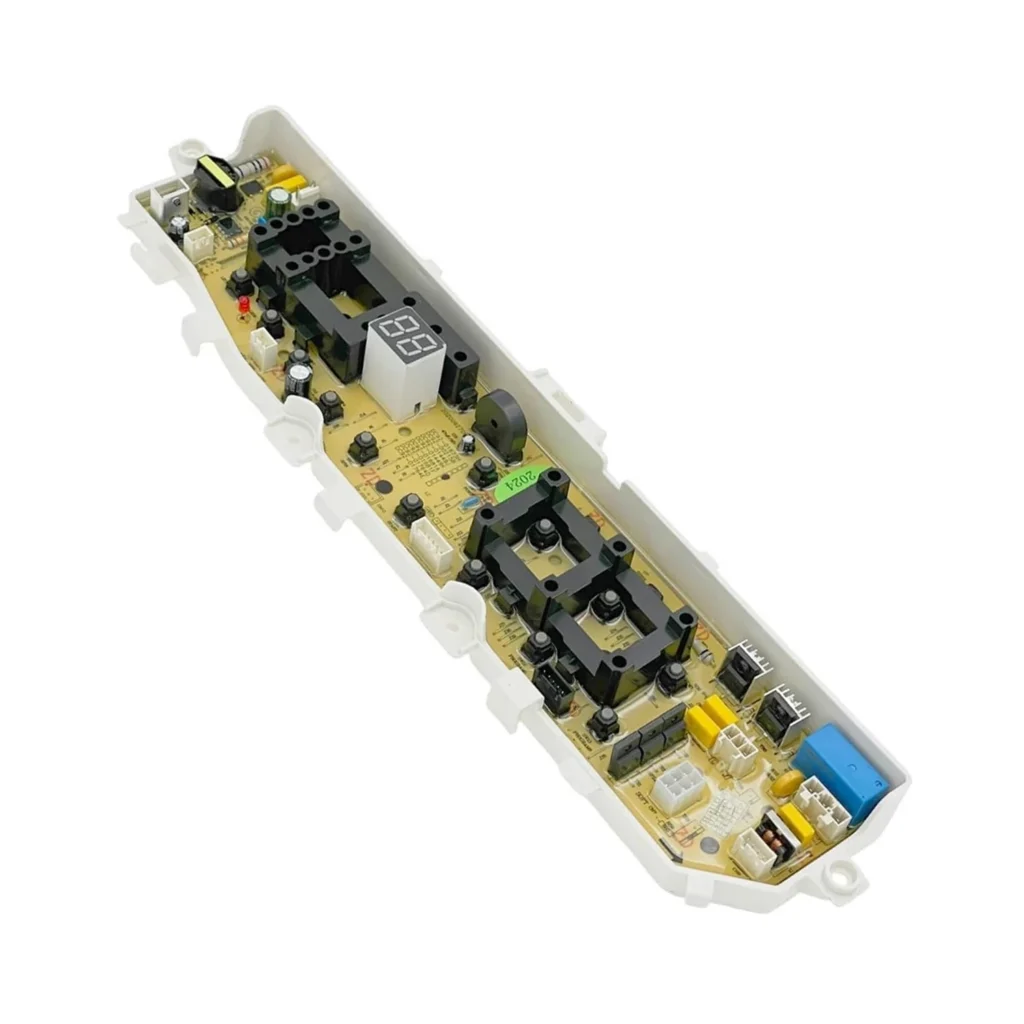
You load the washer, press Start, and… nothing. Or worse — it starts fine, fills with water, then goes completely dead mid-cycle with your clothes sitting in a tub of soapy water. If you own a Samsung WA75H4400SS or WA60H4000SG top-loader, there's a good chance you're looking at a failed main control board.
The DC92-01681A control board is the brain of these machines. When it fails, you'll see random behavior — LEDs flashing in weird patterns, cycles that won't advance, or a washer that acts completely dead. Here's how to diagnose what's actually wrong.
Quick Symptom Check
Before you pull the control panel apart, verify these symptoms match what you're seeing:
- Completely dead — no lights, no sounds, no response to any button
- Lights on but won't start — display works, buttons beep, but Start does nothing
- Stops mid-cycle randomly — starts fine but shuts off during wash or spin
- Flashing error codes — LEDs blink in patterns (often 13E, 3E, or UC)
- Won't drain or spin — gets stuck at one stage and times out
- Buttons unresponsive — some buttons work, others don't register
- Cycles run but logic is wrong — skips rinse, fills twice, or other bizarre sequences
If you're seeing two or more of these, the control board is the likely culprit. Let's narrow it down.
Cause #1: Complete Power Failure to Control Board (40% probability)
This is the most common scenario — the board is getting no power at all, usually due to a blown fuse or failed power relay on the board itself. The washer appears completely dead.
How to diagnose:
- Unplug the washer and wait 2 minutes
- Remove the control panel (4 screws along the top, then lift and tilt forward)
- Locate the wire harness connector on the back of the control board — it's the wide multi-pin connector
- With a multimeter set to AC voltage, check for 120V at the power input pins while the washer is plugged in
- If you see 120V coming in but the board shows no signs of life (no LED glow, even faint), the board's internal power supply or fuse has failed
Fix: The board needs replacement. These boards have internal components that can't be economically repaired. The DC92-01681A replaces the older DC92-01449J and DC92-01390A boards — all three interchange, but the newer revision has improved relay circuits.
Cause #2: Failed Start Relay (25% probability)
The board has power and the display works, but pressing Start does absolutely nothing. No beep, no motor hum, nothing. This points to a failed relay that controls the motor and pump.
How to diagnose:
- Press the Power button — display should light up normally
- Try all other buttons — Temp, Spin Speed, etc. — they should respond with beeps
- Press Start and listen very carefully at the control board — you should hear a faint "click" from the relay
- If you hear the click but nothing happens, the relay contacts are welded or burnt
- If there's no click at all, the relay coil or the microprocessor controlling it has failed
Fix: Control board replacement. The relay is surface-mounted and integrated into the board's circuits — it's not a serviceable component on this model.
Cause #3: Corrupted Firmware After Power Surge (15% probability)
If your area had a power outage or brownout recently, the control board's firmware can become corrupted. The washer might power on but behave erratically — wrong cycle sequences, won't respond to certain buttons, or displays error codes that don't match any real fault.
How to diagnose:
- Try running the diagnostic mode: Power off, then press Temp + Delay Start + Start simultaneously and hold for 3 seconds
- If the washer enters diagnostic mode (LEDs flash in sequence), try running each function test
- If diagnostic mode won't activate, or if tests run but results are nonsensical (motor test shows error when motor is fine), firmware corruption is likely
Fix: These boards can't be reflashed in the field. You need a replacement board. The good news: the new board will come with updated firmware that's more surge-resistant.
Cause #4: Water Damage to Control Board (10% probability)
Top-loaders can splash water up onto the control panel during heavy loads or if the water level sensor fails. Even a small amount of moisture on the board causes corrosion and short circuits.
How to diagnose:
- Remove the control panel and inspect the board closely
- Look for white or green crusty deposits near the wire connectors
- Check for water stains or discoloration on the circuit board itself
- Smell the board — water damage often leaves a distinctive musty or burnt smell
Fix: If you catch it early (within hours of water exposure), you might save the board by thoroughly drying it with compressed air and letting it sit in a warm, dry place for 24 hours. But if corrosion has started, replacement is the only reliable fix. Important: Before installing the new board, figure out where the water came from — check the water level sensor and make sure you're not overloading the machine.
Cause #5: Failed Door/Lid Lock Circuit (5% probability)
The WA75H4400SS and WA60H4000SG models have a lid lock safety mechanism. If the board's lid lock circuit fails, the washer won't start because it thinks the lid is open.
How to diagnose:
- Close the lid and press Start
- Listen for the lid lock engaging — it's a distinct mechanical click from under the lid
- If you hear the click but the washer still won't start, the board isn't detecting the locked state
- If there's no click, the lid lock actuator might be bad, but if you've already replaced it and still have issues, the board's lock circuit has failed
Fix: Replace the control board. The lid lock detection circuit is integrated into the main board and can't be bypassed safely.
Cause #6: Burnt Triac or Motor Control Circuit (3% probability)
The washer starts and fills, but when it tries to agitate or spin, it immediately shuts down. This indicates the triac (motor control component) has failed shorted or open.
How to diagnose:
- Start a wash cycle and let it fill
- When it transitions to agitate, watch what happens
- If the washer hums for 1-2 seconds then shuts off completely, the motor circuit is trying to engage but can't
- Remove the board and inspect the large black rectangular component near the motor connector — this is the triac
- If it shows any burn marks, cracks, or discoloration, it's failed
Fix: Board replacement. You can sometimes find techs who'll replace the triac component alone, but unless you have soldering skills and can source the exact part, it's more reliable to replace the whole board.
Cause #7: Worn Button Membrane Contact (2% probability)
If only one or two specific buttons don't work but everything else is fine, the rubber membrane behind the buttons may have worn out — but this technically isn't a board failure. More often, if buttons are unresponsive, the board's input circuits have failed.
How to diagnose:
- Press each button firmly — does it click mechanically?
- If the button feels mushy or doesn't click, the membrane is worn
- If it clicks but the washer doesn't respond, the board input isn't reading that button
Fix: Try cleaning the membrane contacts with 90% isopropyl alcohol first. If that doesn't help, you'll need a new control board — Samsung doesn't sell the membrane separately for this model series.
When to Call a Pro
Control board replacement on these Samsung top-loaders is genuinely DIY-friendly — it's 8 screws total and two wire harnesses. But call a tech if:
- You've replaced the board and still have the exact same problem (something else is frying the board — could be the motor, water valve, or main harness)
- You're seeing error codes related to the motor or water valves along with the starting issue
- The washer is still under any remaining warranty coverage
A service call runs $150–$250 depending on your area. The board itself costs $80–$120. If you can confidently handle the swap yourself, you'll save $70–130 in labor.
Replacing the DC92-01681A Control Board
If you've diagnosed a board failure, here's the replacement process:
- Unplug the washer and turn off water supply
- Remove the detergent dispenser drawer (pull fully out, press the center tab, pull further)
- Remove 4 screws along the top of the control panel
- Tilt the panel forward — it hinges at the bottom
- Take a photo of the wire harness connections before disconnecting anything
- Disconnect both wire harnesses (press the locking tabs and pull straight out)
- Remove 4 screws holding the board to the plastic panel backing
- Transfer the board to the new panel (or mount the new board if it came loose)
- Reconnect harnesses exactly as they were — they're keyed but double-check against your photo
- Test before reassembling: plug in, power on, test all buttons and start a cycle
- If everything works, reassemble the control panel
The whole job takes 20–30 minutes if you're methodical about it.
Frequently Asked Questions
Will the DC92-01681A work in my older Samsung washer that used DC92-01449J?
Yes. The DC92-01681A is a direct replacement for both the DC92-01449J and DC92-01390A boards. Samsung revised the board to improve relay durability, but the connector pinouts and firmware are identical. It'll drop right in without any programming or calibration needed.
My new control board lights up but the washer still won't start — what's wrong?
If the new board displays normally but won't start a cycle, you likely have a secondary failure. Check the lid lock mechanism first — if the board doesn't detect the lid as locked, it won't start for safety reasons. Also verify the door strike (the metal piece on the lid that engages the lock) isn't bent or misaligned. If the lid lock is working, you might have a failed motor or a break in the main wire harness between the control board and the motor.
Can I test the old board to confirm it's actually bad before buying a replacement?
There's no simple way to bench-test these boards — they require all the sensors and components connected to function. However, if you see physical damage (burnt components, corrosion, cracked solder joints), that's definitive. If the board looks clean but won't power on despite having 120V input, the internal power supply has failed. The most reliable test is substitution — if a new board fixes the problem, the old one was definitely bad.
Diagnosed the problem?
DC92-01681A · In Stock · Fast shipping